Social media scheduling is only one part of a team's workflow. You also need to keep content organized, collect feedback, get approvals, and make sure the right version goes live. That's where choosing between Buffer and Later gets interesting. Both tools help you...
Redesign For multi-location brands
all your locations, one content flow
For multi-brand companies
content collaboration at scale
For agencies
impress your clients and take on more
“The team loved it from the start. Planable helps us overview the entire marketing efforts.“
If you’re looking for Meltwater alternatives that offer more focused social listening features without the complexity of a full PR and media monitoring suite, you’ve got plenty of options.
Meltwater’s built-in PR and media monitoring suite, influencer marketing tools, and AI search visibility features may be a little too much for smaller social media teams that just want to track brand and competitor mentions across social networks.
That translates to potentially paying more than you actually need and marketing budgets that are harder to justify.
In this post, I’ll walk you through some of the best Meltwater alternatives I’ve had the chance to work with over the last few years. These include both specialized social listening tools and unified social media management platforms with native listening capabilities (or features available through add-ons).
Why do teams look for Meltwater alternatives?
Meltwater is a media intelligence and PR platform with built-in social listening, AI brand visibility tracking, and influencer marketing features. Reviewers rate it solidly, with 4.1 out of 5 stars from 2,674 G2 reviews.
For social media teams, however, the reason to switch case lies somewhere else: in the gap between what they pay for and what they actually use.
Here’s what I mean by that:
Setup and interface weight: Kirsten J., a senior partner account manager at an enterprise company, wrote on G2: “The amount of information can feel overwhelming at first, as well as the interface not feeling intuitive in the beginning, and pricing also made us pause.”
Modules nobody opens: A social team that lives in brand and competitor mentions still pays for a suite whose media intelligence and influencer modules sit unused. The agency owner circles exactly that line item at renewal.
Quote-only pricing and annual terms: There’s no public price list to budget against, and the contract length is set before your team has logged in once.
Meltwater’s pricing page, where plans are quoted through sales rather than listed publicly.
For an agency, these pain points compound across clients. A head of social defending the renewal has to explain why a suite priced for media intelligence is the tool behind a weekly brand-mention digest, while approvals for the reply posts still happen in a different platform.
Each extra client on the contract adds another account to that defense.
Meltwater alternatives at a glance: how do they compare?
For a social team that needs listening next to approvals and publishing, start with Planable. For flat-priced monitoring without a long contract, look at Brand24; for PR monitoring across news and forums, go for Determ. For research depth, Brandwatch or Lumen by Talkwalker fit. If you already publish from a social suite, Sprout, Hootsuite or Agorapulse sell listening on top of it.
Here’s a brief rundown of each platform’s ideal use-case, pricing, and whether it includes social listening in its core product offering or sells it as an extra add-on.
Tool
Best for
How listening is sold
Pricing basis
AI in listening
Starting price
Planable
Social teams that want listening next to approvals and publishing
Paid add-on per workspace
Per workspace
AI sentiment on every mention
$39 per workspace per month, plus Social Listening at $99 per workspace per month
Brand24
Flat-priced brand monitoring without a long contract
Core product
Flat per plan, set by keywords and mentions
AI Visibility module on Enterprise
$199 per month, billed annually
Determ
PR teams monitoring news and forums alongside social
Core product
Flat per plan; yearly commitment on Expand and Command
AI features listed on every plan; sentiment filters on results
$99 per month, billed monthly or $990 per year
Brandwatch
Consumer research with historical data
Core product
Custom quote after a demo
Iris AI assistant
Custom quote (not published)
Lumen by Talkwalker
Global coverage with unlimited users
Core product
Custom quote by plan tier
LLM Insights on AI assistant answers
Custom quote (not published)
Sprout Social
Social teams adding listening to a suite they already use
Add-on on Standard and up
Per seat
Trellis AI research assistant
$199 per seat per month, billed annually (+ paid listening add-on)
Hootsuite
Brand and competitor monitoring inside a publishing suite
Included from Standard, advanced listening on Enterprise
Per user
AI forecasting on Professional
$99 per user per month, billed annually
Agorapulse
Listening that feeds social reporting
Advanced Listening add-on
Per user
One-click AI screening filters out coincidental matches
$79 per user per month, billed annually
Planable
Best for
Social teams that want listening next to approvals and publishing
How listening is sold
Paid add-on per workspace
Pricing basis
Per workspace
AI in listening
AI sentiment on every mention
Starting price
$39 per workspace per month, plus Social Listening at $99 per workspace per month
Brand24
Best for
Flat-priced brand monitoring without a long contract
How listening is sold
Core product
Pricing basis
Flat per plan, set by keywords and mentions
AI in listening
AI Visibility module on Enterprise
Starting price
$199 per month, billed annually
Determ
Best for
PR teams monitoring news and forums alongside social
How listening is sold
Core product
Pricing basis
Flat per plan; yearly commitment on Expand and Command
AI in listening
AI features listed on every plan; sentiment filters on results
Starting price
$99 per month, billed monthly or $990 per year
Brandwatch
Best for
Consumer research with historical data
How listening is sold
Core product
Pricing basis
Custom quote after a demo
AI in listening
Iris AI assistant
Starting price
Custom quote (not published)
Lumen by Talkwalker
Best for
Global coverage with unlimited users
How listening is sold
Core product
Pricing basis
Custom quote by plan tier
AI in listening
LLM Insights on AI assistant answers
Starting price
Custom quote (not published)
Sprout Social
Best for
Social teams adding listening to a suite they already use
How listening is sold
Add-on on Standard and up
Pricing basis
Per seat
AI in listening
Trellis AI research assistant
Starting price
$199 per seat per month, billed annually (+ paid listening add-on)
Hootsuite
Best for
Brand and competitor monitoring inside a publishing suite
How listening is sold
Included from Standard, advanced listening on Enterprise
Pricing basis
Per user
AI in listening
AI forecasting on Professional
Starting price
$99 per user per month, billed annually
Agorapulse
Best for
Listening that feeds social reporting
How listening is sold
Advanced Listening add-on
Pricing basis
Per user
AI in listening
One-click AI screening filters out coincidental matches
Starting price
$79 per user per month, billed annually
What are the best Meltwater competitors in 2026?
The eight picks split by job, so you can skip the half that doesn’t match yours. The first entry is a social media management platform where listening sits beside the approval flow and the publishing calendar.
Entries two to five are listening and media-monitoring specialists. Entries six to eight are social suites that sell listening alongside publishing.
If your Meltwater seat mostly serves daily brand mentions, read the first entry and the suites; if it serves research or press coverage, start with the specialists.
1. Planable: for social listening next to approvals and publishing
Best for: Agencies running several client workspaces that want brand and competitor mentions on the same platform where posts get approved and published.
Planable is a social media management tool with collaboration and approvals at its core, covering complete content creation workflows: from planning to first drafts and published posts.
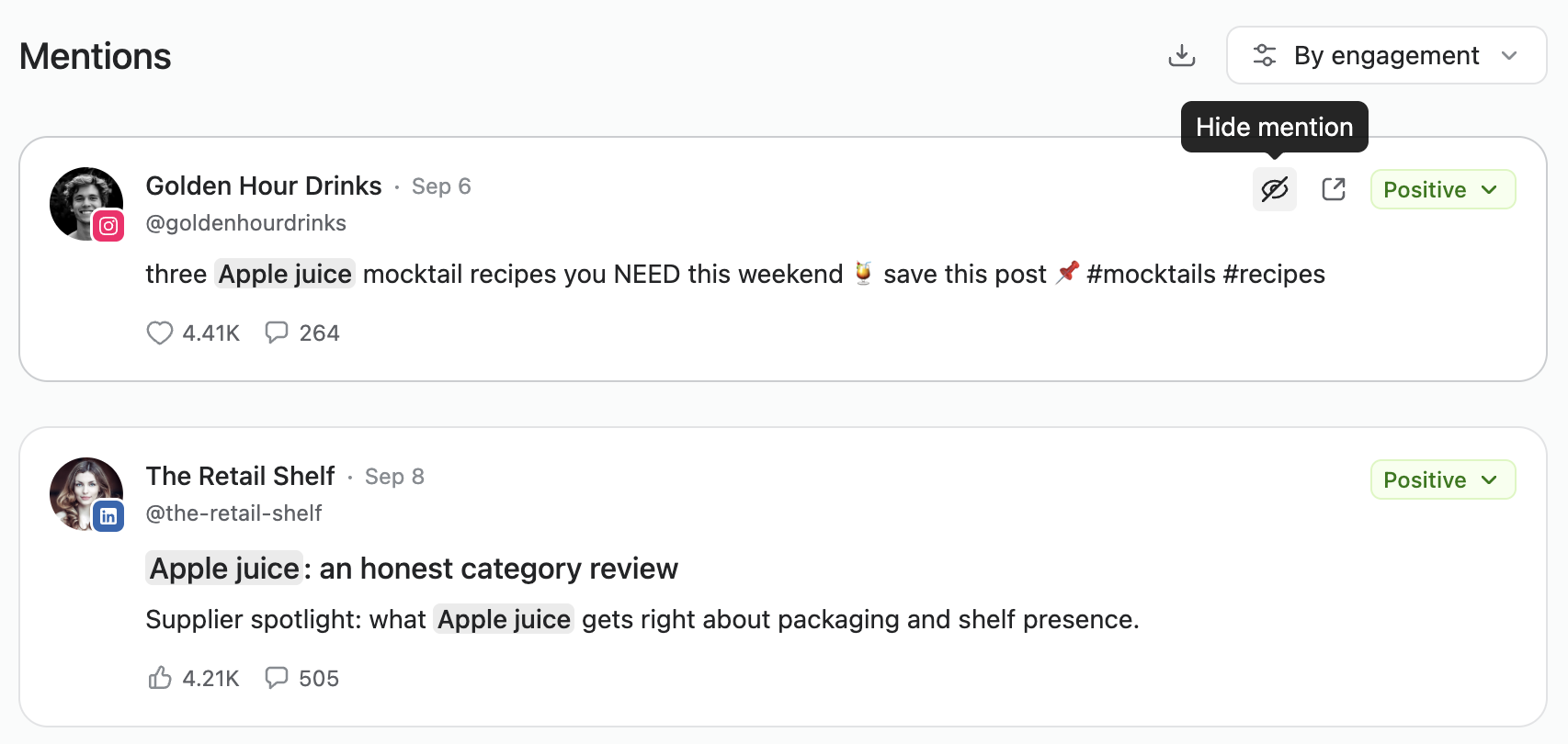
Its Social Listening add-on monitors public brand mentions or custom keywords across 8 sources (including Reddit, news, blogs, and forums) through a centralized dashboard.
That means you can handle most of your day-to-day social media tasks in just a couple of clicks: you can track audience conversations for topic ideation one moment, then go right ahead and create, collaborate, approve, and schedule posts the next.
Listening and approvals are completely centralized in Planable. When a mention calls for a reply post, content creation, feedback, approvals, and scheduling happen in the exact same place, which eliminates the trouble of having to use multiple third-parties.
On Pro and up, approvals can be set to none, optional or required; with required on, at least one approver must approve before a post can be scheduled or published.
For an agency answering a client’s brand mention, switching approvals to required is the difference between a fast reply and a reply nobody on the client side has seen. The Competitors tab also keeps a combined mention feed for the competitors you select, so a rival’s launch and the reaction to it sit in one scroll.
Standout features
Competitors dashboard: The Competitors tab compares your brand keyword against the competitor keywords you track, with a share-of-voice card, a sentiment comparison card and a channel-mix card showing where each brand gets talked about.
Volume and sentiment alerts: Alert rules on the brand keyword take a mentions-per-day threshold for volume or a percentage for sentiment, and a rule can be scoped to specific platforms.
Competitor Analytics: You can track up to 5 competitors per page, with data refreshed daily, as part of the Analytics add-on.
Publishing next to listening: Publishing covers nine networks: Facebook Pages, Instagram, LinkedIn, X, Google Business Profile, YouTube, TikTok, Pinterest, Threads.
Integrations: Planable notifications for approvals and comments can go to a chosen Slack channel. An MCP connection lets Claude, Cursor or another MCP-compatible AI tool work inside your Planable workspace.
Pricing: Basic costs $39 per workspace per month, while Pro costs $59 per workspace per month. Social Listening is an add-on at $99 per workspace per month or $990 per workspace per year. It starts with a free trial, is billed per workspace, and each workspace manages or cancels its own subscription.
Planable pros and cons
Pros
Cons
Enterprise adds multi-level approvals, with sequential stages such as team, then legal, then client.
Each workspace gets 1 brand keyword, 3 topic keywords and 3 competitor keywords, so broad category research needs a specialist.
Clients can approve in Planable without creating an account, using guest view links.
The brand keyword refreshes every 24 hours and topic keywords every 7 days. Competitor keywords refresh every 24 hours too, picked up by the brand keyword’s nightly run. The specialists below go deeper on archive length and refresh speed.
Emily D. of Forward Progress, Inc told Planable: “We literally went from a whole week of back and forth to two days and done: now, we have the content ready on Monday and approved and edited by Wednesday.”
Pros
Enterprise adds multi-level approvals, with sequential stages such as team, then legal, then client.
Clients can approve in Planable without creating an account, using guest view links.
Emily D. of Forward Progress, Inc told Planable: “We literally went from a whole week of back and forth to two days and done: now, we have the content ready on Monday and approved and edited by Wednesday.”
Cons
Each workspace gets 1 brand keyword, 3 topic keywords and 3 competitor keywords, so broad category research needs a specialist.
The brand keyword refreshes every 24 hours and topic keywords every 7 days. Competitor keywords refresh every 24 hours too, picked up by the brand keyword’s nightly run. The specialists below go deeper on archive length and refresh speed.
Per-workspace billing keeps the agency math readable. Eight client workspaces on Pro with Social Listening come to $1,264 per month (8 × $59 plus 8 × $99), and that figure moves only when a client workspace is added. Adding a reviewer leaves it where it was, and so does a client approving through a guest view link.
If listening next to your approval flow is the gap Meltwater leaves, test it on one client workspace first. Explore the platform for free!
2. Brand24: for flat-priced brand monitoring without a long contract
Best for: Small agencies and in-house teams that want brand monitoring on terms they can walk away from after a slow quarter.
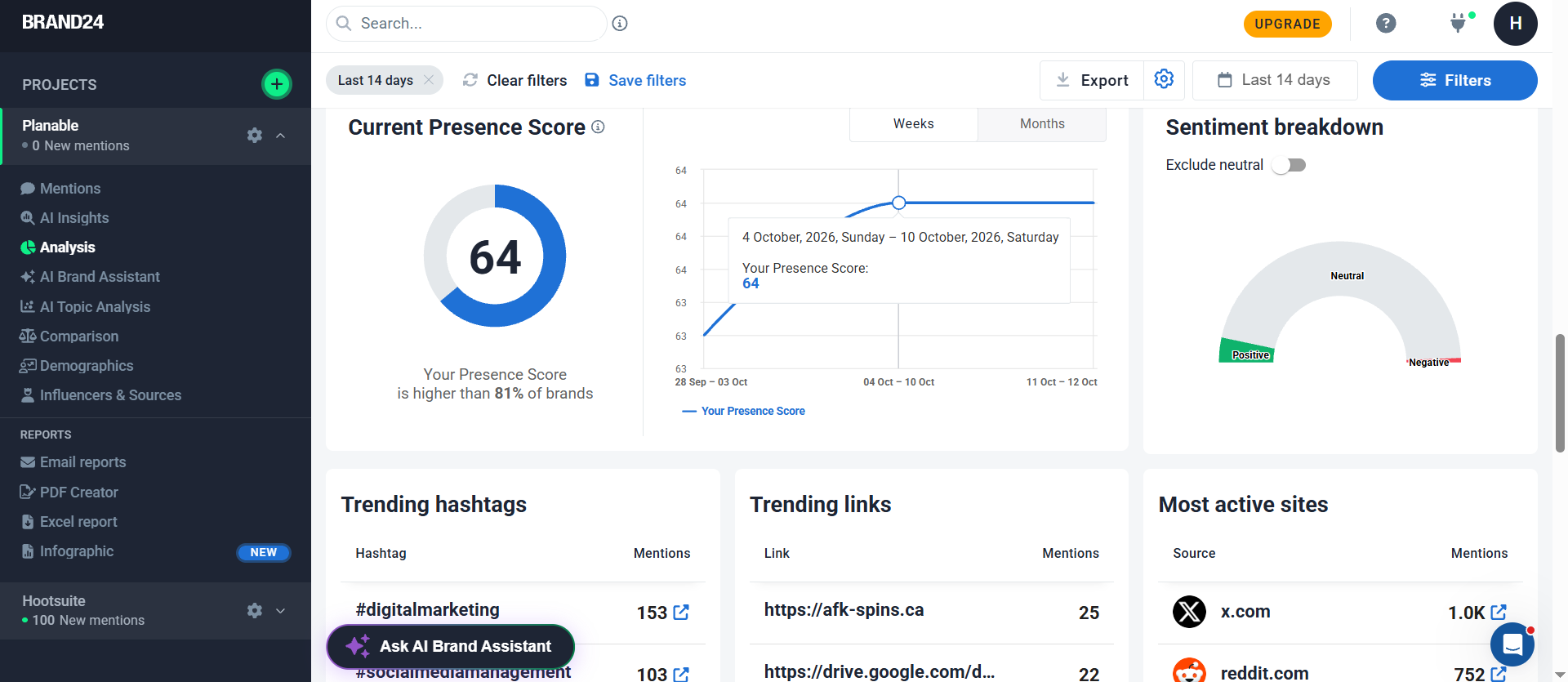
Brand24 is the cleanest contrast to Meltwater’s buying model. Every tier has a published price, so you can build the budget line before anyone books a sales call.
It’s also the specialist to try when your Meltwater use is narrow: a handful of brand names plus a weekly sentiment check, piloted on the entry plan’s monthly billing against one live campaign.
Paying monthly on Individual costs $50 more per month than the annual rate, a small premium for a test you can end. The step from Team to Pro adds 5 keywords and 30K mentions a month for $100 more per month, billed annually, which is the figure to weigh when the next client signs.
Standout features
AI Visibility module: Brand24 lists an AI Visibility add-on in its Enterprise plan.
Sentiment and emotion tracking: Measures sentiment (positive, negative, neutral) and emotions (trust, distrust, joy, anger).
Anomaly detection: Identifies sudden spikes or drops in brand mentions and briefly explains potential causes.
Integrations: Slack and Microsoft Teams, plus network support covering all major social and streaming platforms, on web resources.
Pricing: Individual costs $249 per month billed monthly, or $199 per month billed annually. Team costs $299 per month and Pro $399 per month, both billed annually. Business is $599 per month, again billed annually. Enterprise starts at $1,499 per month, billed annually.
Below Enterprise, the cap climbs by tier: Individual has 3 keywords and 2K mentions, Team has 7 and 10K, and Pro has 12 and 40K with real-time updates.
Brand24 pros and cons
Pros
Cons
Automatically detects important mentions (takes into account source authority, mention engagement, and sentiment strength).
The Individual plan only includes a single user and lacks source coverage across critical networks (LinkedIn, YouTube, TikTok, etc.).
The Team plan includes unlimited users, while Sprout Social and Hootsuite price every seat or user.
Reflex S., a small-business marketing manager, wrote on G2: “One challenge is the limitation on the number of keywords, especially in our case, as our company name is not unique and often appears in unrelated conversations.”
Pros
Automatically detects important mentions (takes into account source authority, mention engagement, and sentiment strength).
The Team plan includes unlimited users, while Sprout Social and Hootsuite price every seat or user.
Cons
The Individual plan only includes a single user and lacks source coverage across critical networks (LinkedIn, YouTube, TikTok, etc.).
Reflex S., a small-business marketing manager, wrote on G2: “One challenge is the limitation on the number of keywords, especially in our case, as our company name is not unique and often appears in unrelated conversations.”
3. Determ: for PR teams that track news and forum coverage
Best for: PR and comms teams that track press and forum coverage as closely as social, and want a say in which sources get watched.
Determ’s Focus package includes unlimited users and unlimited keywords but caps you at 1 topic and a thousand mentions. For a single-brand PR team, that topic cap is the number to plan around, and Focus bills month to month with no yearly commitment.
Expand and Command carry a yearly commitment, even when billed monthly. Teams that came to Meltwater for press coverage rather than social chatter will find Determ closer to that job than the social suites further down this list.
Standout features
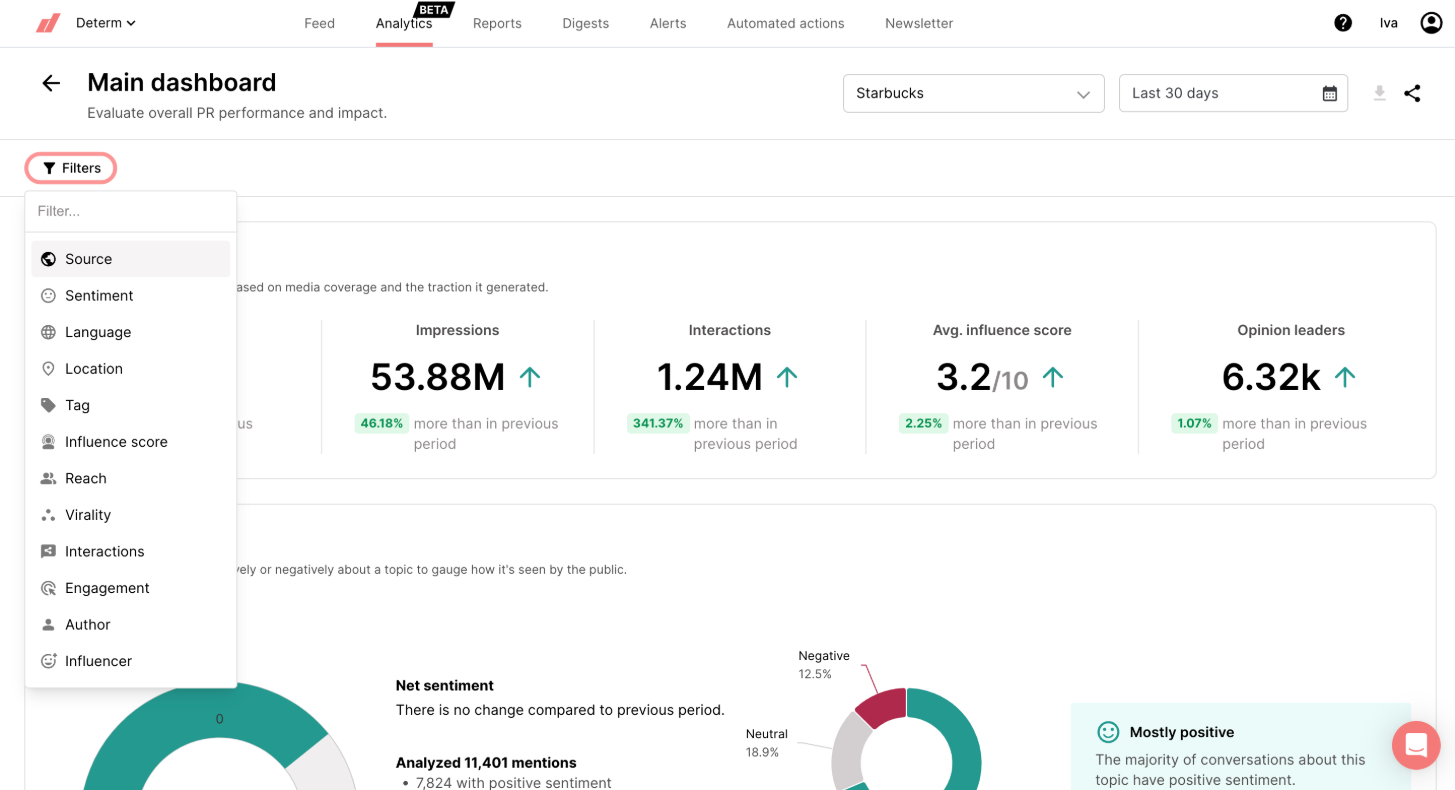
News-to-forum coverage: Determ monitors global online sources, from major news sites to niche forums and social platforms.
Sources on request: You can add or request specific sources directly in Determ.
Granular filters: Results filter by source, sentiment, language, country, or specific domain.
Integrations: Slack, Microsoft Teams, BigQuery, Power BI, plus Zapier and MCPs for Claude, ChatGPT, and Cursor.
Pricing: The entry-level pricing plan costs $99 per month, billed monthly, or $990 per year. The Expand plan costs $299 per month, billed monthly. Command, the top-tier package, is $499 per month, also billed monthly.
Expand raises the cap to 5 topics. Command goes to 10 topics, with a larger mention allowance at each step up.
Determ pros and cons
Pros
Cons
Pulls data from most major social networks (Bluesky included), 100 million+ news websites, and traditional media.
Nagarjuna K., a digital marketing executive at a small company, noted on G2: “Only 90 days of data can we get from the tool. Multi-account management is complex.” The review dates from 2022, so check the current limit during the free trial.
The lack of user-based limits brings good value for larger PR teams.
One topic covers one brand, so an agency watching several clients lands on Expand or Command quickly, and with them a yearly commitment.
Pros
Pulls data from most major social networks (Bluesky included), 100 million+ news websites, and traditional media.
The lack of user-based limits brings good value for larger PR teams.
Cons
Nagarjuna K., a digital marketing executive at a small company, noted on G2: “Only 90 days of data can we get from the tool. Multi-account management is complex.” The review dates from 2022, so check the current limit during the free trial.
One topic covers one brand, so an agency watching several clients lands on Expand or Command quickly, and with them a yearly commitment.
4. Brandwatch: for deep consumer research and historical data
Best for: Insights and research teams whose Meltwater use is audience and trend analysis rather than daily brand monitoring.
Brandwatch’s archive holds 1.7 trillion historical conversations back to 2010, so a question about how a category talked about pricing three years ago has data behind it.
If your Meltwater seat mostly feeds quarterly research decks, Brandwatch is the like-for-like move.
Standout features
Source breadth: Conversations come from 100 million unique sites.
Visual analysis: You can choose from 50+ live visualizations to analyze results.
Iris AI: Iris, a built-in AI assistant that turns data into human-readable insights.
A typical project runs from a query through those visualizations to an export for a stakeholder deck. It pays back a trained analyst far more than a social manager checking mentions between posts. In an agency, that usually means one analyst running queries for several client accounts, while the social managers receive finished charts instead of logging in themselves.
Budget for analyst time as well as the license, and if the deliverable is a quarterly client deck, price a split setup: Brandwatch for the research, your publishing tool for day-to-day replies.
Integrations: Insights can be shared via Excel, PPT, PDF, or the Brandwatch API.
Pricing: Brandwatch publishes no prices: plans from standard to enterprise for each solution are quoted after a demo request, so expect custom pricing.
Brandwatch pros and cons
Pros
Cons
Brandwatch states it has official firehose access to Twitter and Tumblr, which matters when sampled data won’t hold up in a research report.
Can be overwhelming for new users. Janvi B., a management associate at a mid-market firm, said in a G2 review: “Some features can feel slightly complex for first-time users.”
Brandwatch also tracks mentions across Asia-specific networks (Weibo, WeChat, and Rednote).
The Consumer Intelligence platform is strictly analytics-based. If you’d like to also reply to comments and engage with followers, you’ll need a separate subscription to Brandwatch’s Social Media Management solution.
Pros
Brandwatch states it has official firehose access to Twitter and Tumblr, which matters when sampled data won’t hold up in a research report.
Brandwatch also tracks mentions across Asia-specific networks (Weibo, WeChat, and Rednote).
Cons
Can be overwhelming for new users. Janvi B., a management associate at a mid-market firm, said in a G2 review: “Some features can feel slightly complex for first-time users.”
The Consumer Intelligence platform is strictly analytics-based. If you’d like to also reply to comments and engage with followers, you’ll need a separate subscription to Brandwatch’s Social Media Management solution.
5. Lumen by Talkwalker: for global coverage with unlimited users
Best for: Global brands and agencies that need many markets and languages covered, with logins for everyone who reads the data.
In Lumen, every plan comes with unlimited users and professional onboarding, while Sprout Social prices per seat and Hootsuite per user. Meltwater’s strongest card is worldwide coverage, and Lumen by Talkwalker is the specialist that competes on the same ground.
It also tracks the newer question of how AI assistants describe a brand, which puts it alongside Meltwater’s own AI-visibility reporting.
Standout features
Source volume and network coverage: The platform draws on 150 million data sources covering 30+ social platforms, plus blogs, news, TV, and radio.
Extensive language and region support: Supports 187 languages and 196 countries.
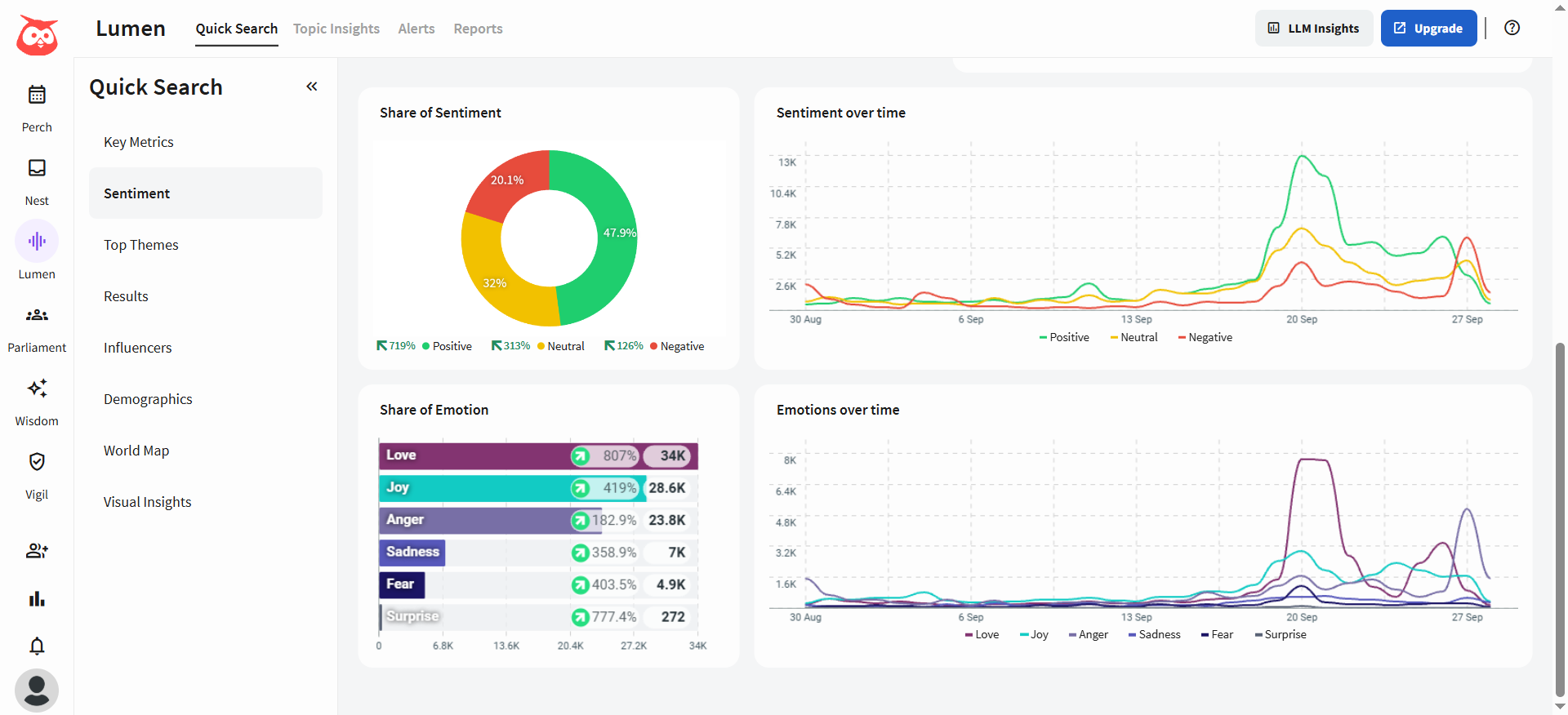
LLM Insights: This feature monitors how AI assistants talk about your brand and industry.
Coverage that wide earns its keep when a client launches in markets your team can’t read. Regional campaigns in smaller markets show up next to domestic-market results, instead of arriving weeks later in a local partner’s spreadsheet.
Integrations: Native Hootsuite integration for access to extra social media management-specific features.
Pricing: Every tier, from Core up to Business, is quoted on request, so pricing is custom. Analyze adds 2x non-sampled results volume and 25 additional topics, filters and channels over Core. The top Business tier goes further, with 6x non-sampled results volume and 3x more topics, filters and channels than Analyze.
Lumen pros and cons
Pros
Cons
Analysts and client stakeholders can all get logins without extra costs.
Setup takes effort, as Jennifer D., a small-business director of digital marketing, flagged on G2: “It’s not the easiest product to set up or manage at the start.”
Professional onboarding included in all plans, which offsets some of the otherwise complex setup.
The platform’s complexity does give it an initial learning curve.
Pros
Analysts and client stakeholders can all get logins without extra costs.
Professional onboarding included in all plans, which offsets some of the otherwise complex setup.
Cons
Setup takes effort, as Jennifer D., a small-business director of digital marketing, flagged on G2: “It’s not the easiest product to set up or manage at the start.”
The platform’s complexity does give it an initial learning curve.
6. Sprout Social: for social teams adding listening to a per-seat suite
Best for: In-house social teams that already publish and report from Sprout Social and want listening without onboarding a second vendor.
For a team that already uses Sprout Social, listening becomes an upgrade decision instead of a migration. Your publishing calendar and reports stay put, and the listening data sits one tab away.
Standout features
Queries without syntax: You can build queries without prior Boolean knowledge.
Share of voice: Listening tracks share of voice (SOV) against competitors and surfaces industry gaps.
Trellis AI: Trellis, Sprout’s AI teammate, answers complex research questions asked in plain language.
The seat math climbs quickly at agency size: an agency team of 12 approvers pays $2,388, $3,588 or $4,788 per month for 12 seats on Standard, Professional or Advanced, billed annually (12 seats × $199, $299 or $399), before the unpublished Listening add-on.
Treat each figure as a floor, and ask for the add-on quote against your real approver count.
Integrations: HubSpot, Salesforce, Zendesk, MS Dynamics 365, review sites (TripAdvisor, Yelp, TrustPilot, and more).
Pricing: The listening add-on is available starting from the Standard plan, which costs $199 per seat per month. Pricing for the add-on itself is quote-based.
Sprout Social pros and cons
Pros
Cons
Centralizes social media accounts. Emma L., an enterprise social media manager, wrote in her G2 review: “I love that Sprout makes it easier to manage multiple social media accounts in one centralized place.”
Listening is sold separately on the Standard plan and up.
You can try Sprout free for 30 days with no credit card required.
HubSpot, Salesforce, Zendesk, Marketo, and Microsoft Dynamics integrations only available in the Advanced plan ($399 per user per month).
Pros
Centralizes social media accounts. Emma L., an enterprise social media manager, wrote in her G2 review: “I love that Sprout makes it easier to manage multiple social media accounts in one centralized place.”
You can try Sprout free for 30 days with no credit card required.
Cons
Listening is sold separately on the Standard plan and up.
HubSpot, Salesforce, Zendesk, Marketo, and Microsoft Dynamics integrations only available in the Advanced plan ($399 per user per month).
7. Hootsuite: for brand and competitor monitoring inside a publishing suite
Best for: Teams that already schedule from Hootsuite and need brand and competitor monitoring without a separate listening contract.
Hootsuite is a social media management suite with particularly detailed listening tools: it covers extensive reports on keyword engagement metrics, related sub-topics, and sentiment.
Hootsuite includes listening features starting from the entry-level plan. You gradually get access to more advanced tools as you scale up through pricing tiers. Up-tier packages include capabilities that are comparable to Meltwater.
The plan choice becomes the real decision. A team that only needs to watch its own brand and a few rivals can opt for entry-level plans; a team replacing Meltwater’s alerts and history ends up at Enterprise.
Standout features
Ample data coverage: Hootsuite pulls data from 30+ social channels, 150 million+ websites, and 300+ review sites.
Monitoring from Standard: The Standard plan lets you monitor your brand and competitors.
Advanced listening: The Enterprise plan adds advanced listening that uncovers trends across social and digital channels, plus competitive benchmarking.
Integrations: MCP connectors for ChatGPT, Claude, and Gemini, plus access to 100+ third-party apps via Hootsuite’s app marketplace.
Pricing: Standard costs $99 per user per month, billed annually. Professional runs $199 per user per month, billed annually. Advanced, at $399 per user per month, is billed annually as well.
Hootsuite pros and cons
Pros
Cons
Alyssa P., a senior social media manager, put it on G2: “Managing social media for multiple client accounts can get messy fast. Hootsuite makes scheduling easy.”
Enterprise’s advanced listening is where 13 months of historical data comes in, along with alerts and brand review monitoring.
Hootsuite also identifies branded assets across images and videos.
Professional’s Quick Search covers up to 30 days of conversations, with AI-powered forecasting up to 90 days ahead.
Pros
Alyssa P., a senior social media manager, put it on G2: “Managing social media for multiple client accounts can get messy fast. Hootsuite makes scheduling easy.”
Hootsuite also identifies branded assets across images and videos.
Cons
Enterprise’s advanced listening is where 13 months of historical data comes in, along with alerts and brand review monitoring.
Professional’s Quick Search covers up to 30 days of conversations, with AI-powered forecasting up to 90 days ahead.
The per-user model and the Enterprise gate may push the final price tag for agencies. A team that needs Meltwater-style alerts for several clients ends up requesting an Enterprise quote that covers everyone who touches those clients.
Enterprise can still make sense when your publishing already lives in Hootsuite and moving it would cost more than the listening upgrade. When it doesn’t, compare the Enterprise quote against a split setup before deciding.
8. Agorapulse: for listening that feeds social reporting
Best for: Agencies that want listening results inside monthly client reports, next to their publishing numbers.
In Agorapulse, listening results land in the same report builder that already holds publishing and inbox numbers. That removes a monthly copy-paste job from an agency’s reporting week.
Standout features
Channel coverage: Listening monitors Facebook, Instagram, YouTube, X, LinkedIn and Reddit alongside thousands of news sites, blogs, and forums.
Share of Voice view: Adding competitors gives you a native Share of Voice view.
Spike and sentiment alerts: Alerts fire on volume spikes and sentiment shifts, and a dedicated saved search can hold your crisis keywords.
Integrations: Listening data flows into Report Studio, so it sits in the same report as publishing and inbox results.
Pricing: Standard costs US $79 per user per month billed annually, or US $99 per user per month billed monthly. Professional comes in at US $119 per user per month, billed annually. The Advanced tier is US $149 per user per month, again billed annually.
Agorapulse pros and cons
Pros
Cons
The Listening Screening automatically separates real conversations about your brand from coincidental keyword matches.
Data retention is 6 months on Standard, rising to 24 months on Advanced.
Agorapulse is free for 30 days, with no credit card required.
Brand conversation tracking reaches millions of social accounts as a separate add-on (pricing is upon request).
Pros
The Listening Screening automatically separates real conversations about your brand from coincidental keyword matches.
Agorapulse is free for 30 days, with no credit card required.
Cons
Data retention is 6 months on Standard, rising to 24 months on Advanced.
Brand conversation tracking reaches millions of social accounts as a separate add-on (pricing is upon request).
That retention applies to post and inbox data, which is what a year-over-year client report compares against. The plan that fits your reporting calendar may sit one tier above the plan that fits your posting volume.
If you promise clients annual reviews, price the tier with the retention those reviews need, then multiply it by every user who needs a login, before adding the Advanced Listening add-on.
How do you choose a Meltwater alternative?
Start by auditing which Meltwater modules your team opens in a normal week:
If it’s mostly brand and competitor mentions, split the job: a social platform with built-in listening, plus a specialist only if its keyword caps bite.
If it’s media intelligence or global coverage, replace Meltwater like for like with a listening specialist.
Which Meltwater modules does your team actually open?
Pull last quarter’s activity and look at what people did, not what the contract includes. In a social team, look first at two features. Meltwater lets teams set custom alert thresholds and route alerts by email, Slack or other channels. It also includes competitor tracking and share-of-voice analysis.
If those two are the whole story, you’re paying suite prices for a job several entries above handle as a feature. Compare them on refresh speed and price, since the feature names will look alike on every pricing page.
A quick way to run the audit: ask everyone with a login to name the last few things they did in Meltwater, then sort the answers by job, with daily monitoring in one pile and research or press work in another.
Monitoring answers point to a split setup. Research and press answers point to a specialist. A mix usually means the suite is doing two jobs, and each job can go to a different entry.
How much setup time can you give a new tool?
Query building is where Meltwater’s learning curve lives. André P., a technical consultant at a mid-market IT services company, wrote on G2:
Setting up effective searches requires some practice, especially when building more advanced Boolean queries.
That practice transfers to the research-grade specialists, whose reviewers flag a similar learning curve at the start. Tools that build queries for you, or that only ask for a brand keyword, trade some depth for a shorter setup.
How much does AI visibility tracking matter?
It matters once comms or leadership start asking about AI answers, and Meltwater has moved on it. Meltwater’s latest mid-year release added GenAI Lens, which shows how your brand appears in AI-generated responses.
Meltwater’s GenAI Lens, showing how a brand appears in AI-generated responses.
If AI answers are part of your reporting, shortlist the alternatives that track them. Planable includes an AI Visibility dashboard that tracks brand mentions, source citations, and traffic from AI search, while Brand24 offers its AI Visibility module on Enterprise, and Lumen by Talkwalker has LLM Insights.
What do you need to export before the contract ends?
Get your data out while you still have access. Meltwater offers API access, flexible data exports and integrations with common business tools, so plan the export before you give notice.
Export your saved searches with their full Boolean strings, along with every alert rule and its threshold. Then save your report templates and a historical mention export for each client. That history is what next year’s reports will compare against, and rebuilding it later is guesswork.
Note which alerts actually fired last year too, since those are the rules worth rebuilding first.
Your situation
Replace or split
Entries to shortlist
Mostly brand and competitor mentions, publishing in another tool
Split
Planable for listening next to approvals, plus Brand24 or Determ only if keyword caps bite
Already publishing from a social suite
Split
Planable, Sprout Social, Hootsuite or Agorapulse with their listening layers
PR coverage and press monitoring
Replace
Determ
Research decks and historical analysis
Replace
Brandwatch
Worldwide coverage across many languages
Replace
Lumen by Talkwalker
Mostly brand and competitor mentions, publishing in another tool
Replace or split
Split
Entries to shortlist
Planable for listening next to approvals, plus Brand24 or Determ only if keyword caps bite
Already publishing from a social suite
Replace or split
Split
Entries to shortlist
Planable, Sprout Social, Hootsuite or Agorapulse with their listening layers
PR coverage and press monitoring
Replace or split
Replace
Entries to shortlist
Determ
Research decks and historical analysis
Replace or split
Replace
Entries to shortlist
Brandwatch
Worldwide coverage across many languages
Replace or split
Replace
Entries to shortlist
Lumen by Talkwalker
When is Meltwater still the right call?
Stay when Meltwater’s breadth is the part you use, and switching would cost coverage you’d have to rebuild elsewhere.
Worldwide social monitoring in one contract: Meltwater covers 20+ networks across 200+ countries and 240+ languages.
Reddit as a core channel: Meltwater says it offers access to Reddit’s full firehose, which matters if subreddits shape your category.
PR and social in one view: Daniel S., co-founder of a small business, wrote on G2: “What I like most about Meltwater is having media coverage, social mentions, and reporting in one place.”
If two of those describe your team, renegotiating may beat switching. The published prices above give you concrete numbers to bring to the renewal call, which is leverage a quote-only contract rarely hands you.
Agencies with one or two global clients face a version of this too. Keeping Meltwater for those accounts while moving the rest to a social platform with built-in listening can cost less than forcing every client onto the same contract.
Before the renewal call, list the modules nobody on your team opened last quarter and ask for them to come off the contract.
A slimmer Meltwater footprint for the global accounts, paired with a social platform for everyone else, is a test you can run for one contract term before committing to a full move. Book the data export before that call, so the renewal talk and your exit plan share one set of dates.
Can you use Meltwater for free, and what do alternatives cost?
No. Meltwater doesn’t offer a self-serve free trial, so the closest thing to a test drive is a human-guided demo. There’s no public price list either: Meltwater quotes tailored, custom pricing through sales for every plan, from Starter up to Agency.
Most partnerships run on annual agreements with a minimum contract length of 12 months. Enterprise or complex setups may also carry a one-time implementation or onboarding charge.
Every alternative below publishes at least its plan structure, and most publish a price. Here’s what each one charges and what actually moves the bill:
Tool
Starting price
Billing basis
What sets the price
Meltwater (reference)
Custom quote (not published)
Custom, annual agreement
Quoted per plan through sales
Planable
$39 per workspace per month (Basic)
Per workspace, or $390 per workspace per year
Workspaces, plus Social Listening at $99 per workspace per month
Brand24
$199 per month, billed annually
Flat per plan, or $249 per month billed monthly on Individual
Keywords and monthly mentions per tier
Determ
€99 per month, billed monthly
Flat per plan, or €990 per year billed annually; Expand and Command carry a yearly commitment on monthly billing
Topics and mentions per tier
Brandwatch
Custom quote (not published)
Custom, after a demo
Quoted per solution, standard to enterprise
Lumen by Talkwalker
Custom quote (not published)
Custom, by plan tier
Results volume and topics per tier
Sprout Social
$199 per seat per month, billed annually
Per seat
Seats, plus a Listening add-on with no published price
Hootsuite
$99 per user per month, billed annually
Per user
Users, and which listening depth your plan includes
Agorapulse
$79 per user per month, billed annually
Per user, or $99 per user per month billed monthly
Users, plus the Advanced Listening add-on
Meltwater (reference)
Starting price
Custom quote (not published)
Billing basis
Custom, annual agreement
What sets the price
Quoted per plan through sales
Planable
Starting price
$39 per workspace per month (Basic)
Billing basis
Per workspace, or $390 per workspace per year
What sets the price
Workspaces, plus Social Listening at $99 per workspace per month
Brand24
Starting price
$199 per month, billed annually
Billing basis
Flat per plan, or $249 per month billed monthly on Individual
What sets the price
Keywords and monthly mentions per tier
Determ
Starting price
€99 per month, billed monthly
Billing basis
Flat per plan, or €990 per year billed annually; Expand and Command carry a yearly commitment on monthly billing
What sets the price
Topics and mentions per tier
Brandwatch
Starting price
Custom quote (not published)
Billing basis
Custom, after a demo
What sets the price
Quoted per solution, standard to enterprise
Lumen by Talkwalker
Starting price
Custom quote (not published)
Billing basis
Custom, by plan tier
What sets the price
Results volume and topics per tier
Sprout Social
Starting price
$199 per seat per month, billed annually
Billing basis
Per seat
What sets the price
Seats, plus a Listening add-on with no published price
Hootsuite
Starting price
$99 per user per month, billed annually
Billing basis
Per user
What sets the price
Users, and which listening depth your plan includes
Agorapulse
Starting price
$79 per user per month, billed annually
Billing basis
Per user, or $99 per user per month billed monthly
What sets the price
Users, plus the Advanced Listening add-on
The decision rule comes down to who logs in. Per-seat and per-user suites cost more every time an approver or client needs access. Per-workspace and flat plans track client count or listening volume instead, which is closer to the number an agency already bills against.
Flat plans have their own trap. The cap sits on keywords or mentions, so a busy month or a client with a common name can push you up a tier mid-contract.
One more cost hides outside the price column: switching time. Expect to rebuild saved searches and recreate alert rules in the new tool, so an overlap period, if your contract dates allow one, keeps alerts running while you rebuild.
Picture an agency with 8 client workspaces and 12 people who review or approve. On a per-seat plan, all 12 count toward the bill. On a per-workspace plan, the 8 workspaces do, and the twelfth reviewer costs nothing extra.
FAQs
Is Meltwater a PR tool?
Partly. Meltwater positions itself as one platform combining social listening, media intelligence and influencer capabilities. PR teams lean on the media side for press coverage, while social teams use the listening side. If your team only uses one half, that’s the half to price against a specialist or a social platform.
Does Meltwater still exist?
Yes, and it’s still shipping. Its latest mid-year release added a Meltwater Agent for Slack that surfaces answers and analysis in Slack. If an old forum thread questions the company’s future, treat it as out of date and judge Meltwater on its current product and contract terms instead.
Meltwater vs Planable: which fits your team?
Meltwater is better suited for larger PR teams that need comprehensive media monitoring and intelligence, while Planable is a better fit for social media teams and agencies looking to combine content planning, collaboration, publishing, and social listening in one platform.
Meltwater vs Brandwatch: which fits your team?
Choose Meltwater when press coverage and social listening need to live in one contract. Choose Brandwatch when the job is consumer research built on deep history, and your analysts have time to get past its learning curve. For daily brand alerts next to publishing, a social platform with built-in listening covers the job with less setup.
Which Meltwater alternative works for agencies managing several clients?
Check what the price is tied to before comparing features. Per-seat suites charge again whenever an approver or client needs a login, while per-workspace pricing follows your client count. When you bill per client, per-workspace listening next to approvals, as in Planable, keeps the cost line tied to revenue.
Which Meltwater alternative should you choose?
For a social-first team, the choice turns on which half of Meltwater the team actually uses: daily mentions call for a split, research or press coverage calls for a like-for-like swap.
Listening beside your approval flow: Planable.
Flat plans you can cancel any time: Brand24.
PR monitoring across news and forums: Determ.
Research with deep history: Brandwatch.
Global coverage with unlimited users: Lumen by Talkwalker.
Listening inside a suite you already pay for: Sprout Social.
Plan-tiered brand and competitor monitoring: Hootsuite.
Listening that lands in client reports: Agorapulse.
If the first line sounds like your team, run one client workspace against your Meltwater alerts for a week and compare. Try Planable for free!
Horea is a B2B SaaS content writer and MarTech researcher. He has written for Planable since 2023, covering social media management, scheduling, listening and collaboration software. He's spent 7+ years writing about marketing technology, with work for HubSpot, Surfer and UX Pilot AI on topics from SEO and answer engine optimization to UX and web design tools. His roundups are research-first: he tests the tools and workflows himself, then writes the comparisons that help marketers choose with confidence.







 Creation
 Scheduling
 Planning
 Social Inbox
 Collaboration
 Analytics
 Approval
 Social Listening