Social media scheduling is only one part of a team's workflow. You also need to keep content organized, collect feedback, get approvals, and make sure the right version goes live. That's where choosing between Buffer and Later gets interesting. Both tools help you...
Redesign For multi-location brands
all your locations, one content flow
For multi-brand companies
content collaboration at scale
For agencies
impress your clients and take on more
“The team loved it from the start. Planable helps us overview the entire marketing efforts.“
We get it. You’re reading Planable reviews on Planable’s own blog, so a little skepticism is only natural.
Every quote below is verbatim and kept short. Quotes from public reviews link to the review they came from, and the few that customers sent our team directly are labeled as such. The critical reviews get their own section, and so do the features that launched too recently for many reviewers to mention.
Planable started as a collaboration and approvals tool, and reviewers still rate it highest for that. It now covers the full social media workflow, from planning to performance and listening, so this page reads the reviews against the whole product and says where it falls short.
Where Planable reviews come from and how they score
As of October 2026, Planable has 1,522 reviews across three review platforms. Most of them are on G2, where it averages 4.6 out of 5.
G2 says its reviews are shared across its marketplace brands, including Capterra. We counted Capterra’s own 326 reviews once and left GetApp and Software Advice out, so a small number of reviews may appear on more than one platform.
On G2, 74% of reviewers give five stars and 22% give four. Ease of use is the strength reviewers mention most (88 mentions), followed by post scheduling (50) and the calendar view (45). The drawbacks tagged most often are high pricing (53 mentions) and plan limitations (28). On Trustpilot, 87% of reviewers give four or five stars, and 11% give one star.
Who reviews matters here. Of G2’s 1,125 reviews, 1,063 come from small businesses (50 or fewer employees) and 235 from agencies, while only 6 come from enterprises with more than 1,000 employees. The evidence is strong for small teams and agencies and thin for large enterprises.
Is Planable worth it?
For most reviewers, yes, especially when content needs sign-off from someone outside the team. The reviewers who rate Planable highest use it as the place where posts are drafted and approved before they’re scheduled.
Whether it’s worth it for you comes down to how many clients or brands you manage and which add-ons you need. It also depends on how much of your work relies on features that launched recently.
Planable prices per workspace, with one workspace per client or brand. Billing includes unlimited users per workspace. If you run several clients or locations and need approvals and reporting in one place, the reviews point to a good fit. If you manage one brand and mostly need scheduling, compare the plan limits and add-on costs first.
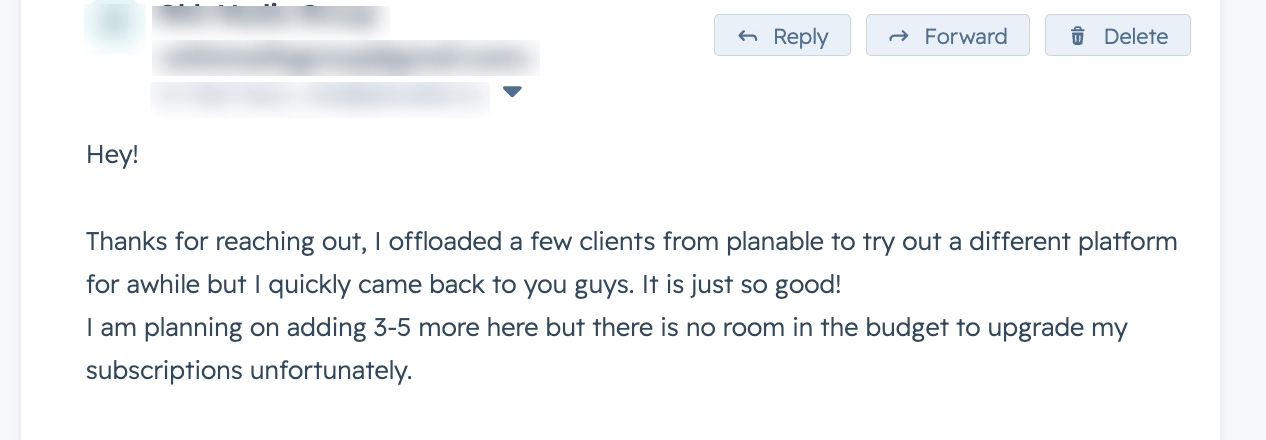
Public reviews aren’t the only signal. Customers also write to our team directly, and one agency owner’s email shows both sides of the question in two lines.
Social media agency owner, email to our team
“I quickly came back to you guys. It is just so good!”
They had moved a few clients to another platform for a while before bringing them back.
An agency owner’s email to our team
What Planable covers beyond approvals
Planable is a full-stack social media management tool with collaboration and approvals at its core. Several 2026 reviews mention the rest of the workflow, and the table shows what’s there and what it costs.
Area
What you get
Cost
Planning and publishing
Feed, calendar, and grid views, plus campaigns, a media library, and publishing to nine networks
Included
Collaboration and approvals
Comments, text suggestions, and optional, required, or multi-level approvals
Required approvals on Pro, multi-level on Enterprise
Analytics
Per-page and cross-channel reports, paid vs organic splits, and custom reports
Add-on, $14 per workspace/month
Competitor Analytics
Benchmarking of up to 5 competitors per page on Instagram, Facebook, YouTube, TikTok, and LinkedIn
Included with Analytics
Social Listening
Brand, topic, and competitor monitoring across 8 sources, with sentiment and alerts
Add-on, $99 per workspace/month
Social Inbox
Comments on Facebook, Instagram, LinkedIn, and TikTok, plus Facebook and Instagram DMs
Add-on, $9 per workspace/month
AI
Caption generation, rewriting, hashtags, Brand Context, and suggested inbox replies
Included
MCP and API
Connect AI assistants such as Claude and ChatGPT, or build on the Public API
MCP on every plan, Public API on Pro and Enterprise
Planning and publishing
What you get
Feed, calendar, and grid views, plus campaigns, a media library, and publishing to nine networks
Cost
Included
Collaboration and approvals
What you get
Comments, text suggestions, and optional, required, or multi-level approvals
Cost
Required approvals on Pro, multi-level on Enterprise
Analytics
What you get
Per-page and cross-channel reports, paid vs organic splits, and custom reports
Cost
Add-on, $14 per workspace/month
Competitor Analytics
What you get
Benchmarking of up to 5 competitors per page on Instagram, Facebook, YouTube, TikTok, and LinkedIn
Cost
Included with Analytics
Social Listening
What you get
Brand, topic, and competitor monitoring across 8 sources, with sentiment and alerts
Cost
Add-on, $99 per workspace/month
Social Inbox
What you get
Comments on Facebook, Instagram, LinkedIn, and TikTok, plus Facebook and Instagram DMs
Cost
Add-on, $9 per workspace/month
AI
What you get
Caption generation, rewriting, hashtags, Brand Context, and suggested inbox replies
Cost
Included
MCP and API
What you get
Connect AI assistants such as Claude and ChatGPT, or build on the Public API
Cost
MCP on every plan, Public API on Pro and Enterprise
Per-workspace pricing is $39 for Basic and $59 for Pro, with Enterprise from $200 per month.
Add-ons stack: a Pro workspace with Analytics, Social Inbox, and Social Listening costs $59 + $14 + $9 + $99 = $181 per month.
Approvals and client feedback
Approvals come up across all three platforms. Reviewers describe sign-off moving out of email threads and onto the post itself, where the person approving sees what will actually go live.
The honest limit is the level of control. One G2 reviewer, Alana G., wanted approval levels, so a manager signs off before the CEO. Multi-level approvals exist, but only on Enterprise. Required approvals start on Pro, and client membership isn’t available on Basic. For the mechanics, see the guide to content approvals in Planable.
Planning and previews
Reviewers keep returning to two things: seeing a post the way it will look on the platform, and moving content around a calendar.
“makes scheduling Instagram posts and reels stress-free”
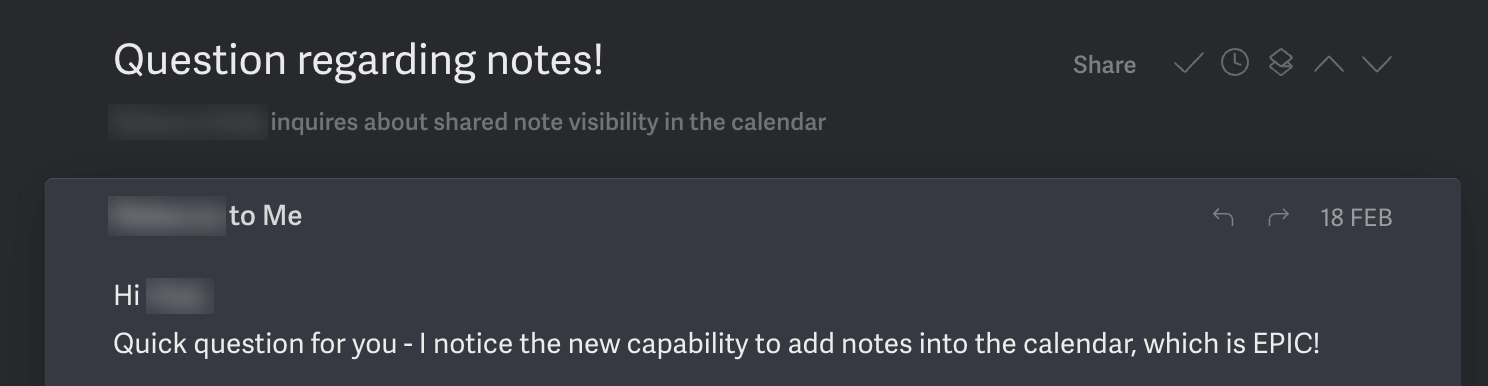
Smaller planning updates get noticed too. When notes arrived in the calendar, one customer emailed our team about it before asking how note visibility works.
Marketing lead, email to our team
“the new capability to add notes into the calendar, which is EPIC!”
A customer’s email about calendar notes
Analytics and Competitor Analytics
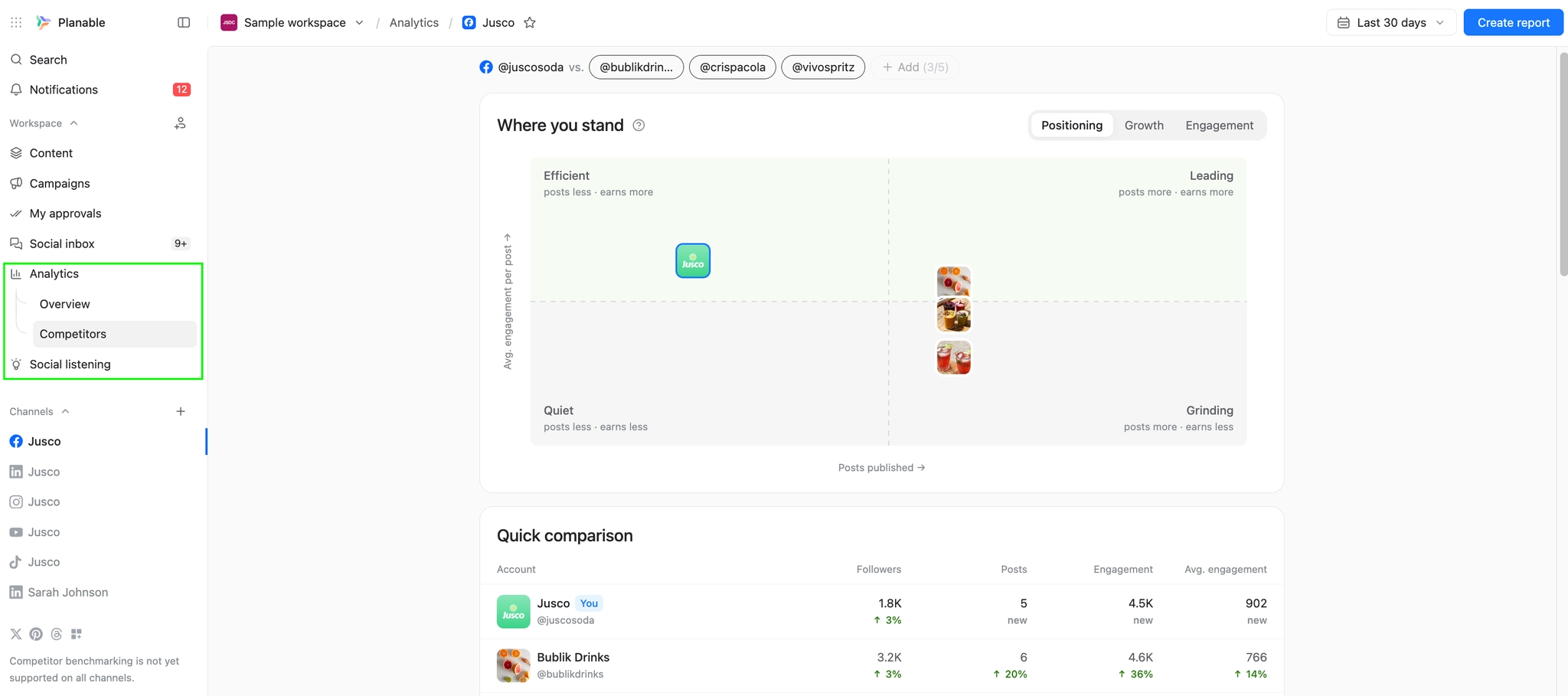
Analytics is a paid add-on and an area where reviewers ask for more. Competitor Analytics, released in June 2026, sits inside Analytics in a Competitors tab. It tracks up to 5 competitors per page across five networks, listed in the table above, and compares their followers and engagement against your own page.
Competitor Analytics in Planable: positioning chart and quick comparison against up to 5 competitors per page
It also shows trend charts and each competitor’s top posts, and reports can include competitor sections.
“The analytics can definitely be a bit more robust”
Rachel is a founder who otherwise rates Planable 4.5 for team collaboration and cross-platform posting. Planable’s reply on G2 says it had just added competitor analytics.
“see how valuable the analytics feature could be before committing to the cost”
Neither reviewer mentions the competitor tab, so treat both as feedback on the core analytics add-on. The limits are real:
Competitor data refreshes daily, not in real time
Trend charts need at least two days of data
TikTok and LinkedIn data is thinner than Instagram, Facebook, and YouTube data
Social Listening
Social Listening launched in June 2026 as a separate section. It monitors public posts across 8 sources, from social networks such as X and TikTok to Reddit and the wider web. Each mention gets a positive, neutral, or negative sentiment label that you can edit by hand.
Volume and sentiment alerts are available, and a Competitors tab shows share of voice and sentiment against the competitor keywords you track.
Social Listening Competitors tab: share of voice, sentiment and source split against tracked competitor keywords
Social Listening is too new for many public reviews, so we also looked at what prospects and customers said about it on our sales and demo calls in September and October 2026. These aren’t public reviews, so we don’t name anyone, and each quote comes from a call recording.
The reason that came up most often was getting listening into the same tool as planning and analytics. Teams replacing Meltwater or Hootsuite said this most.
Non-profit replacing Meltwater, existing customer
“that number is very manageable for us”
They were comparing the add-on with the Meltwater listening they pay for now.
In-house social team moving off Hootsuite and Meltwater
“We don’t want to be jumping from one tool to another.”
Photography franchise, prospect
“This is really cool. This could be sales opportunities.”
This was their reaction to negative mentions of competitors.
PR agency, on trial
“they also need to know what is their share of voice”
Prospects also told us where it falls short for them:
PR agency with one client, prospect
“Oh, it’s a 100 per month? … Okay. That’s too much for me.”
Global retailer, existing customer
“as live as possible”
They wanted mentions faster than the daily refresh. They also asked about historical data, and listening only starts from setup.
Taken together, the calls point the same way. Listening appeals most to teams replacing a separate listening tool and to agencies with one or two larger clients. Small teams and single-client agencies often find $99 per workspace hard to justify. The limits below are the ones prospects raised most:
It costs $99 per workspace per month ($82.50 billed annually), with a 30-day free trial
Brand and competitor keywords refresh every 24 hours and topic keywords every 7 days, so it isn’t real time, and there’s no historical data from before setup
Each workspace gets 1 brand keyword, 3 topic keywords, and 3 competitor keywords
Several sources are reached through search discovery and third-party scraping, so test coverage for your market during the trial
It isn’t a fit for hour-by-hour crisis monitoring
AI and the MCP connector
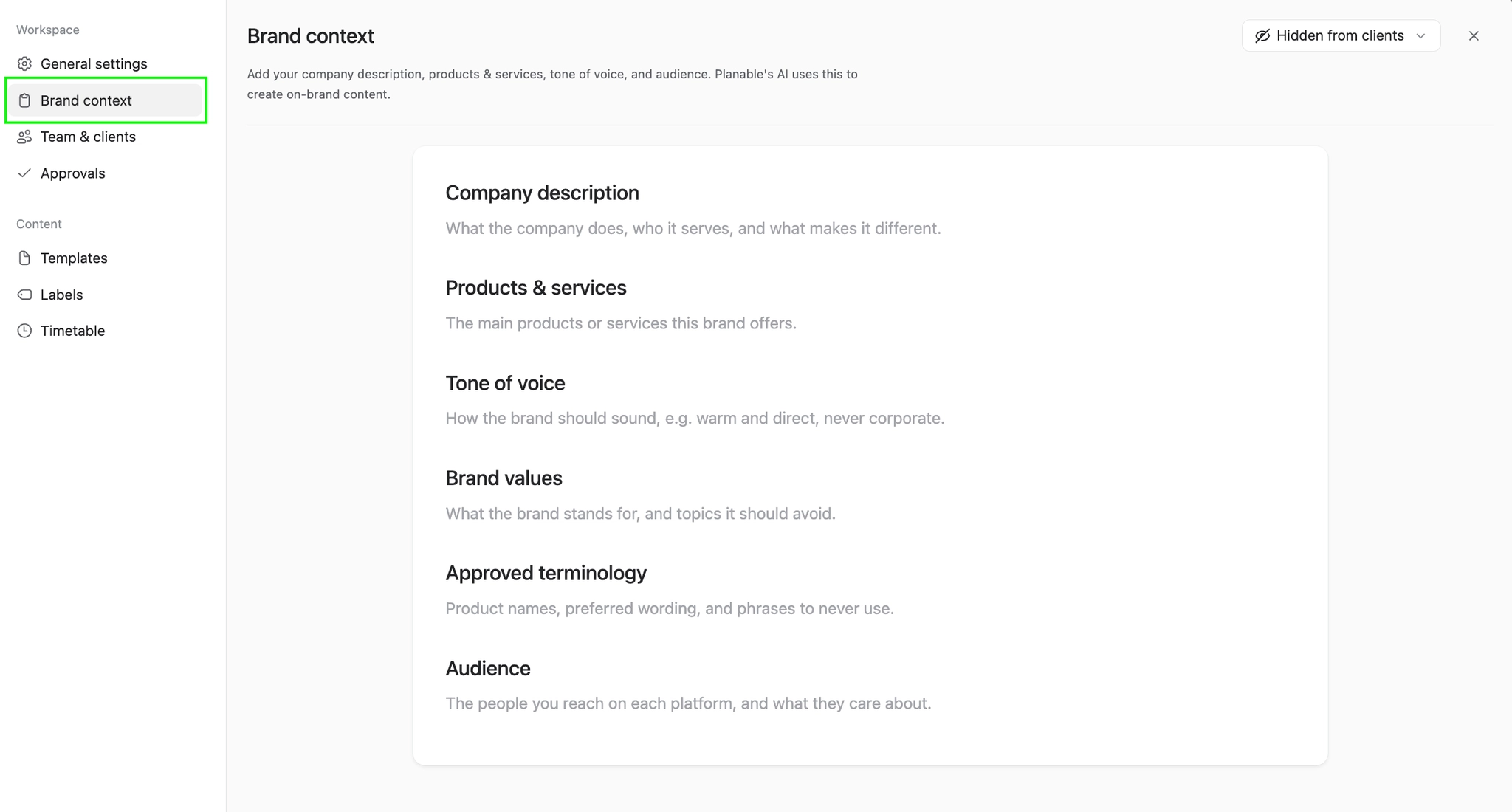
Planable’s AI works from Brand Context, a per-workspace brand profile. It holds your tone of voice and values, plus approved terminology and audience.
Brand Context in workspace settings: the brand profile Planable’s AI uses to write on-brand posts
The AI uses it when it writes or rewrites a post, so an agency can keep a separate voice for each client. The AI also generates hashtags and suggests replies in Social Inbox.
The MCP connector lets AI assistants such as Claude and ChatGPT browse your workspaces and draft posts within your permissions. Posts created that way are always drafts, never published automatically.
“the recent claude mcp connector is beautiful and so insanely helpful”
Treat AI output as a first draft that someone on your team reviews. Brand Context helps most when you fill it in properly, and it doesn’t apply to every AI action: Shorten and Generate hashtags don’t use it.
Multi-client workspaces and agency use
Agencies and consultants judge Planable by how it handles several clients at once. They describe one workspace per client, with each client’s content and approvals kept apart. G2 lists 235 reviews from agencies and 34 from consultants.
Taylor O. describes managing multiple clients on the same calendar and sending posts to a boss for review without individual emails. Aaron F. says clients got access to the platform and were good to go.
Planable replies to reviews on G2 and Trustpilot, including critical ones. Its replies usually point to a specific fix or help article.
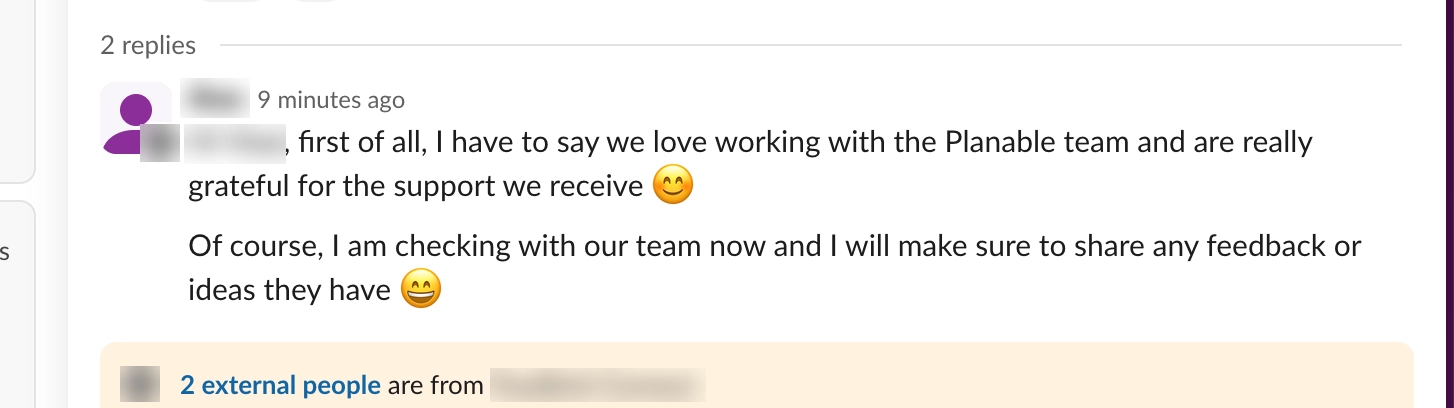
Support also comes up when customers talk to us directly. A content agency that works with our team in a shared Slack channel opened a message this way:
Content agency, Slack message to our team
“really grateful for the support we receive”
A content agency’s message to our team in a shared Slack channel
“Service has been much better since my previous review”
Brian raised his rating after the issue was resolved. His earlier review describes an account that was canceled without notice, which is the kind of failure worth knowing about before you buy.
What critical reviews say about Planable
Here’s what reviewers raise and how Planable handles each one.
How do reviewers feel about Planable’s pricing?
High pricing is the top drawback on G2 (53 mentions), and plan limitations follow (28). Reviewers want more included in lower plans.
“the cap on the number of posts included in the plan”
A small-business reviewer, Hilde v., found the jump from free to paid steep for a one-person company that posts once or twice a week. Another, Lalie K., rated Planable 1.5 and called it way overpriced for what it offers.
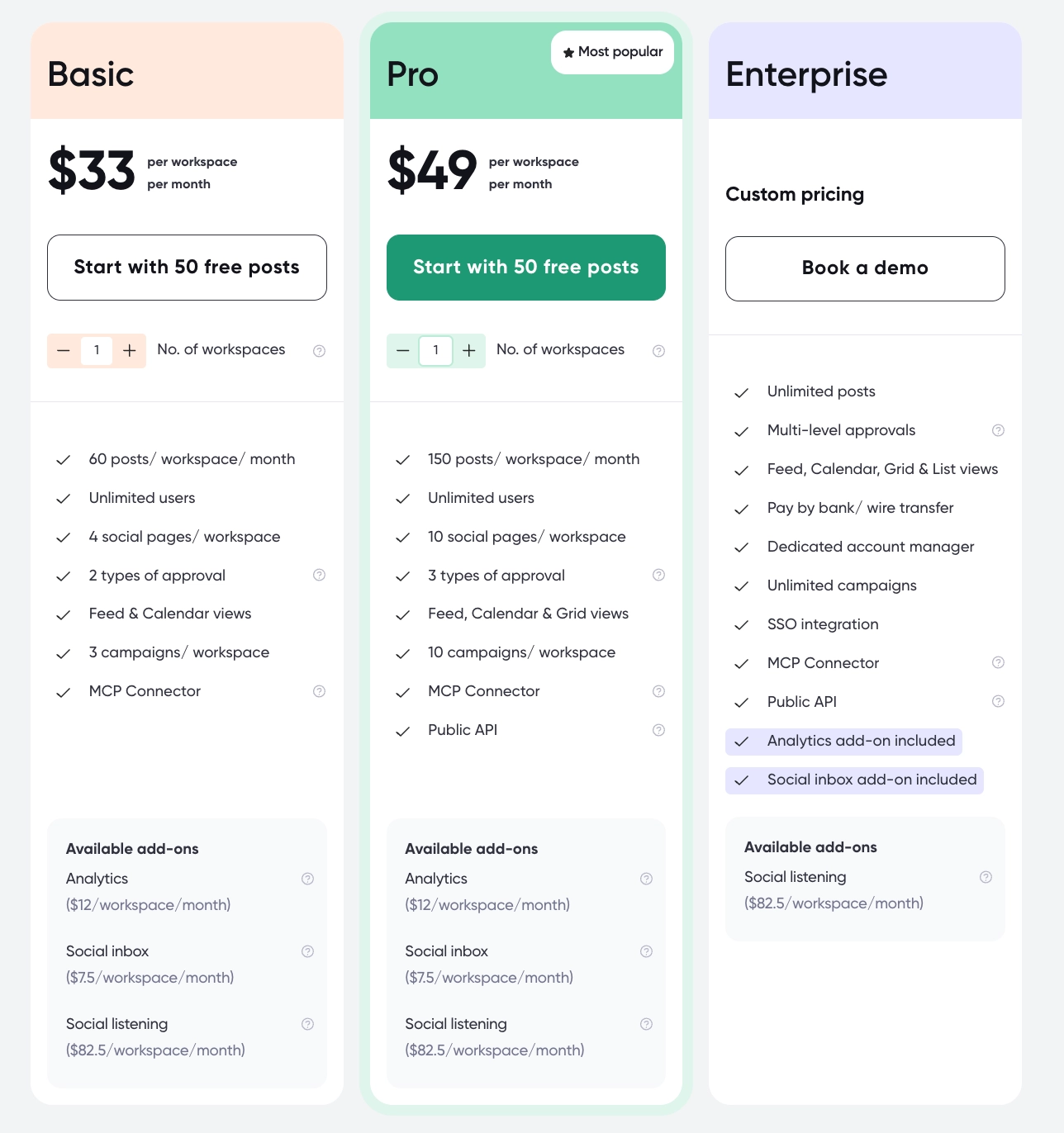
Planable prices per workspace: Basic starts at $39 per workspace per month ($390 billed annually) and Pro at $59 ($590 annually), with Enterprise from $200 per month. Billing includes unlimited users per workspace, so adding a teammate or reviewer doesn’t add a seat charge.
Planable pricing plans, billed annually
Client membership starts on Pro, so check which plan covers the approvers you need. Basic includes 4 pages and 60 posts per workspace per month, and Pro includes 10 pages and 150 posts. On Pro, the Extra Posts add-on raises the limit to 500 posts for $49.
The add-ons are where costs grow. Analytics ($14), Social Inbox ($9), and Social Listening ($99) are priced per workspace, and Planable says its add-ons come with a 30-day free trial.
You can also test the core product first: the free trial covers 50 posts across all workspaces and has no time limit. Try it free!
Why do reviewers hit limits on Instagram and other platforms?
Instagram limitations are the third most common G2 drawback (22 mentions), and Trustpilot reviewers raise Stories and music.
The reviewer says this happens when copying notes for Stories stickers, and asks for a TikTok thumbnail option on desktop.
Many of these limits come from the platforms’ own APIs, not from Planable. Instagram’s API doesn’t allow stickers or music from third-party tools, and direct Stories publishing works only for Business accounts.
For Stories that need stickers, Planable sends a push notification so you publish natively. TikTok doesn’t support custom thumbnails through its API.
Luis Alfredo A. also reports that shared LinkedIn posts don’t preview correctly, and Planable replied that its API access doesn’t let it manage that preview. Plan those posts with the limits in mind.
Does Planable ever fail to publish?
Publishing errors show up in a few reviews, and G2 tags scheduling issues 21 times.
“Failed to publish scheduled content to our business”
Planable’s reply to that review says platforms sometimes reject a post without explaining why, and it asked the reviewer to contact in-app chat so the team could look at what went wrong.
A post that fails to publish shows the Failed status. If a page disconnects, reconnect it from Page Settings. LinkedIn asks for re-authentication every two months.
Is the interface reliable?
Planable has a 74% five-star review share on G2, suggesting that most reviewers rate their overall experience positively. The platform also offers 10GB of storage on Basic, 50GB on Pro, and unlimited storage on Enterprise.
Planable redesigned its mobile composer in June 2026 to improve the mobile experience. However, Analytics and Social Inbox remain web-only.
That said, not every user has had a smooth experience. Lalie K. describes Planable as “buggy and unreliable” on G2, reporting freezes and issues with saving content. Similarly, a daily user on Trustpilot gave Planable two stars, calling the interface “clunky and very buggy” and reporting unresponsive buttons in both the browser and iOS app.
These reviews represent a minority of the feedback, but they’re worth considering, especially if reliability is a priority for your workflow. If you encounter an unresponsive button or similar issue, you can report it through Planable’s in-app chat so the team can investigate and reproduce the problem.
Is Planable’s feature depth enough?
G2 tags limited features 19 times, mostly about advanced performance tracking. Analytics and Competitor Analytics, plus Social Listening, now cover much of that gap, but they’re paid add-ons or sit inside one.
For client-facing work, custom reports can carry your company logo and your own title, and Planable supports single sign-on. It doesn’t offer full white labeling, so the app itself stays Planable-branded.
Pros and cons at a glance
Pros
Cons
Approvals and client feedback sit on the post
Required approvals start on Pro, multi-level on Enterprise
Previews match how each network shows the post
Instagram, TikTok, and LinkedIn API limits affect Stories, thumbnails, and tagging
Per-workspace pricing with unlimited users
Analytics, Social Inbox, and Social Listening are paid add-ons that stack
Analytics, Competitor Analytics, and Social Listening in one workspace
Listening is not real time, and competitor data refreshes daily
AI grounded in a per-client Brand Context, plus an MCP connector
AI output needs review, and one reviewer found it inaccurate
30-day free trials on add-ons and a free trial with no time limit
Post caps of 60 and 150 per workspace per month on Basic and Pro
Pros
Approvals and client feedback sit on the post
Previews match how each network shows the post
Per-workspace pricing with unlimited users
Analytics, Competitor Analytics, and Social Listening in one workspace
AI grounded in a per-client Brand Context, plus an MCP connector
30-day free trials on add-ons and a free trial with no time limit
Cons
Required approvals start on Pro, multi-level on Enterprise
Instagram, TikTok, and LinkedIn API limits affect Stories, thumbnails, and tagging
Analytics, Social Inbox, and Social Listening are paid add-ons that stack
Listening is not real time, and competitor data refreshes daily
AI output needs review, and one reviewer found it inaccurate
Post caps of 60 and 150 per workspace per month on Basic and Pro
Put Planable to work on a real project
Reviews show how Planable works for other teams. To see how it works for yours, set it up for the client whose approvals take the longest.
Start with the free trial: 50 posts, no time limit, no credit card required. Check three things first whether:
your reviewers can comment and approve without extra steps
the plan you’d buy covers your pages and monthly posts
the add-on you care about fits after its 30-day trial.
If you get stuck, the Help Center covers all the needed setup.
How these reviews were selected
Sources: the three platforms in the table above. GetApp and Software Advice share G2’s marketplace network, so we left them out.
Sales calls: for Social Listening only, we added short quotes from recorded Planable sales and demo calls (September–October 2026). Speakers are described by role or company type, not named, because these aren’t public reviews.
Date of counts: ratings and review counts as displayed in October 2026.
Sampling: we read the most recent page of G2 reviews and the reviews G2 surfaces for its top pros and cons, plus the first page of Trustpilot’s reviews (August 2025 to July 2026).
Capterra: we use Capterra for its rating only. The reviews it surfaced were mostly from 2018 to 2021, and its individual review links weren’t available, so we don’t quote them.
Quotes: every quote is verbatim and under 15 words. Quotes from public reviews link to the individual review on G2 or Trustpilot.
Customer conversations: we added a few short quotes from emails and Slack messages customers sent our team, with screenshots. Names and company details are blurred, and speakers are described by role.
Incentivized reviews: G2 labels some of the G2 reviews we quote as incentivized, meaning they were collected through seller invites: Taylor O., Beau ., Hilde v., and Alana G. We don’t exclude them.
Attribution: we show each reviewer’s name as the platform displays it. Statements about Planable’s replies come from its public responses on those reviews.
Monica leads product marketing at Planable. She owns go-to-market for new features and shapes how Planable fits into the broader SE Ranking product family. She joined in 2023 as Planable's first product marketer, built the function from scratch, and now runs the team's competitive intelligence program. With a background in product management and Romania's startup scene (How To Web, MVP Academy), she writes about competitor analysis, product launches and marketing workflows from the builder's side. Before Planable, she spent almost five years managing Orange Fab Romania, Orange's startup acceleration program, where she supported 40 startups and helped generate over €2.2M in commercial value.







 Creation
 Scheduling
 Planning
 Social Inbox
 Collaboration
 Analytics
 Approval
 Social Listening