Your graphics leave the editor looking client-ready, and that's usually when the search for Adobe Express alternatives starts: the client wants to approve before anything goes live; a second brand needs its own calendar; the monthly report sits behind another login. I...
Redesign For multi-location brands
all your locations, one content flow
For multi-brand companies
content collaboration at scale
For agencies
impress your clients and take on more
“The team loved it from the start. Planable helps us overview the entire marketing efforts.“
Planable is where content gets created, reviewed, and approved. Slack is where most teams coordinate day to day. If the two are disconnected, it is easy to miss approvals and comment threads.
The Planable x Slack integration sends key Planable notifications to your Slack workspace, so you see time-sensitive updates where you already work. You get notified when something needs your input, without switching tabs or monitoring Planable manually.
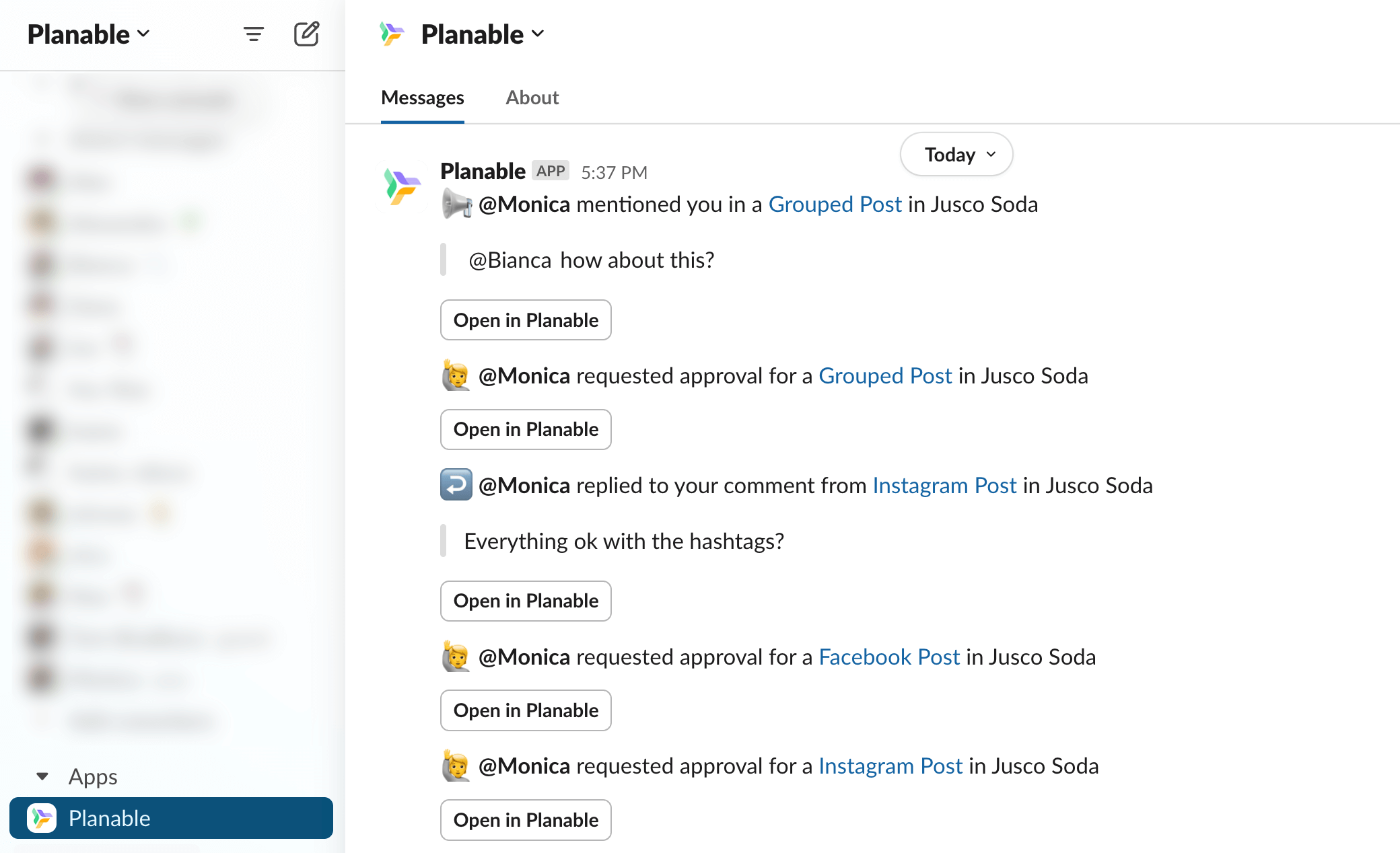
Slack notifications examples from Planable app
Availability: Included on all Planable plans at no extra cost.
What you get when you connect Planable to Slack
After connecting your accounts, Planable will send Slack notifications for the Planable events below:
Approval needed: You are in the approval chain and a post is waiting for your approval.
Comment left: Someone commented on a post you created.
Suggested edits: Someone suggested edits to a post you created.
Mentioned in a comment: Someone tags you in a comment to request input.
Reply to your comment: Someone replies to a comment you wrote, and the thread moves forward.
Publishing error: A post you created wasn’t published due to an error.
Page reconnection: A page from your workspace needs to be reconnected.
Where notifications appear in Slack: Notifications show up in the Planable app section in your Slack workspace, separate from your regular channels and DMs. This keeps Planable updates organized and easy to scan.
Who this integration is for
This integration is a good fit if:
Your team uses Slack as the primary place to coordinate work.
Approvals and comment feedback need quick turnaround.
You want fewer context switches between Planable and Slack.
It may be less useful if:
Your team does not use Slack regularly.
You prefer to handle all review/approval work directly inside Planable without external notifications.
Setup requirements
A Slack account in the workspace where you want to receive notifications.
Access to your Planable profile settings.
How to set up the Planable x Slack integration
The integration is connected per user, not at the workspace level. Each team member connects their own Slack account.
Integrations page with Slack connect option in Planable
New notifications will start appearing in Slack after authorization.
Availability and pricing
The Slack integration is available on all Planable plans at no extra cost.
FAQs
What does the Planable and Slack integration do?
It sends Planable notifications (approvals, comments, publishing errors, or page reconnection requests) to Slack so you can respond faster without monitoring Planable constantly.
Which Planable notifications come through to Slack?
Seven types: approval requests, comments, edit suggestions, @mentions, replies to your comments, publishing errors, and page reconnections.
Where do Planable notifications appear in Slack?
In the Planable app section inside your Slack workspace, separate from your channels and message threads.
Is this a per-user or workspace-wide integration?
Per user. Each team member connects Slack from their own Planable profile settings. One person connecting Slack does not enable notifications for others.
Monica leads product marketing at Planable. She owns go-to-market for new features and shapes how Planable fits into the broader SE Ranking product family. She joined in 2023 as Planable's first product marketer, built the function from scratch, and now runs the team's competitive intelligence program. With a background in product management and Romania's startup scene (How To Web, MVP Academy), she writes about competitor analysis, product launches and marketing workflows from the builder's side. Before Planable, she spent almost five years managing Orange Fab Romania, Orange's startup acceleration program, where she supported 40 startups and helped generate over €2.2M in commercial value.







 Creation
 Scheduling
 Planning
 Social Inbox
 Collaboration
 Analytics
 Approval
 Social Listening