Planning your content is essential for any marketing team: it helps publish consistently, always keep track of what’s what, and streamline your content workflow to know who’s responsible for that last-mile approval. If you're on the hunt for game-changing content...
Redesign For multi-location brands
all your locations, one content flow
For multi-brand companies
content collaboration at scale
For agencies
impress your clients and take on more
“The team loved it from the start. Planable helps us overview the entire marketing efforts.“
Tracking Facebook Ads performance with native Meta Business Suite is often enough to get the job done. But the platform is far from intuitive, and finding the metrics you actually want to see sometimes gets quite frustrating. In short, you’d be better off with third-party Facebook analytics tools.
But, having worked in social media for years, the option to also manage ad creatives and track campaigns across multiple social media channels would be that much better. That’s why I compiled a list of some of the best social media management and performance analytics tools for Facebook I worked with.
I included both unified social media management tools and dedicated data visualization platforms so you can have more options to choose from.
Quick summary: My Facebook Ads analytics tools top 7 picks
Tool
Best for
1. Planable
Unified Facebook management workflows
2. Hootsuite
Organic and paid campaign tracking
3. Sprout Social
Advertising campaign ROI tracking
4. Metricool
Large-scale campaign management and tracking
5. Social Status
Comprehensive data analysis across Meta platforms
6. Whatagraph
Optimizing multi-channel advertising campaigns through AI-powered insights
7. DashThis
Small businesses looking for a customizable dashboard and report builder
1. Planable
Best for
Unified Facebook management workflows
2. Hootsuite
Best for
Organic and paid campaign tracking
3. Sprout Social
Best for
Advertising campaign ROI tracking
4. Metricool
Best for
Large-scale campaign management and tracking
5. Social Status
Best for
Comprehensive data analysis across Meta platforms
6. Whatagraph
Best for
Optimizing multi-channel advertising campaigns through AI-powered insights
7. DashThis
Best for
Small businesses looking for a customizable dashboard and report builder
1. Planable: best for centralized Facebook analytics, content creation, and collaboration
Best for: Unified Facebook management workflows
Rating: 5/5 (super straightforward content planning and analytics dashboards with deep insights)
Planable is a unified social media management tool with dozens of network-specific features. The platform handles direct Facebook Link and Carousel Ads creation.
You can publish ads to Facebook directly from Planable or save them to Facebook via its native Meta Ads Manager integration. This lets you tweak your ad spend, target audiences, and anything else ad-related.
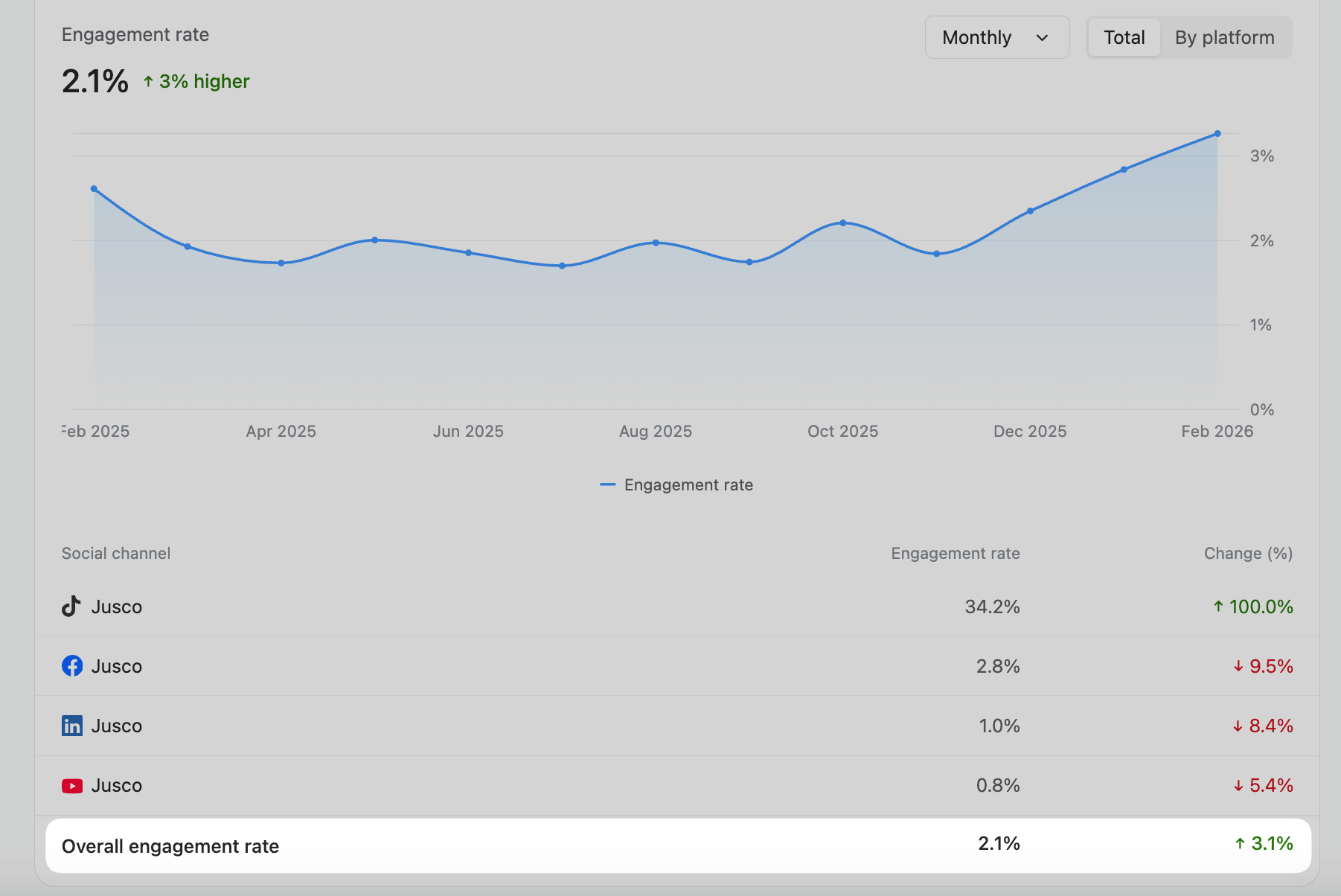
Its analytics tool also lets you measure your social media presence across multiple platforms and includes network-specific metrics.
That means you can track Facebook Page views, engagement rates, followers, and impressions. Planable also covers performance metrics for social media posts across both organic and boosted formats, including comments, link clicks, and more.
Planable engagement rate chart with monthly trend and per-platform performance breakdown
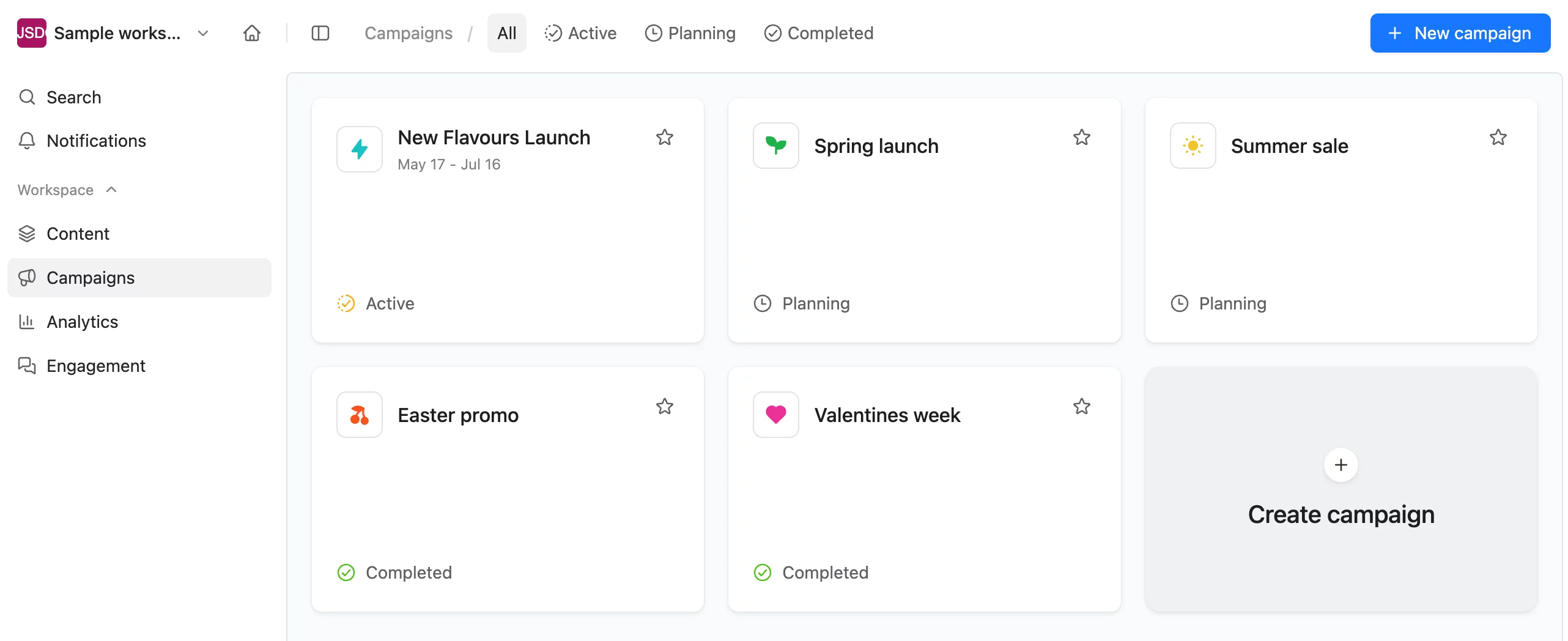
Plus, the platform’s Campaigns feature tags and monitors multi-format posts belonging to the same campaign: videos, organic posts, link and carousel ads included. This feature is useful to track campaign performance across multiple social media accounts.
Planable’s campaign overview showing project statuses like active, planning, and completed.
Add in real-time collaboration features, unified content calendars, Grid views, and engagement tools, and Planable handles everything and anything on Meta and beyond.
Our workflow is now seamless thanks to Planable, and we wouldn’t consider using any other platform. The ability to view both analytics and engagement within the same space is also a huge advantage.
Customizable reports: Generate cross-network and client-ready reports with custom metrics in a single click. Share reports with clients via guest view links or downloadable PDFs.
Performance overview: Grab quick overviews of top posts and zoom in on key metrics to see what made it work. Measure each post’s engagement, reactions, impressions, and more.
Media asset management: Organize image and video assets for Facebook ad campaigns in the platform’s media library.
Built-in visual editors: Trim, crop, and fine-tune ad images and videos through Planable’s native editor. Or use the Canva integration for extra editing tools.
Real-time collaboration: Create Facebook ad sets and posts, and collaborate with team members through annotations, comments, and clear text suggestions. Pick between four approval workflow types (none, optional, required, and multi-level) to polish Facebook campaign content prior to publishing.
Integrations: Facebook, Instagram (with direct Stories and Reels publishing), Threads, X, TikTok, YouTube, Pinterest, LinkedIn, Google Business Profile.
Pricing: Planable starts at $33/workspace/month, with a free plan that includes up to 50 posts. Planable Analytics is an add-on that costs $14/workspace/month extra.
Pros
Cons
Handles Facebook scheduling, collaboration, engagement, and analytics
Engagement and analytics tools are extra add-ons
Cross-network social media analytics are useful to gain actionable insights for multi-platform campaigns
No dedicated hashtag and competitor analysis tools
Customizable dashboards and reports are a big plus
Pros
Handles Facebook scheduling, collaboration, engagement, and analytics
Cross-network social media analytics are useful to gain actionable insights for multi-platform campaigns
Customizable dashboards and reports are a big plus
Cons
Engagement and analytics tools are extra add-ons
No dedicated hashtag and competitor analysis tools
2. Hootsuite
Best for: Organic and paid campaign tracking
Rating: 4.5/5 (very capable Facebook analytics tools, but occasionally tricky to use)
Why I picked Hootsuite
Hootsuite stood out to me because it includes automated reporting tools that compare ad and organic performance side-by-side. This lets you track performance across shared assets or cross-reference metrics between organic posts and paid ads, which is perfect for optimizing Facebook performance.
Plus, Hootsuite includes advanced social listening and competitive benchmarking tools. However, the platform’s complexity does make it tricky to use in some cases.
There are these moments when I’m hunting for one tiny metric and I end up clicking around longer than I meant to. It breaks the rhythm. The ads side is fine, just not something I move through easily, so I still check things on the native platforms. And the cost nudges at me a bit when I’m handling several clients at once.
Rating: 4/5 (powerful analytics tools, but locked behind top-tier plans or extra add-ons)
Why I picked Sprout Social
Sprout Social makes it easy for external stakeholders to gauge campaign performance and quick, data-driven decisions.
The platform’s reports include ROI overviews of all ongoing campaigns combined, then break them down individually to pinpoint which campaigns yield the most revenue and which may need to be put on hold.
You can also spot top-performing campaigns by custom KPIs, including views, conversions, and more.
But that comes at a cost. The platform’s paid social analytics features are only available in top-tier plans. More advanced reporting tools are also locked behind an extra add-on.
Premium analytics is great, but it should be available to all users. Reporting without premium analytics can be cumbersome and labor-intensive. Some elements of paid ad management are limited by API.
Generate cross-channel and network-specific reports that compare paid and organic content performance.
Manage brand reputation through a consolidated social inbox, sentiment analysis, and case management features.
Measure and benchmark competitor performance across Facebook, Instagram, and X.
Integrations: Facebook, Instagram, Threads, X, BlueSky, YouTube, TikTok, LinkedIn, Google Business Profile, and review sites (TripAdvisor, Yelp, etc.)
Pricing: Paid social media analytics are unlocked in the Professional plan. It costs $299/user/month (billed annually). There’s a 30-day free trial available.
Pros
Cons
Paid, organic, competitor, and sentiment analysis tool
More advanced reports are locked behind extra add-ons
Top-notch social media customer service features
Pricey even by enterprise standards
Review site integrations are a big plus
Has a rather steep learning curve
Pros
Paid, organic, competitor, and sentiment analysis tool
Top-notch social media customer service features
Review site integrations are a big plus
Cons
More advanced reports are locked behind extra add-ons
Pricey even by enterprise standards
Has a rather steep learning curve
4. Metricool
Best for: Large-scale campaign management and tracking
Rating: 4/5 (capable social media management tool, but with otherwise clunky scheduling features)
Why I Picked Metricool
Metricool is an analytics-centric social media management tool that integrates natively with Google Looker Studio. That means you can connect social data with 250+ extra sources, including your websites and Twitch accounts, to set up unified reports with real-time updates.
This makes Metrciool a solid option for marketers looking to track and manage campaigns across all marketing touchpoints. The platform also includes native social media scheduling tools, but they are quite clunky UX-wise.
When I manage several brands that are closely connected, I have to switch into each account separately to see their schedules. It would be much more convenient to have one combined calendar view that shows all brand accounts together.
Some features are only available to select networks (hashtag analytics only possible for Instagram, for example)
Looker Studio integration is only available in high-tier plans
Features outside analytics are not as well-developed
5. Social Status
Best for: comprehensive Meta ad performance analytics
Rating: 4/5 (great dedicated marketing analytics platform for mid-sized teams, but no publishing tools)
Why I picked Social Status
I picked Social Status because it’s a dedicated social media analytics solution that tracks metrics across social media profiles, competitors, influencers, and advertising campaigns for multiple social media platforms.
As for ad campaign tracking, Social Status gives you valuable insights covering key Facebook ads metrics: total ad spend, reach, link clicks, conversions, and product sales.
You can zoom in on your results to see each particular campaign’s (or ad’s) click-throughs or how much landing page traffic it generated, for example.
But unlike the above-mentioned tools, Social Status doesn’t offer any built-in social media management-specific features. The platform also has a few UX-related bugs.
Filters on Content Themes don’t seem to always work for me and it’s a bit buggy.
Track multi-network competitor performance data within unified dashboards, zoom in on specific social posts, or measure overall audience sentiment by tracking Facebook reactions across content.
Use Ads Feed to view all ongoing ads in a centralized place, along with real-time customized metrics under each.
Set up audience demographics dashboards to break down your follower base by age, gender, location, and more.
Whatagraph’s AI tools turn complex datasets into actionable social media insights. The platform tracks omnichannel performance and summarizes its findings to help you spot underperforming ads or ideal ad formats, and provides suggestions to optimize future campaigns.
Whatagraph also stands out through the platforms it supports. You can measure advertising campaigns across Meta platforms, LinkedIn Ads, Google Ads, Bing, Amazon, Apple Search, and even Spotify.
However, it does have the occasional bug, especially when working with multiple users on the same reports.
If two people are editing a report at the same time, the widgets can glitch or break which is frustrating on tight deadlines.
Track overall campaign performance through unified dashboards that cover top-performing channels, audience demographics breakdowns, AI summaries, and more.
Connect the platform with Google Analytics and specialized SEO tools to compare performance between paid and organic search optimization efforts.
Set up fully customized reports through an ample set of ready-made templates and drag-and-drop, or have the AI do it for you.
Pricing: Whatagraph starts at $229/month (billed annually). There’s a free forever plan available.
Pros
Cons
Numerous integrations outside social media
Steep gaps between plans make scalability tricky
Plenty of report customization options
Occasional bugs and glitches
Unlimited users across all plans
No X integration
Pros
Numerous integrations outside social media
Plenty of report customization options
Unlimited users across all plans
Cons
Steep gaps between plans make scalability tricky
Occasional bugs and glitches
No X integration
7. DashThis
Best for: Small businesses looking for a customizable social media analytics dashboard and report builder
Rating: 4/5 (great data visualization tools, but has a learning curve)
Why I picked DashThis
With pricing plans starting at $42 per month, DashThis is the more small business-friendly alternative to specialized data analytics tools.
The platform lets you set up customized dashboards to monitor key metrics across most advertising channels, and also connects with Google Analytics and email marketing tools to get detailed insights across entire customer journeys.
But navigating the platform does require a bit of know-how, which might seem overwhelming to new users.
Also, some of the advanced features are a little tricky to set up without some prior knowledge.
How I chose the best Facebook analytics tools: selection criteria
Here’s my thought process behind each tool that made it on the list:
Native Meta Ads integration: This was my baseline. Native Meta Ads integration helps accurately track Facebook data and gives more options when rolling out paid campaigns.
Use-case: How well does each platform’s hallmark feature work? Do its tools provide valuable insights or unique functionalities that would be otherwise hard to find anywhere else?
Report customization: Sharing digestible reports to external stakeholders is a must, so I prioritized customization options and drag-and-drop editors for ease of use.
Extra analytics tools: Does the platform go beyond Facebook and Instagram profiles? How about competitor analytics, hashtag tracking, or sentiment analytics?
What are analytics software for Facebook Ads integration?
Analytics software for Facebook Ads integration are third-party tools that link to Meta Ads Manager. This helps marketers thoroughly measure Facebook and Instagram metrics across paid and organic marketing activities. They help optimize Facebook strategies through:
Dedicated Facebook analytics dashboards with high-level overviews of Facebook page and ad campaign performance
Real-time ad campaign tracking and adjustments to prevent overspending
Automated Facebook reports for stakeholder sharing
Individual Facebook post analytics
Although you can also use Meta’s native analytics platform, the layout is quite disorganized, making it hard to track the data you want. That’s why third-party tools are recommended.
Key features & benefits of Facebook advertising reporting software for
Here’s a brief rundown of the top features you should look for and how they help:
Feature
Benefit
Native ad support
Schedules and tracks Facebook Ads campaigns within the platform of choice (some social media tools only cover Facebook Page scheduling)
Customization and white-labeling
Useful to send clients branded reports covering their top-priority metrics
AI-powered analytics
Helps with fast decision-making by summarizing key data into actionable advice
Feature
Native ad support
Customization and white-labeling
AI-powered analytics
Benefit
Schedules and tracks Facebook Ads campaigns within the platform of choice (some social media tools only cover Facebook Page scheduling)
Useful to send clients branded reports covering their top-priority metrics
Helps with fast decision-making by summarizing key data into actionable advice
How to choose the best Facebook analytics tool to boost social media ad campaign performance
There are many Facebook analytics tools to choose from, so here’s a brief of what each tool I showcased throughout the post is best for and why you should use it:
If you’re looking to unify all your Facebook management workflows, from organizing and paid content creation, approvals, and analytics, Planable is your best bet.
If you actively run a blend of organic and paid campaigns, Hootsuite’s powerful Facebook analytics tools let you measure them side-by-side for further optimization.
Go for Sprout Social if you want to demonstrate and improve Facebook return on ad spend for clients.
Status Social is ideal for mid-sized teams that heavily prioritize data for their overall marketing strategies.
If you’re managing loads of advertising channels and having trouble tracking all the data, Whatagraph’s AI tools compile all the numbers into easy-to-digest formats.
A small business struggling to find advanced data visualization tools within a tight social media performance budget? DashThis is a solid overall Facebook advertising reporting tool.
Still, I definitely recommend Planable as your go-to. Its quick and easy reports let you find and hone in on exactly what works to make your next posts or ads reach viral status, as well as create them with your team and roll them out right then and there.
Horea is a software reviewer and tester, content writer, and tech geek. He loves to fiddle with MarTech solutions to find what each software is best for and help you decide which one might be your best fit. His content is allergic to fluff and eats research for breakfast. If you’re on the fence about whether you should commit to a particular platform, Horea probably already wrote about it.








 Create
 Schedule
 Plan
Plan Engage
 Collaborate
 Analyze
 Approve