If your Instagram keeps disconnecting, your scheduler swallows the post and silently fails, your support ticket has been “with the team” for a week, or your monthly bill creeps up every time you add a channel, you’re not the only one running out of patience with...
Redesign For multi-location brands
all your locations, one content flow
For multi-brand companies
content collaboration at scale
For agencies
impress your clients and take on more
“The team loved it from the start. Planable helps us overview the entire marketing efforts.“
If you’re managing content for multiple clients, brands, or locations, publishing and approvals are usually only part of the job. The harder part is tracking what people say about those brands outside the content you publish yourself.
Planable Social Listening helps teams monitor brand mentions, industry topics, and competitors across social platforms and the open web. It brings those conversations into Planable, alongside the content calendar and workflows your team already uses.
That matters because important conversations don’t always happen in your comments or tagged mentions. Someone might mention a client without tagging them, discuss a competitor’s launch on Reddit, or talk about a brand somewhere your team isn’t actively monitoring.
Without social listening, teams often leave those conversations uncovered or rely on a separate monitoring tool. That can mean another login, another export, and more time moving insights and screenshots into reports disconnected from the content plan.
This guide explains how Social Listening in Planable works, what sources and mentions it tracks, how to measure brand sentiment, what it costs, and which teams are most likely to benefit from it.
What does social listening track?
Social listening tracks conversations about your brand, competitors, or industry, including relevant discussions where your account is not directly tagged. It covers a broader conversation set than basic mention tracking, which usually focuses on direct @mentions and interactions with your own profiles.
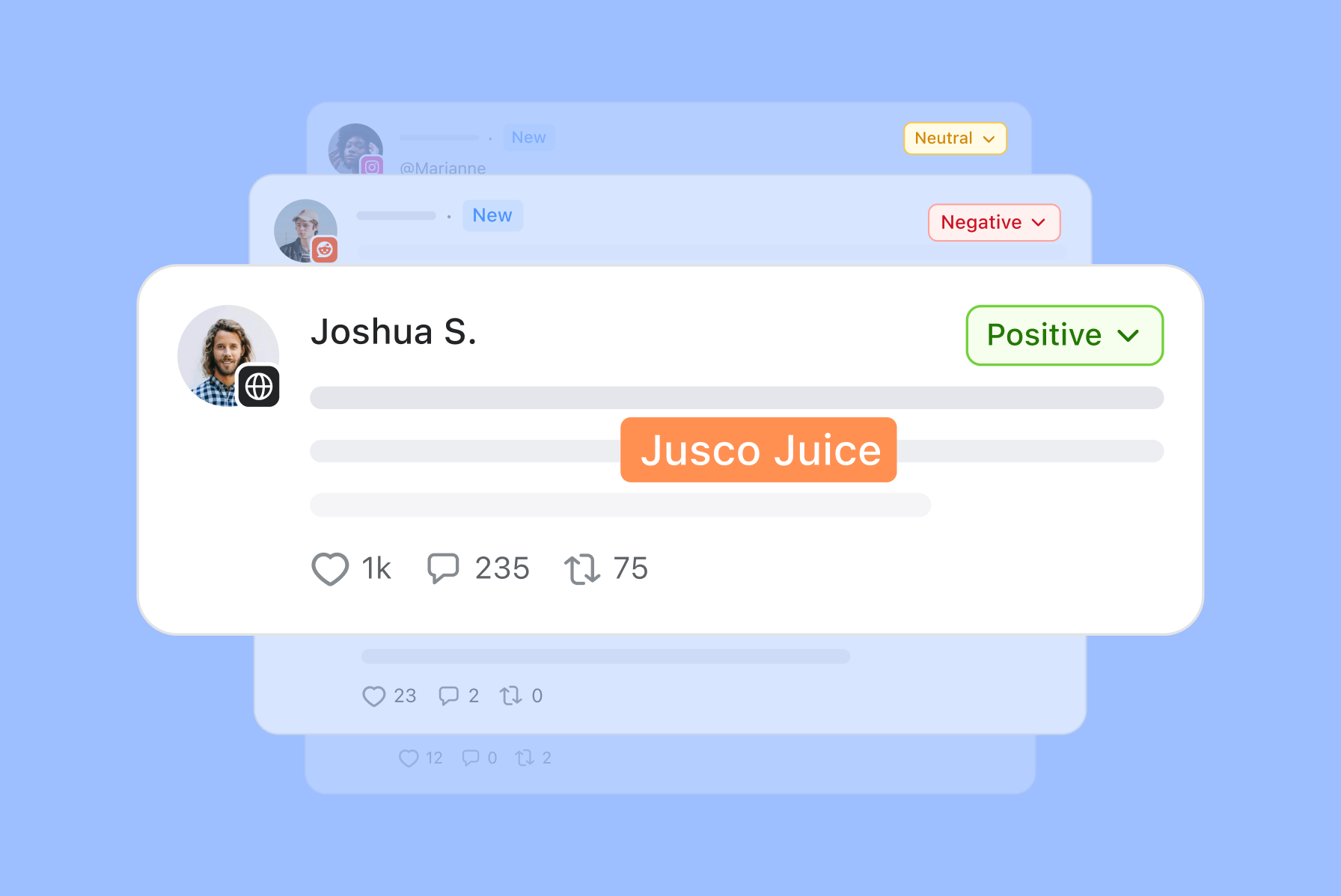
Planable’s social listening tracks a keyword you define (your brand, a client’s brand, or an industry topic) across eight sources: Instagram, Facebook, LinkedIn, YouTube, X, TikTok, Reddit, and the open web (blogs, news sites, forums, and newsletters).
For every mention, you get:
The full post text: not a truncated snippet, including in the CSV export.
Sentiment: positive, neutral, or negative.
Engagement, and, where the platform provides it, estimated reach and earned media value.
Relevance filtering: Planable checks each mention against your brand context before counting it, so a keyword that happens to match unrelated content doesn’t inflate your numbers.
Set up brand tracking in Planable Social Listening
How does social listening work?
Two keyword types cover three distinct jobs:
Brand keyword (1 per workspace) — your company, product, or a client’s brand. Filtered for genuine mentions, not just name-drops.
Topic keywords (3 per workspace) — an industry term, a campaign hashtag, or a competitor’s name.
Competitor keywords (3 per workspace) — your selected competitors, also identified by brand keyword, not tagged mentions.
Alerts — defined by sentiment or volume shifts, so you can get on top of a trend while it’s hot.
That setup lets one Planable workspace monitor your own brand, your industry, and your competitors at the same time. Add a competitor’s name as a listening topic to track what people are saying about them across the sources covered by Social Listening.
This is different from Competitor Analytics. Social Listening tracks conversations and mentions about a competitor, while Competitor Analytics (part of Planable Analytics) tracks the competitor’s own social profiles, posts, and profile performance for up to five competitors.
To ensure that your brand mentions are relevant, you can define your Brand context for the whole workspace. This also impacts the in-app AI generator, which will always take your brand details and tone of voice into account.
Sync runs in the background: your brand keyword refreshes every 24 hours, topic and competitor keywords every 7 days, and each keyword shows a “last synced” timestamp. Filter the feed by the last 7, 14, or 30 days, or export it to CSV, full text included.
Sort and filter brand mentions by relevance, engagement, recency, or sentiment.
Sort the mentions feed by relevance, engagement, or recency and filter by sentiment. You can choose to hide or show your own or irrelevant mentions. Plus, on each mention, you have the option to hide it as irrelevant.
Alerts sit on top of the feed. Turn them on to get pinged in-app, by email, or in Slack when mention volume or sentiment spikes, so nobody has to sit refreshing a tab.
How do you set up social listening in Planable?
1. Open Social listening for the workspace you want to track.
2. Add your brand keyword, the company or client name you want to watch most closely.
3. Add up to three topic keywords: an industry term, a hashtag, or a competitor’s name.
Monitor brand mentions, engagement, sentiment, and mention volume in one dashboard
4. Turn on alerts if you want a notification when volume or sentiment moves.
5. Give the first sync a few hours, then check the feed. Filter by date range, platform, or sentiment as needed.
How much does social listening cost?
Social listening is a stand-alone add-on: $99 a month, or $990 a year, per workspace. It comes with a 30-day free trial, available on any paid plan, so you can see real mentions before you commit to anything.
Need more than one brand keyword or three topic and competitor keywords? Larger keyword allowances are handled case by case, as part of Enterprise plans. Talk to your Planable contact.
Who this is for
Agencies managing multiple clients that want to monitor brand, industry, and competitor conversations for each client without adding a separate specialist listening tool to the stack.
Multi-location brands that need to understand how individual regions, stores, or locations are discussed beyond the content published by the corporate account.
Teams running campaigns or launches that want to track a topic or hashtag, understand how the conversation is developing, and use those insights to inform upcoming content.
For these teams, Social Listening in Planable adds monitoring to the same workspace where content is already planned and managed, rather than introducing another standalone tool.
FAQs
What counts as a mention?
Any post, comment, or article on a tracked platform that includes your keyword. For a brand keyword, Planable checks the post against your brand context first, so an unrelated use of the same word doesn’t get counted.
Which platforms does social listening cover?
Instagram, Facebook, LinkedIn, YouTube, X, TikTok, Reddit, and the open web, including blogs, news sites, forums, and newsletters.
How many keywords can I track?
One brand keyword, three topic keywords, and three competitor keywords per workspace, included in the base price. Additional keywords go through your Planable contact.
How often does the data update?
Planable refreshes brand keyword data every 24 hours, while topic and competitor keywords refresh every 7 days. Each keyword also displays a last synced timestamp, so you can see exactly when its data was most recently updated.
Can I track a competitor with social listening?
Yes. Add their name to see what’s said about them across social and the web. That’s separate from Competitor Analytics, which tracks up to five competitor profiles’ own posts and performance under the Analytics add-on.
Does it tell me whether a mention is positive or negative?
Every mention gets a sentiment tag (positive, neutral, or negative) so you can filter for the ones that need a response first.
Can I get notified instead of checking the feed manually?
Yes. Turn on alerts to get notified in-app, by email, or in Slack when mention volume or sentiment spikes.
Do I need the Analytics add-on to use social listening?
No. Social Listening is a separate add-on and does not require Planable Analytics. A workspace can use Social Listening, Analytics, both add-ons, or neither, depending on what the team needs.
Ready to see the conversation you’re missing?
Social listening comes with a 30-day free trial on any workspace, on top of any paid plan. Add your first keyword and see what’s already being said about your brand, your industry, and your competitors. Start your free trial!
Monica leads product marketing at Planable. She owns go-to-market for new features and shapes how Planable fits into the broader SE Ranking product family. She joined in 2023 as Planable's first product marketer, built the function from scratch, and now runs the team's competitive intelligence program. With a background in product management and Romania's startup scene (How To Web, MVP Academy), she writes about competitor analysis, product launches and marketing workflows from the builder's side. Before Planable, she spent almost five years managing Orange Fab Romania, Orange's startup acceleration program, where she supported 40 startups and helped generate over €2.2M in commercial value.






 Creation
 Scheduling
 Planning
 Social Inbox
 Collaboration
 Analytics
 Approval
 Social Listening