Social listening shows a lot of data: mentions, sentiment, competitor chatter, all in one feed. It’s not always clear what to do with it. A pile of tagged mentions isn’t worth much by itself. The value only shows up once a mention turns into a reply, a lead, a report, or a decision.
This guide covers 18 ways to put that data to work, based on real usage we’ve learned from Planable users. First, a quick look at what you’re actually working with.
In this guide:
What you’ll see in Planable’s social listening
With Planable’s Social listening add-on you can monitor your brand, topic, and competitor keywords. The basic upfront setup tracks one brand keyword, three topics, and three competitors. But for companies with bigger needs, custom setups are available.
It’s a standalone add-on, priced per workspace at $99/month or $990/year, with a 30-day free trial. It turns on per workspace, so an agency running several clients can switch it on only where it’s actually needed.
Coverage spans X, YouTube, Reddit, TikTok, Facebook, Instagram, LinkedIn, and the web, with every mention tagged by sentiment (positive, neutral, or negative) as it comes in.
Here’s what you get:
A sentiment chart for every keyword
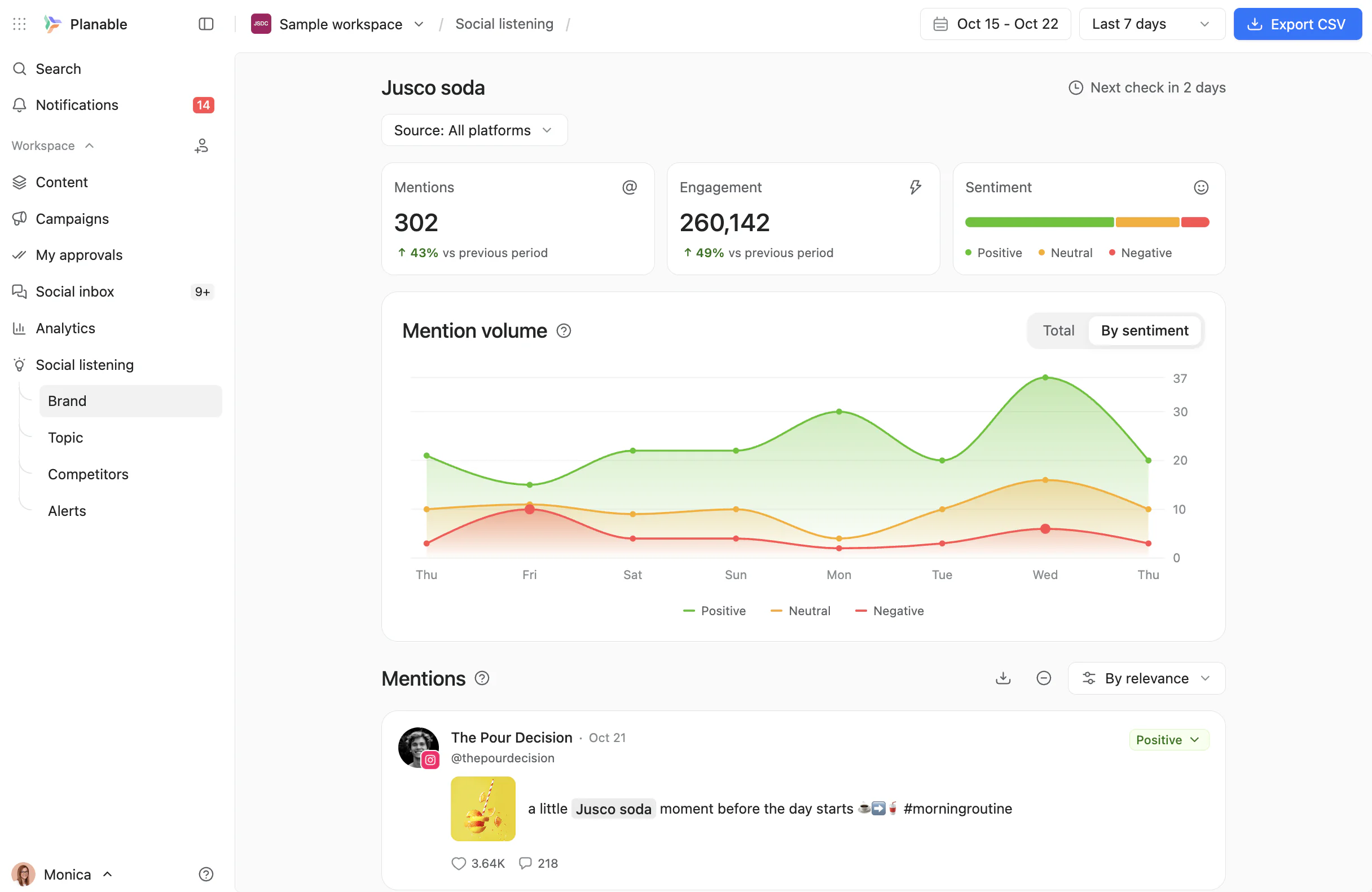
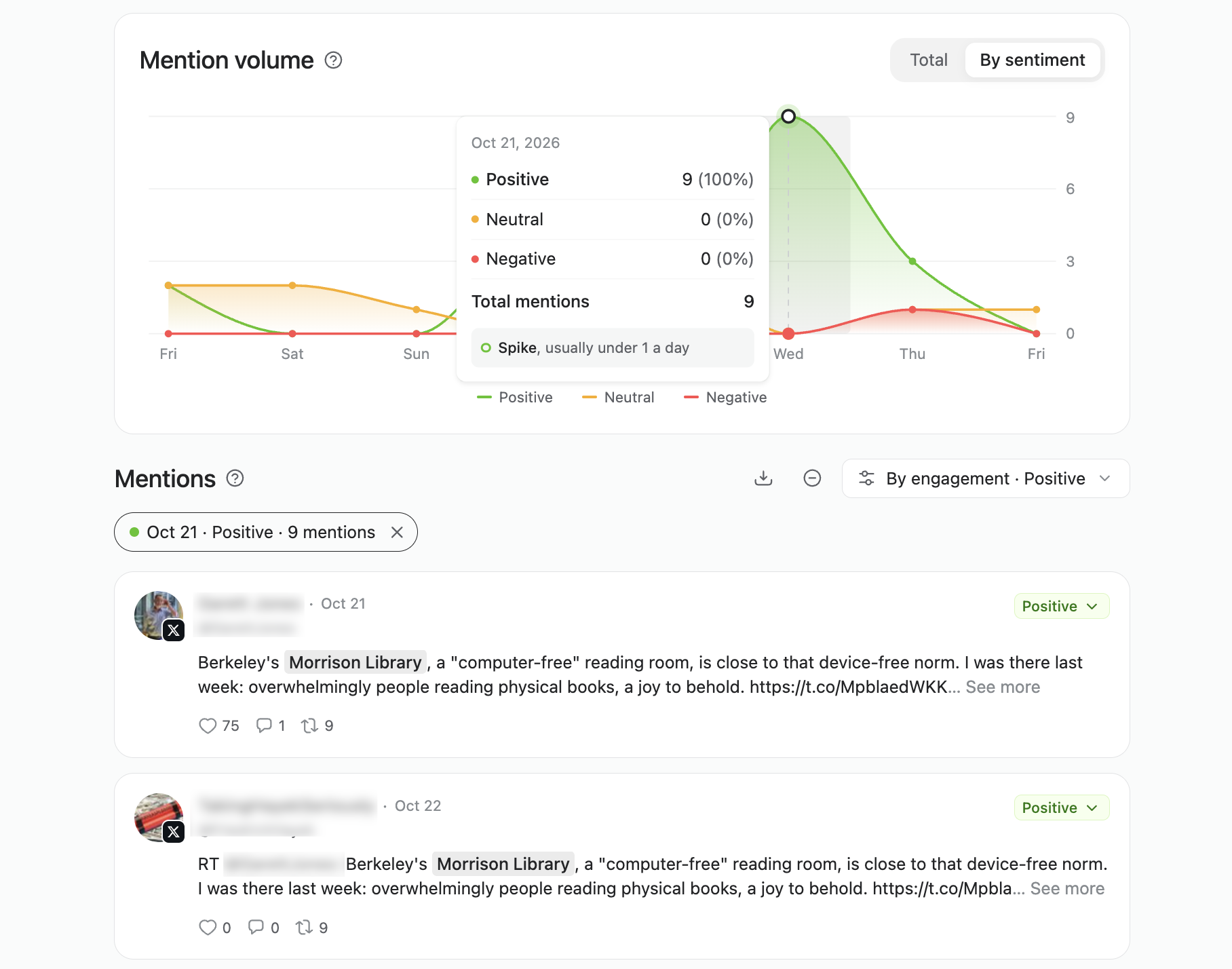
Brand keyword dashboard in Planable’s social listening, with mention volume split by sentiment
Brand, topic, and competitor keywords each get their own chart with total mention volume and a positive/neutral/negative breakdown over time, with spikes flagged automatically. Click a day on the chart to jump straight to the mentions behind it.
A side-by-side view of the competition
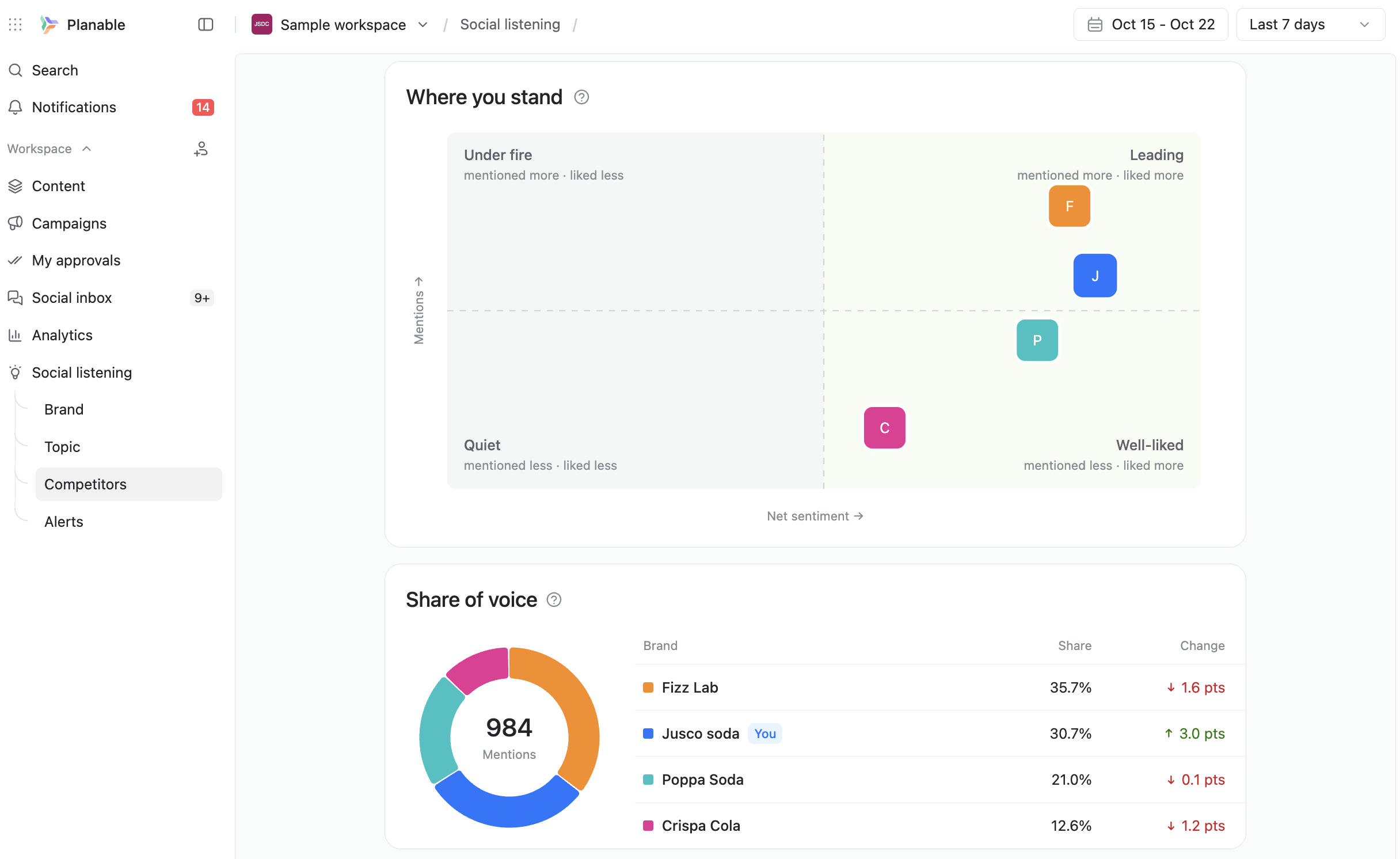
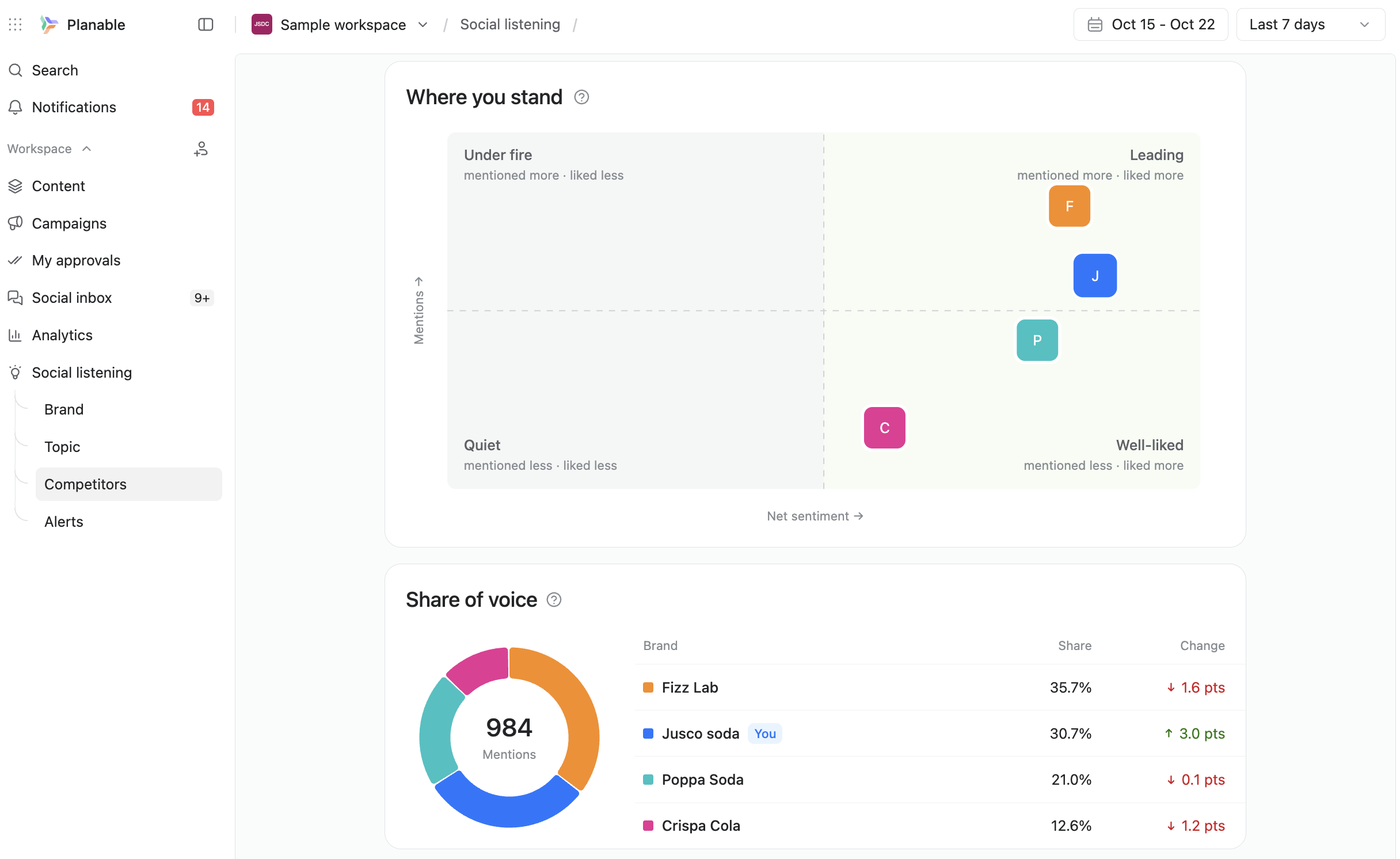
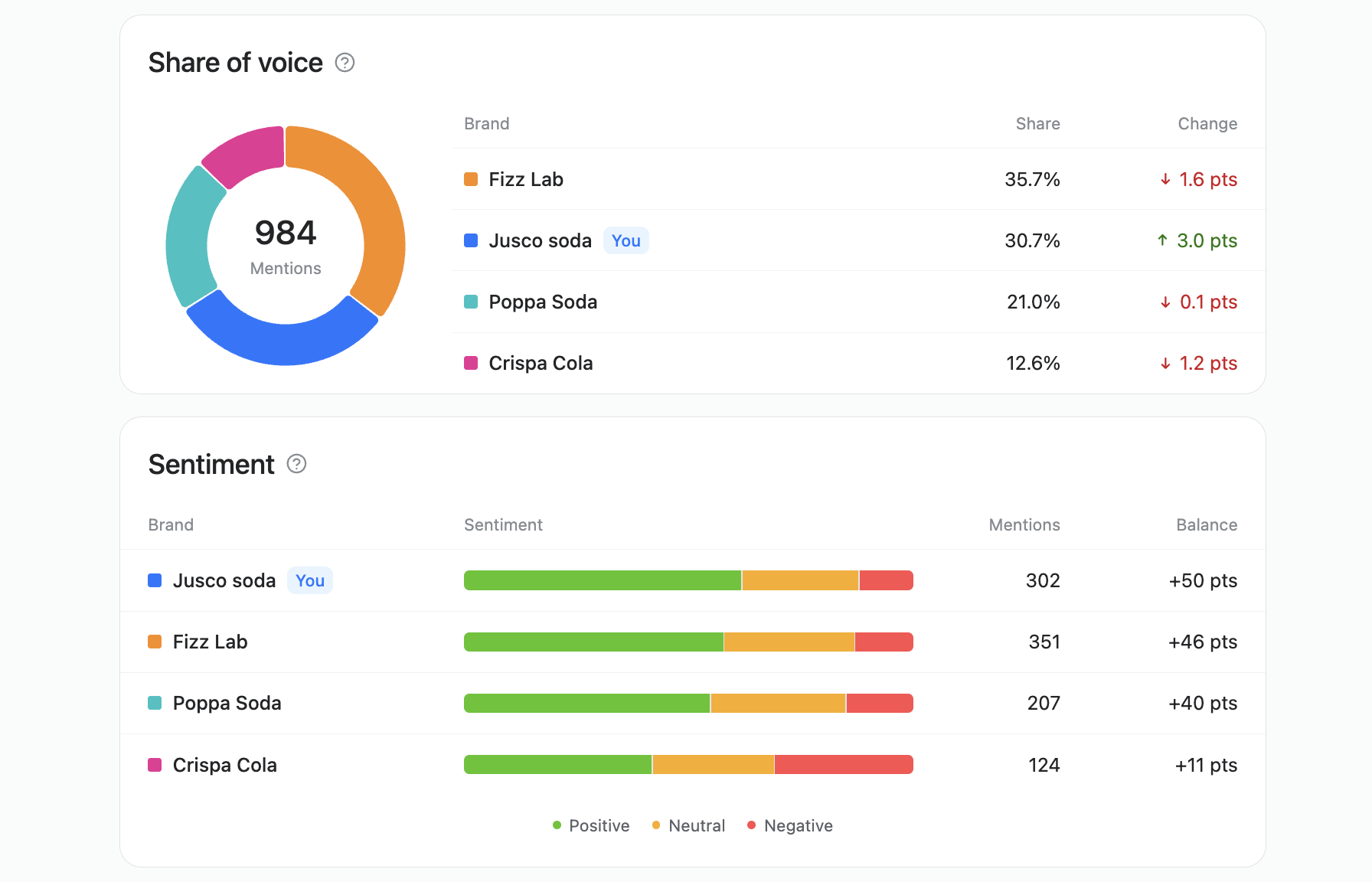
The Competitors tab maps your brand against competitors and splits share of voice
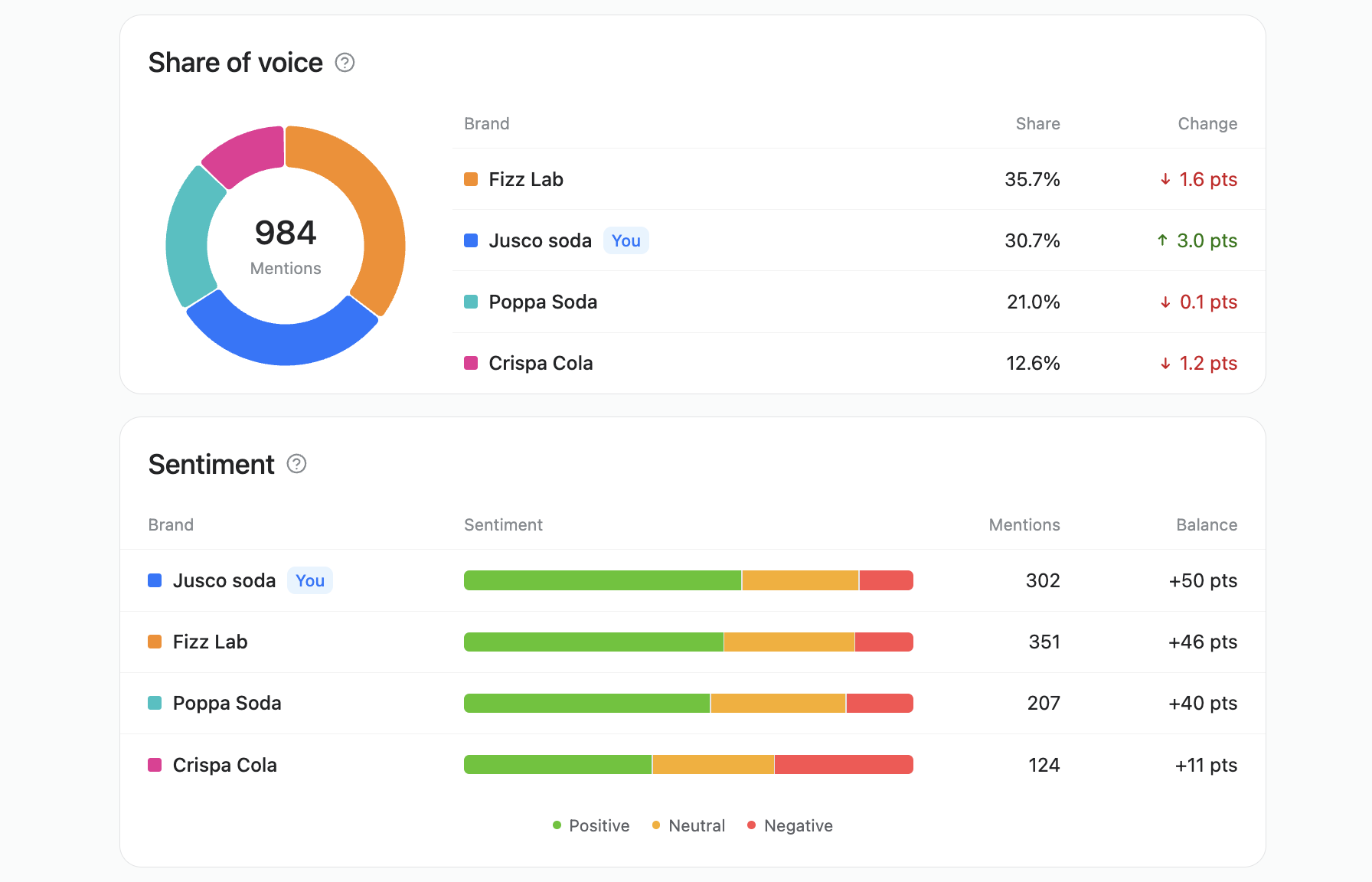
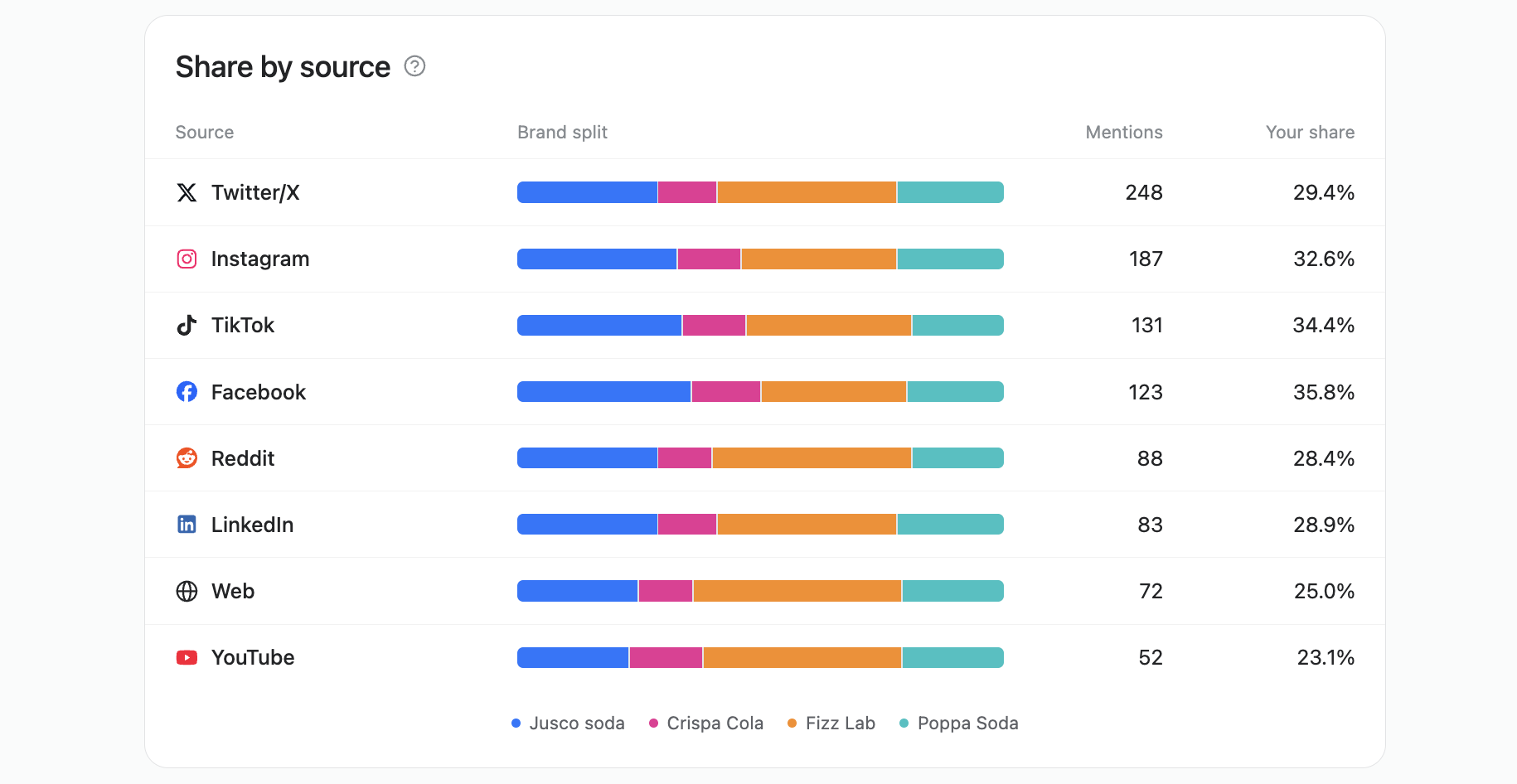
Add a competitor keyword, and the Competitors tab lines your brand up against it: a comparison matrix, the share of voice split (general, and per-each channel), a sentiment comparison, and a combined mention feed you can filter down to one competitor at a time.
Alerts for when something’s worth a look
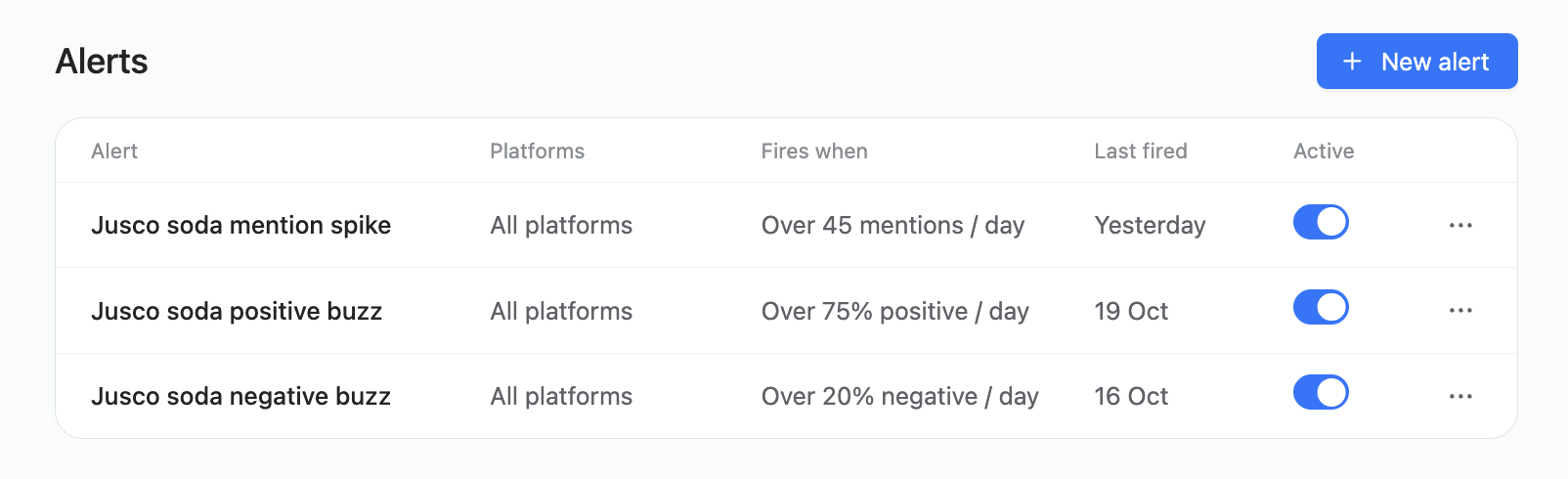
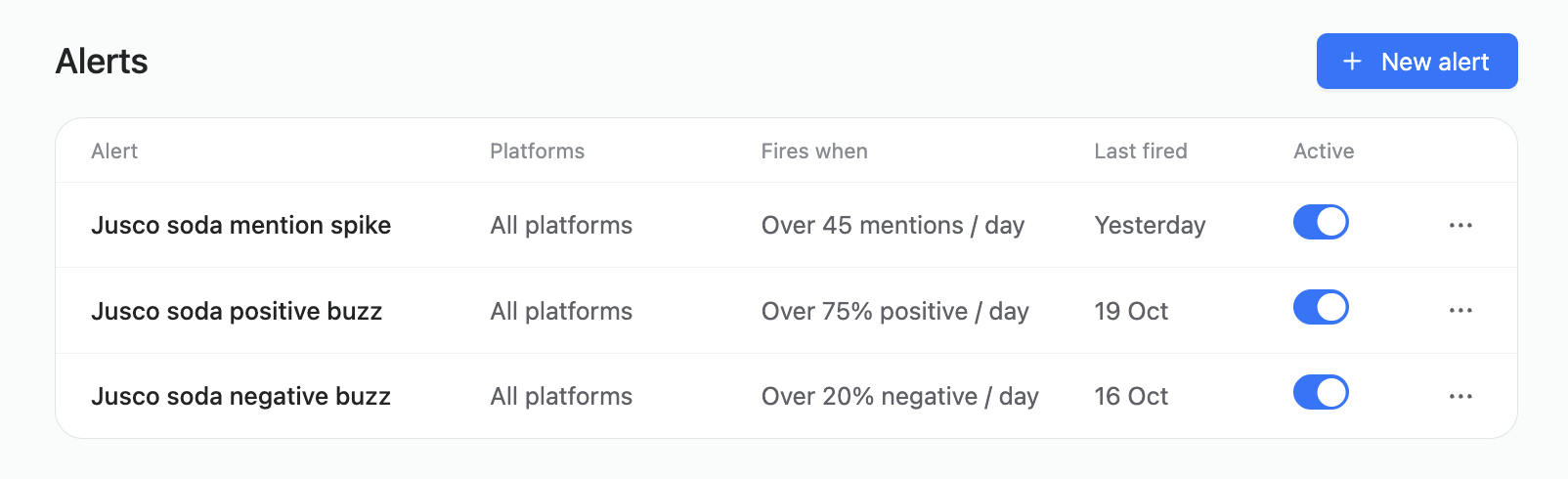
Alerts fire on mention spikes or sentiment thresholds you set
Set an alert on your brand keyword for a mention spike or a sentiment shift past a threshold you pick, scoped to all platforms or just the ones that matter, and Planable notifies you by email, or in Slack, wherever you prefer.
One limit worth knowing upfront: brand and competitor keywords refresh daily, while topic keywords refresh weekly. If you need faster refreshes, that can be part of a custom setup you can talk to the team about.
Now let’s see how teams are putting this data to good use, turning insights into actions that actually grow businesses:
Catch problems while they’re still small
A complaint or a developing story almost always exists somewhere online before it reaches a support inbox or a journalist. Catching it a day earlier allows you to act before it blows up.
1. Reply before someone else has to point it out
Make it a daily habit: triage the negative mentions, reply or escalate the ones that need it.
But when you’re done with the negative, make sure to review the positive mentions too. Looking at negative mentions in isolation makes it easy to overreact. Seeing both sides keeps the picture honest, which matters when a client or a manager asks “how bad is it, really.”
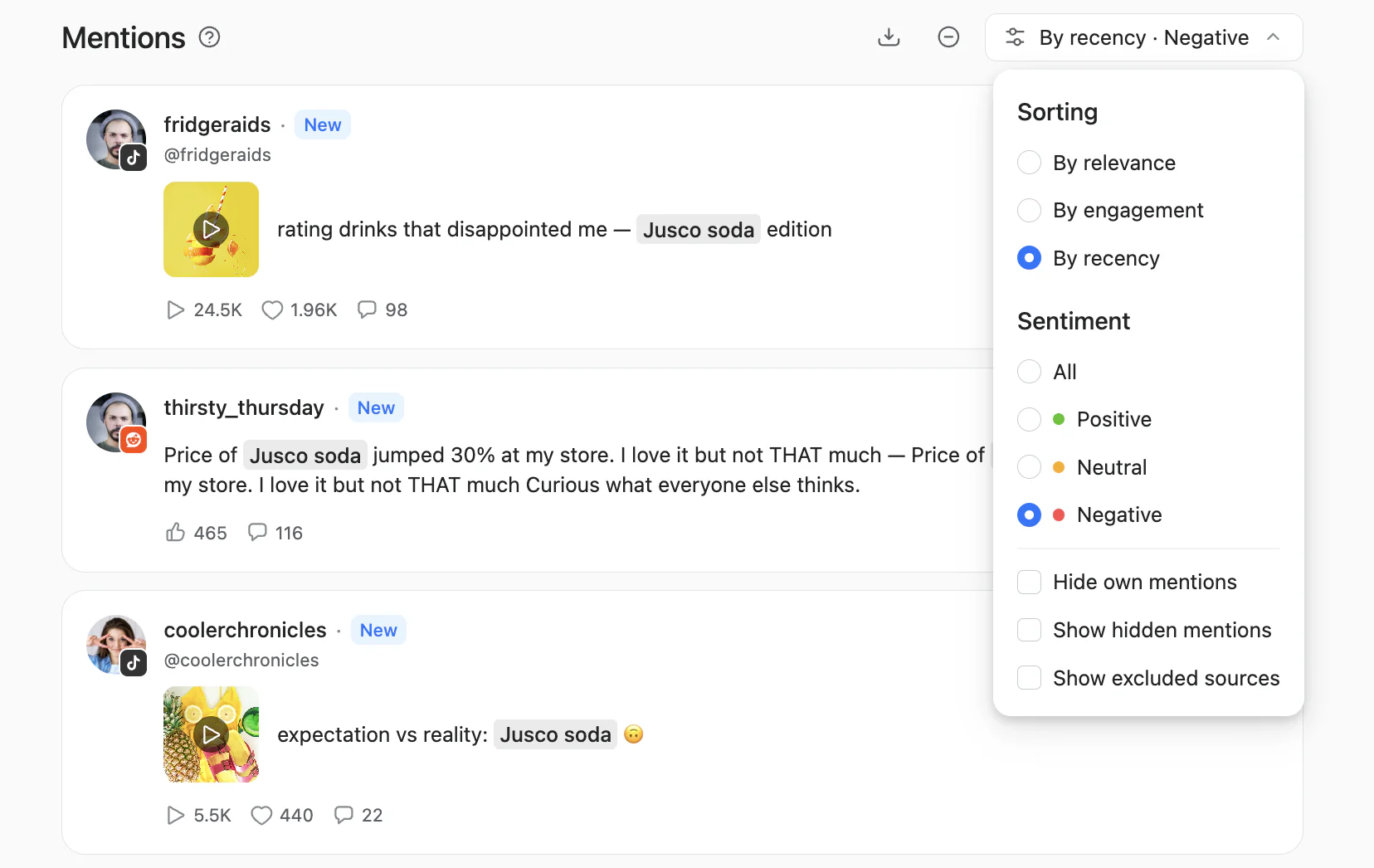
Filter the mention feed to negative sentiment for a daily triage
2. Spot a developing story early, not instantly
A keyword in Planable can be any phrase up to four words. That means you can turn a building, a place, or an incident term into its own keyword: not something you pair alongside your brand keyword, but a separate, self-contained phrase that builds its own slice of the feed.
A university can add its residence halls and major buildings as topic keywords of their own, so a mention naming one of them shows up on its own line in the feed, rather than reaching comms only through word of mouth.
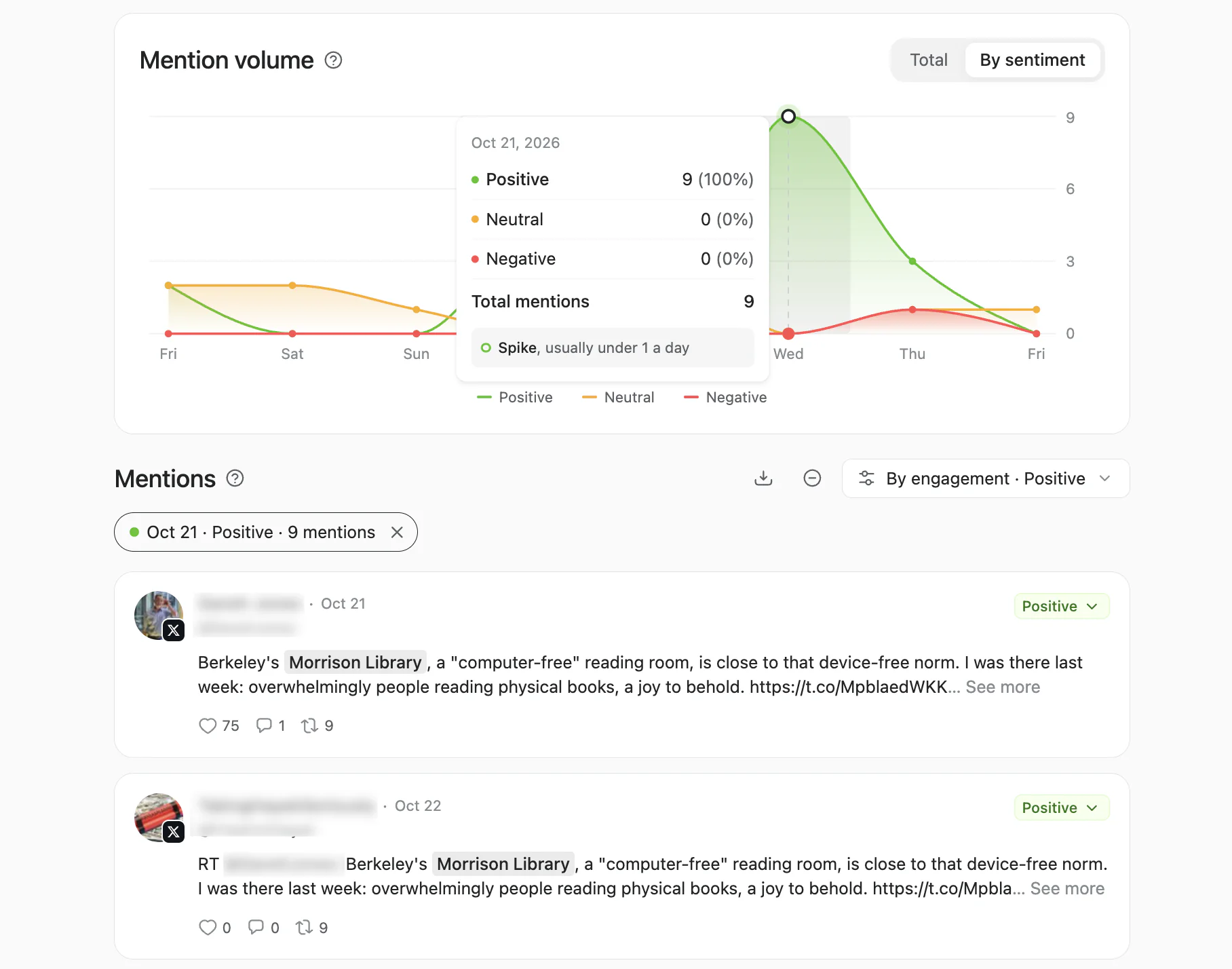
A building tracked as its own topic keyword, with a flagged spike and the mentions behind it
A city communications office can go further and combine two words into a single keyword — a neighborhood name plus “fire” say — to track a specific kind of incident as its own thread, separate from everything else said about the city.
The same setup helps outside emergencies, too. Once the right keyword catches a story circulating, a sports team’s comms lead can give a coach or a player a heads-up — “you might get questions about this” — before a press conference instead of after one.
Keep in mind that topic keywords refresh weekly by default, so if you need to monitor for active, unfolding emergencies, you’ll need a dedicated setup. You can book a demo here and talk to the team about it.
3. Pull an incident write-up straight from the feed
When comms or legal has to explain what happened and how far it spread, pulling that history out of a listening feed is faster than reconstructing it from memory or a folder of screenshots. One retail brand needed a full incident write-up the same week something happened, not weeks later once memories had faded.
Find the sales signal in a complaint
Not every mention needs a reply. Some need a handoff.
4. Turn a competitor complaint into a lead
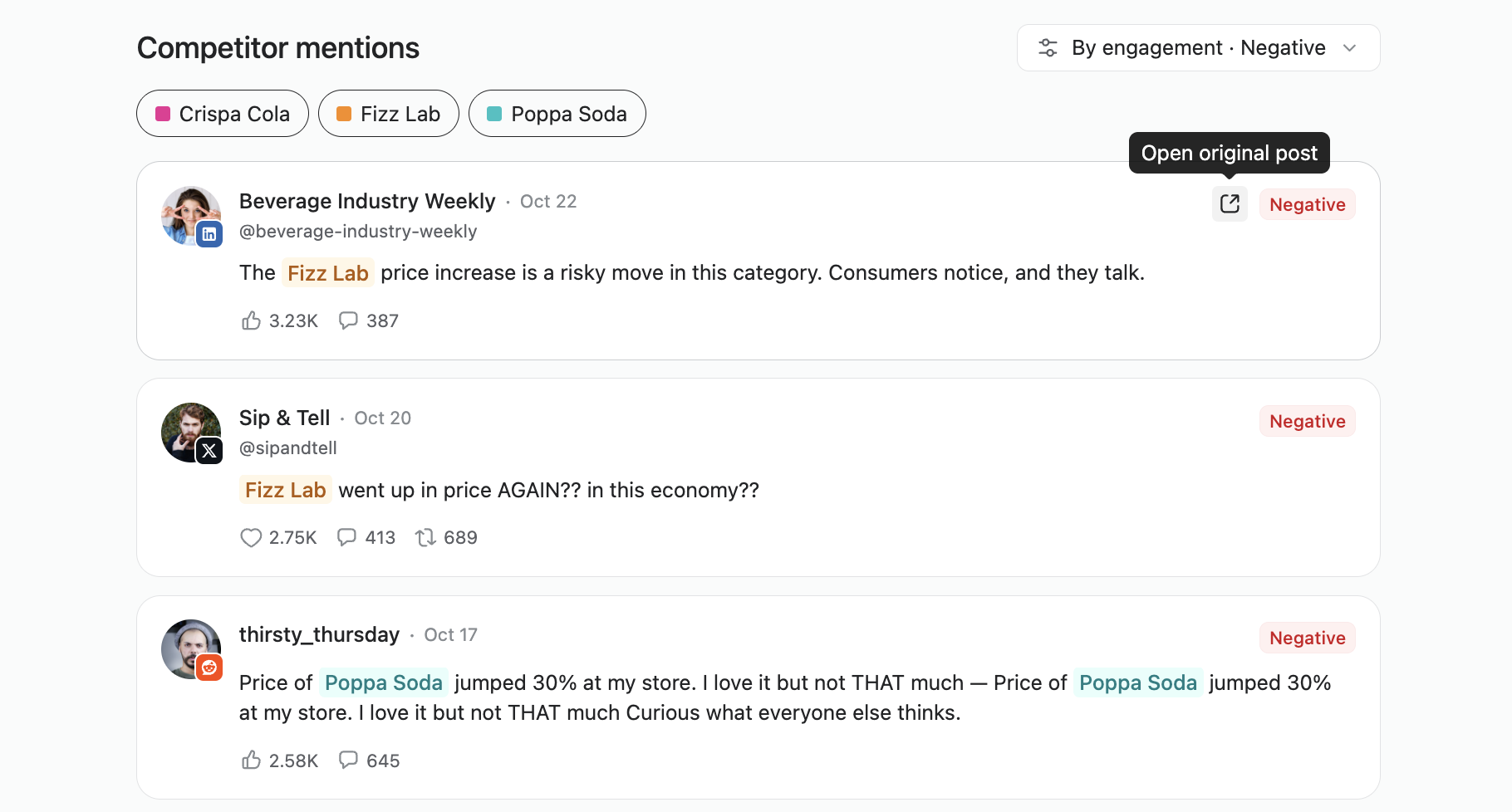
When someone complains publicly about a competitor, that’s a warm opening, not just something to note and move on from. Reply helpfully so the brand gets noticed, and route anyone clearly unhappy with a competitor to sales.
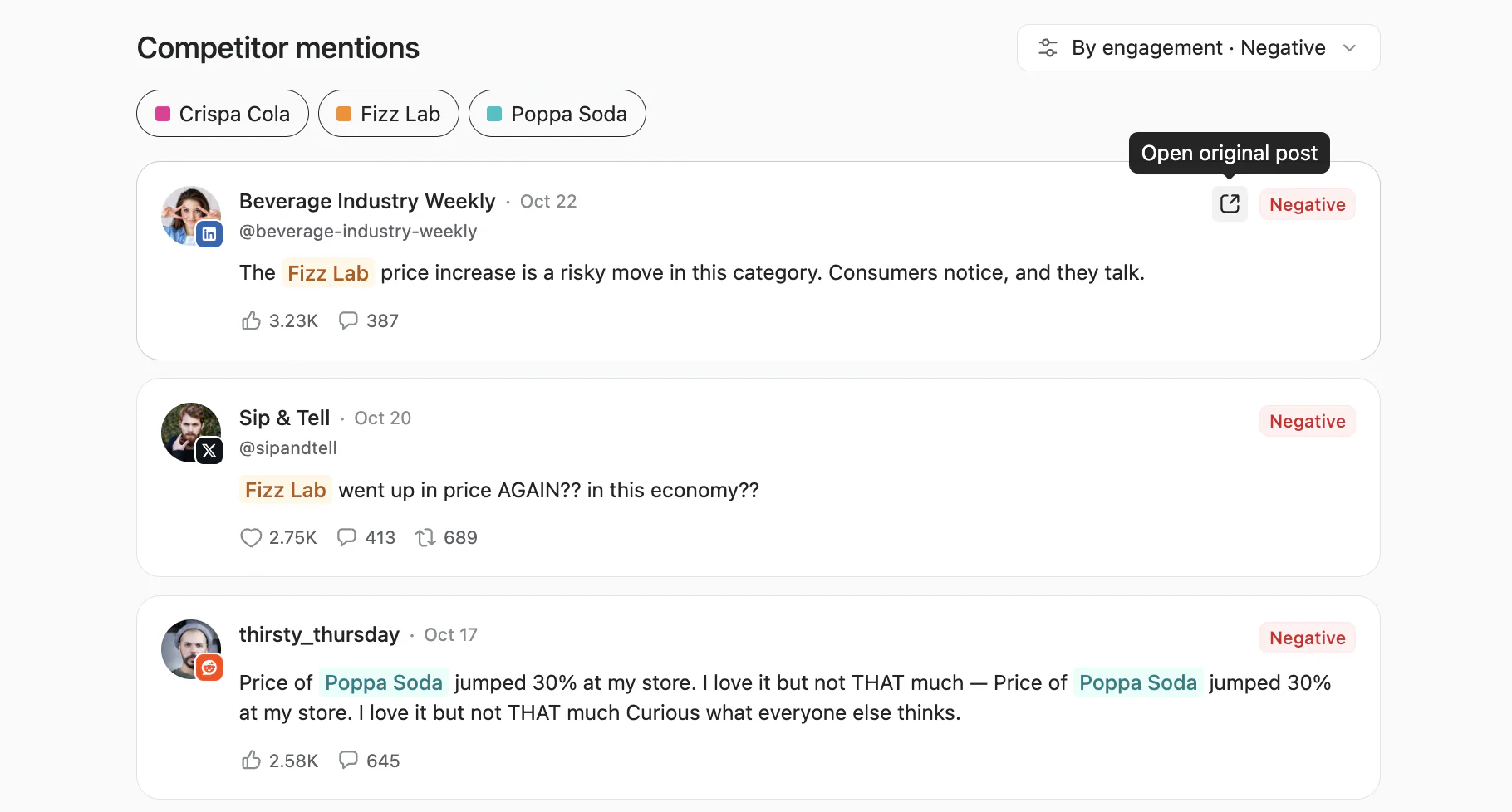
Negative competitor mentions, sorted by engagement, ready to reply to or route to sales
5. Catch a buying signal before your competitor does
A medical aesthetics practice combines a specific treatment name with its own town into one topic keyword, instead of tracking either term on its own.
That compound keyword catches posts like “has anyone tried [treatment] in London?” — close to a buying signal, since the person asking is already looking for somewhere local to get it.
For companies offering local services, running this approach catches more of these local questions than any one person could track by hand, close enough to reach before a competitor does.
6. Open a pitch with the prospect’s own words
An agency pitching new business can show a prospective client what’s already being said about their brand, sentiment and all, before the deck gets anywhere near a slide of agency credentials. The same history is just as useful inside an existing account, as the opening of an upsell conversation rather than a cold one.
Find what never tagged you
A mention doesn’t need to tag a brand to be about it. Most of listening’s real value sits here, because this is the conversation a brand otherwise can’t see at all.
7. Thank or join in, even when nobody tagged you
Your brand keyword catches every public mention of your name, tagged or not — which matters, because most of what gets said about a brand never tags it directly.
A credit union and a healthcare brand both put this to use the same way: once their name was tracked as a keyword, compliments and questions that never tagged the account started showing up in the feed, ready to thank, answer, or reshare.
An agency managing a client’s personal brand gets the same benefit on someone else’s behalf — it can flag a mention the client hasn’t seen yet, instead of waiting for the client to come across it on their own.
A reply at the moment someone’s already talking about the brand, unprompted, is often what turns an occasional customer into one who recommends it without being asked.
A keyword tracks mentions across every supported platform, whether or not the brand has an account there.
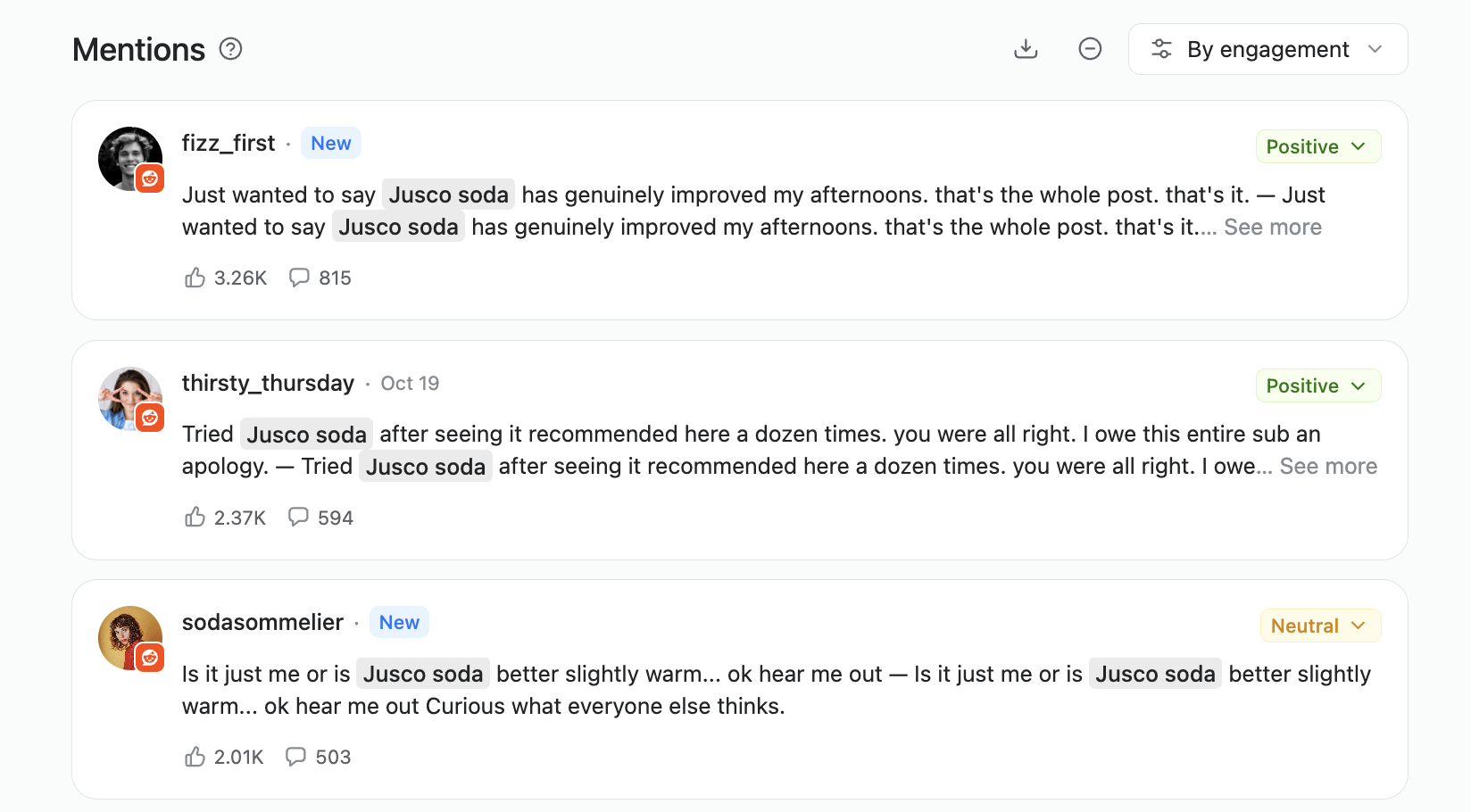
Hospitality and experience brands are increasingly tracking Reddit for exactly this reason: some of the most candid conversations about a brand happen there. And even if the brand doesn’t have an official account to reply from, there’s value in seeing the conversation and maybe even answering from personal accounts.
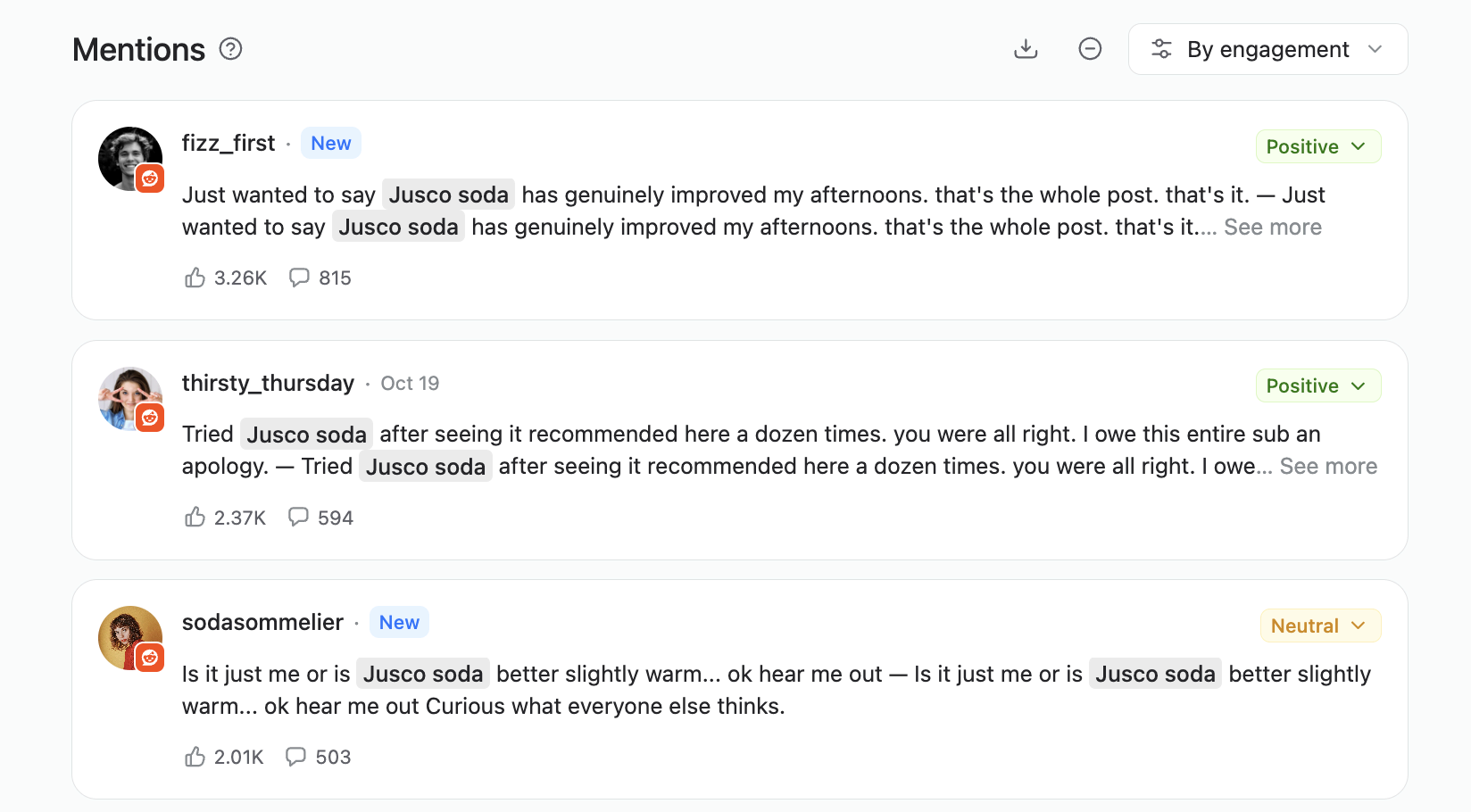
Reddit mentions caught by the brand keyword, even without a brand account there
9. Fix what comparison content gets wrong about you
For software brands specifically, a real share of brand conversation lives in comparison content other people write: listicles and comparison pages that sometimes misrepresent a product. Catching one early leaves time to ask the publisher for a correction, rather than finding out from a deal that didn’t close.
Fuel content, product, and campaigns
A feed of what people actually ask and say is also raw material: for a content calendar, a product roadmap, and a campaign recap.
10. Turn real questions into content
Recurring questions in a mention feed are a shortlist of FAQ answers, blog posts, and AI-search prompts waiting to be written — in the actual words real people use, not a guess at it.
The same feed doubles as a diagnostic tool: when a brand’s visibility in AI-generated answers drops around the same time its social sentiment does, that’s worth checking side by side before assuming the two are unrelated.
Planable pairs very well for this with the sister product SE Visible. Here’s how you can pair social content in Planable with AI visibility data in SE Visible, to create content people actually want to read.
11. Measure what a hashtag or a launch actually did
Counting posts under a campaign or event hashtag turns a vague sense that people liked it into a number worth reporting — and a strong count is a reasonable basis for deciding whether to run the same event again.
The same hashtag tracking turns up attendee posts worth collecting, too. With permission from whoever posted them, those double as a recap and as ready-made content.
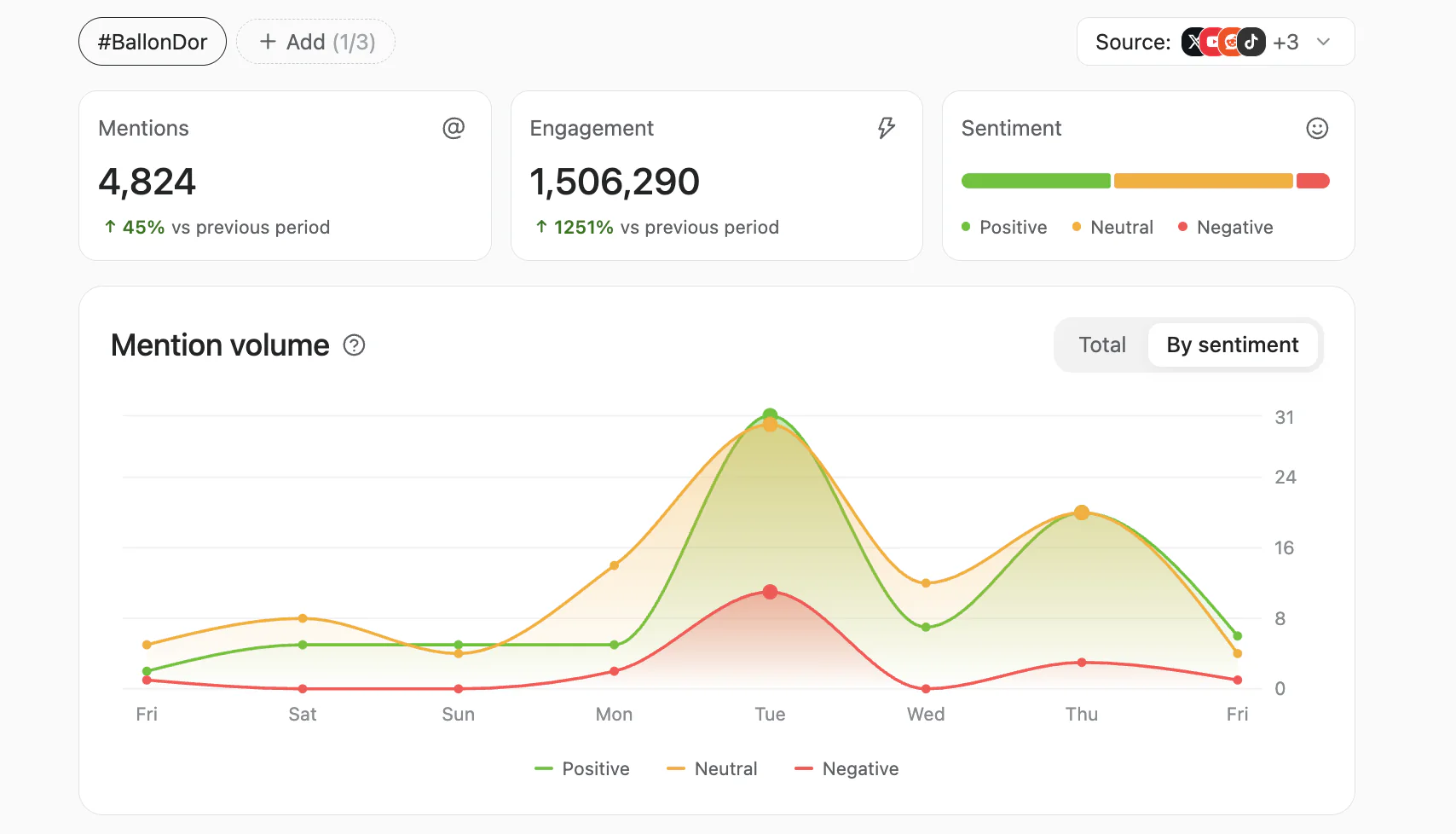
An event hashtag tracked as a keyword, with mention and engagement totals
12. Split launch reaction out from brand-wide noise
For a brand with more than one product or model, counting mentions by product name, not only by brand, shows which one a conversation is actually about, a distinction that gets lost in a single brand-wide sentiment score. Watching the feed in the days around a launch also shows whether reaction shifted, instead of waiting for a quarterly report to find out.
A smaller habit worth building alongside this: the features people praise most in positive mentions are often ready-made ad copy, almost word for word, and the people who praise a brand often enough are worth simply asking for a review.
Prove the work, in a report someone will actually read
Sentiment and mention data are also a reporting beat in their own right, and that’s where a good share of the value shows up for agencies and brand teams.
13. Send a share-of-voice brief every month
A monthly share-of-voice and competitor-sentiment brief, built straight from the mention feed, is often what keeps a client renewing a service with confidence.
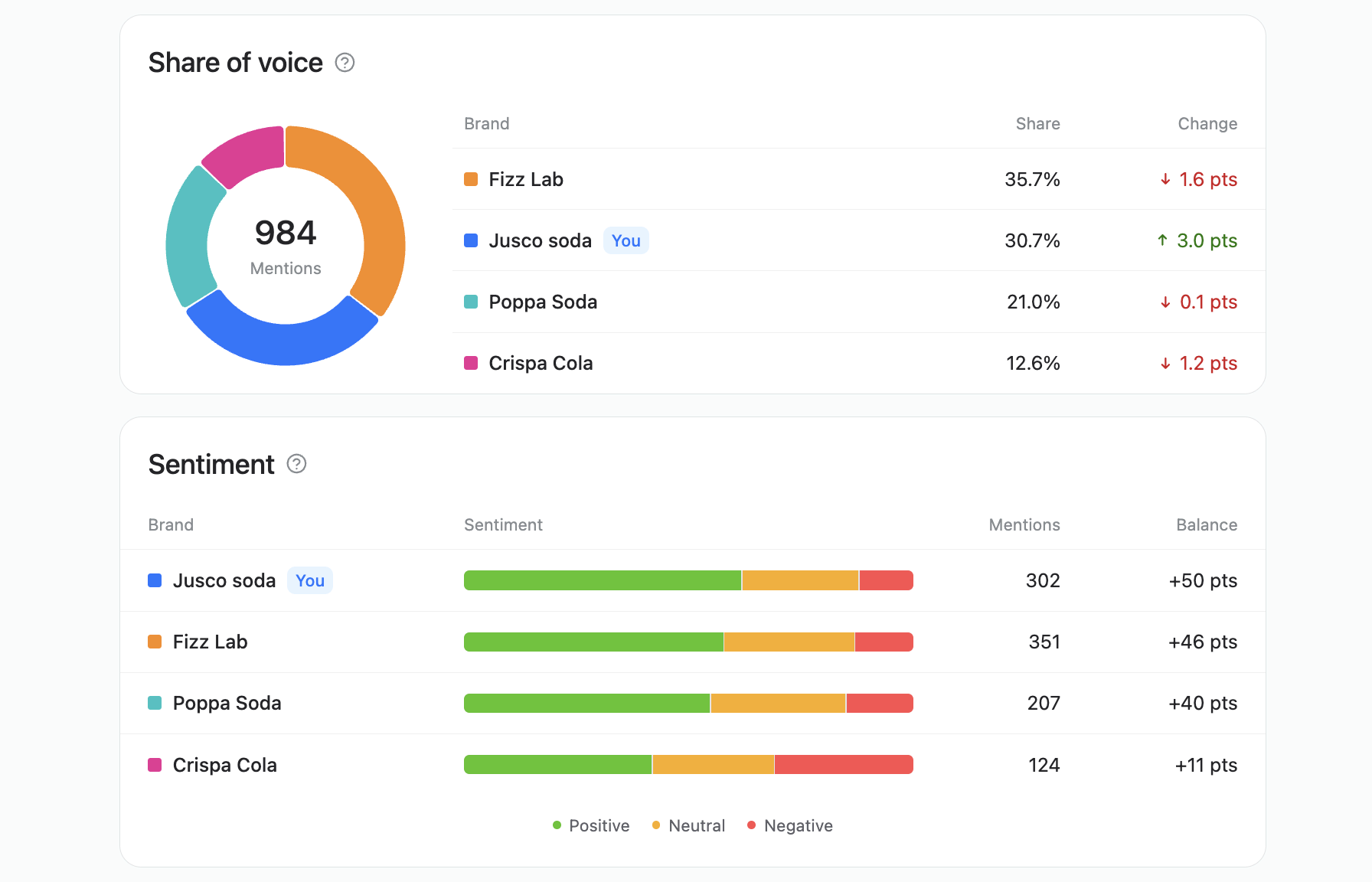
Share of voice and sentiment balance per brand, ready for a monthly client brief
Agencies running several client accounts keep clients separated by workspaces, so the share of voice and competitor comparisons are readily split per client.
Nonprofits can run the same comparison against peer organizations instead of competitors, for the same kind of standing report.
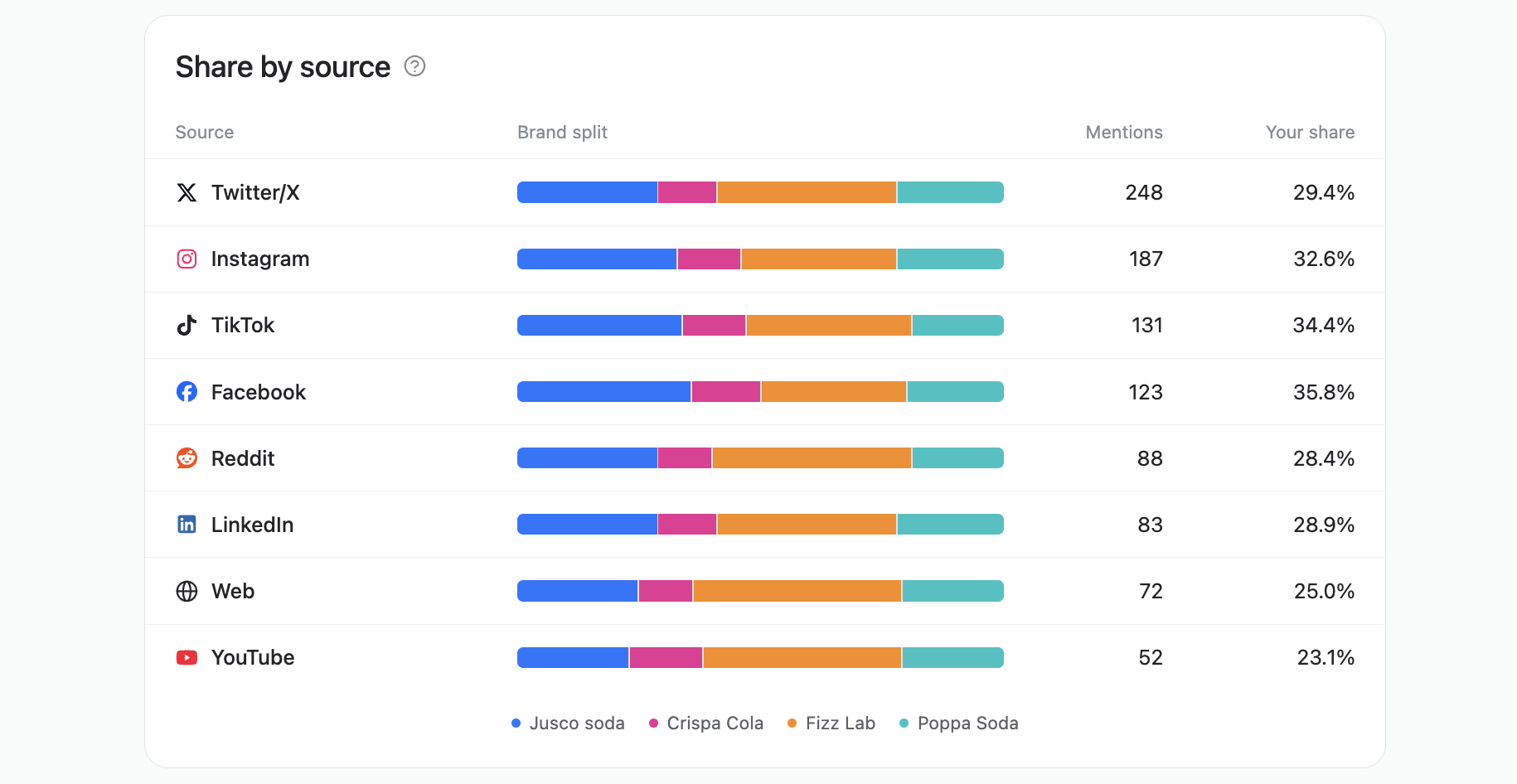
Share of voice and sentiment balance per brand, ready for a monthly client brief
14. Measure what a press release actually did
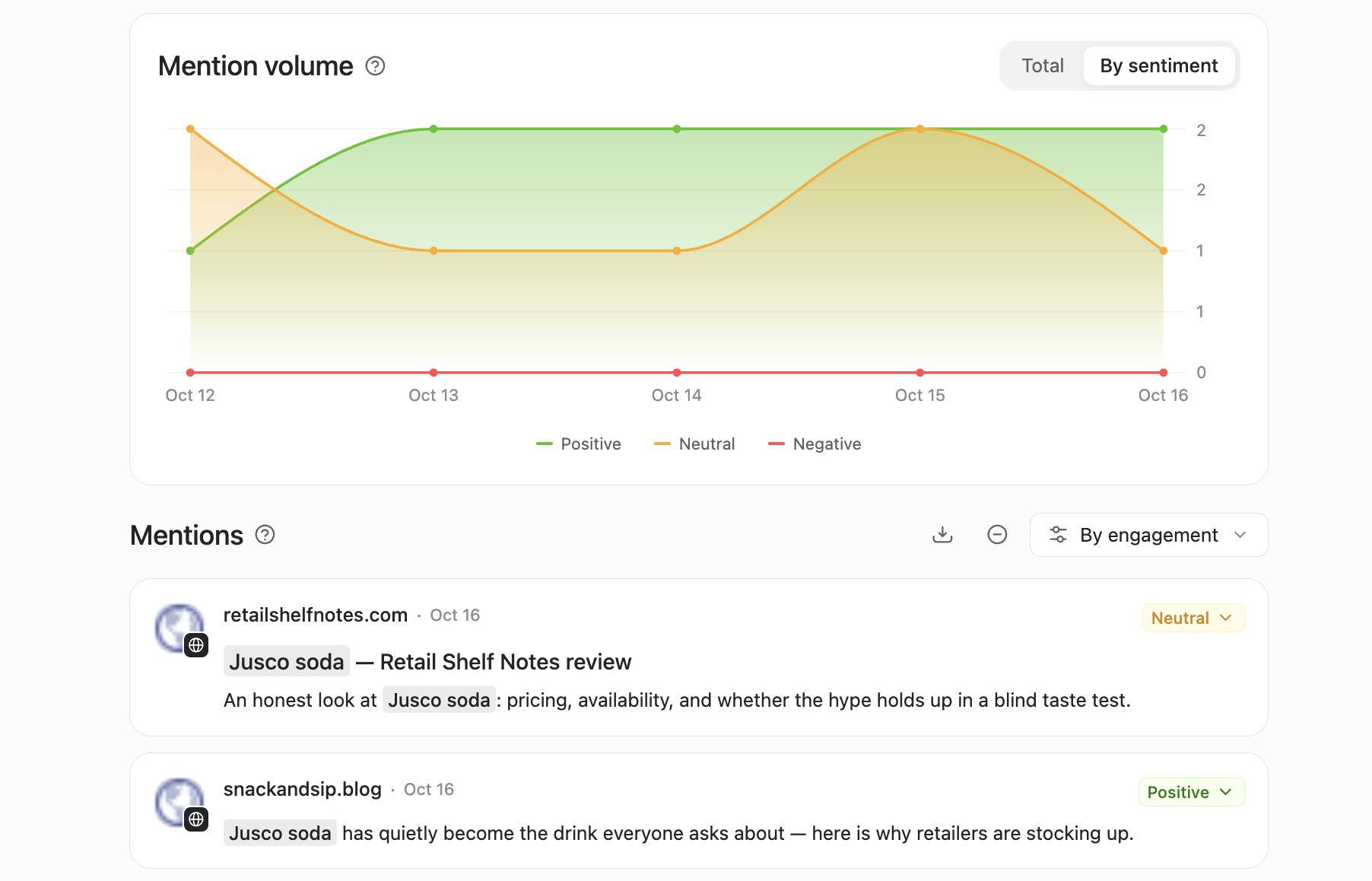
Pairing a keyword with a press release date shows whether coverage spread and when mentions spiked, which can cover the “did this land” question a separate media-monitoring subscription would otherwise exist to answer.
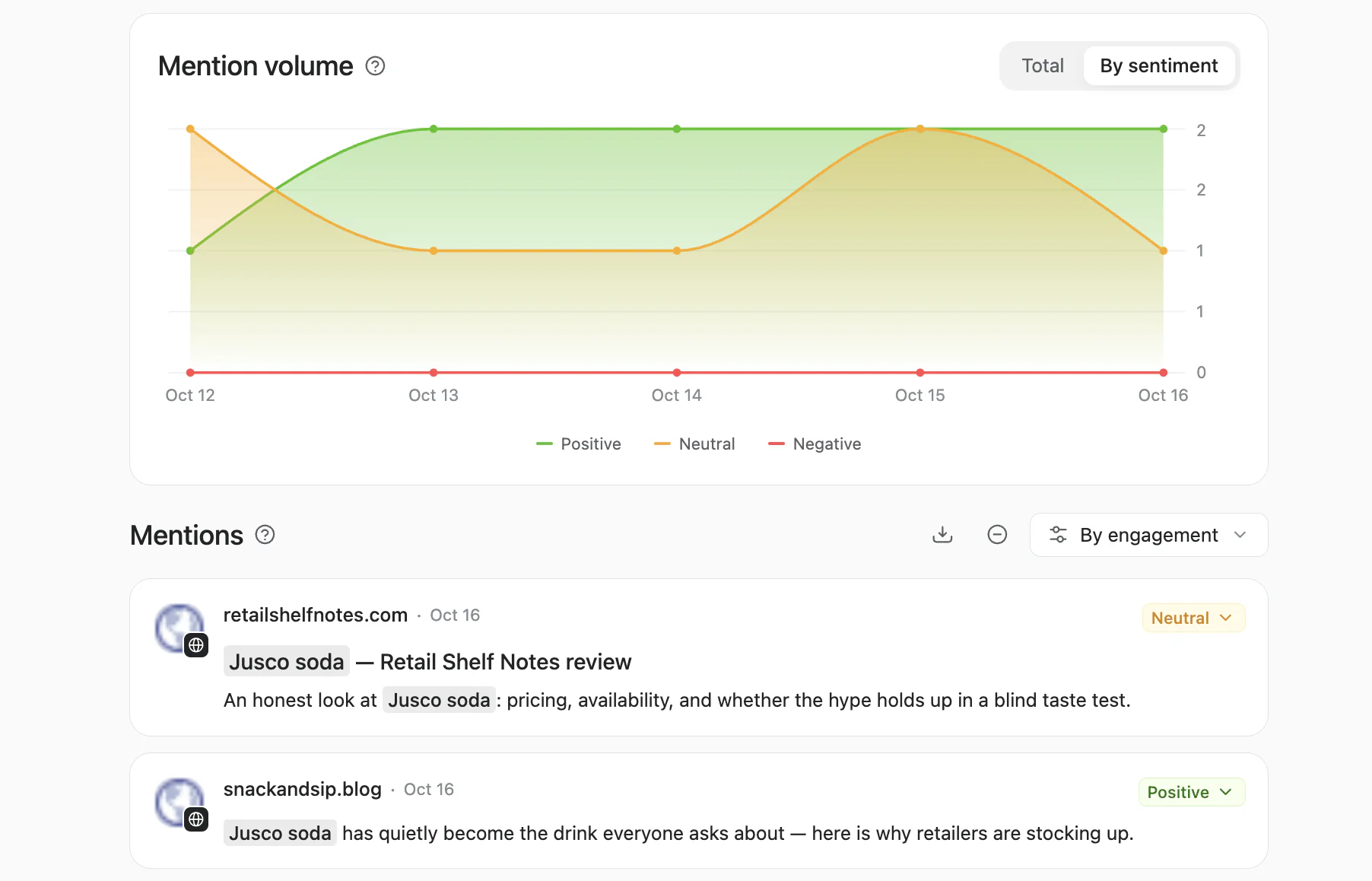
Web coverage from blogs and review sites, lined up on the mention volume chart
15. Trim the report to what people will actually read
The recurring request here is less data and more of a filter: a short weekly brief with the top mentions, a sentiment shift, and a couple of recurring topics, instead of a page-by-page log of every post.
For leadership specifically, that filter can shrink to one page: just the numbers and quotes that actually need a decision or a sign-off.
For a report a team already builds elsewhere, the data doesn’t need to be copied in by hand, the way some teams do it today. A CSV export of the mentions and metrics drops straight into whatever spreadsheet or dashboard that report already lives in, and the same data is reachable through Planable’s MCP server and its official Claude and ChatGPT connectors too, for a team that would rather pull it directly into the tool it’s already working in.
16. Set a baseline before you change anything
A brand launching a new strategy, or deliberately repositioning, is in a strong position to record a sentiment baseline first and compare it a few months later, instead of guessing whether perception actually moved.
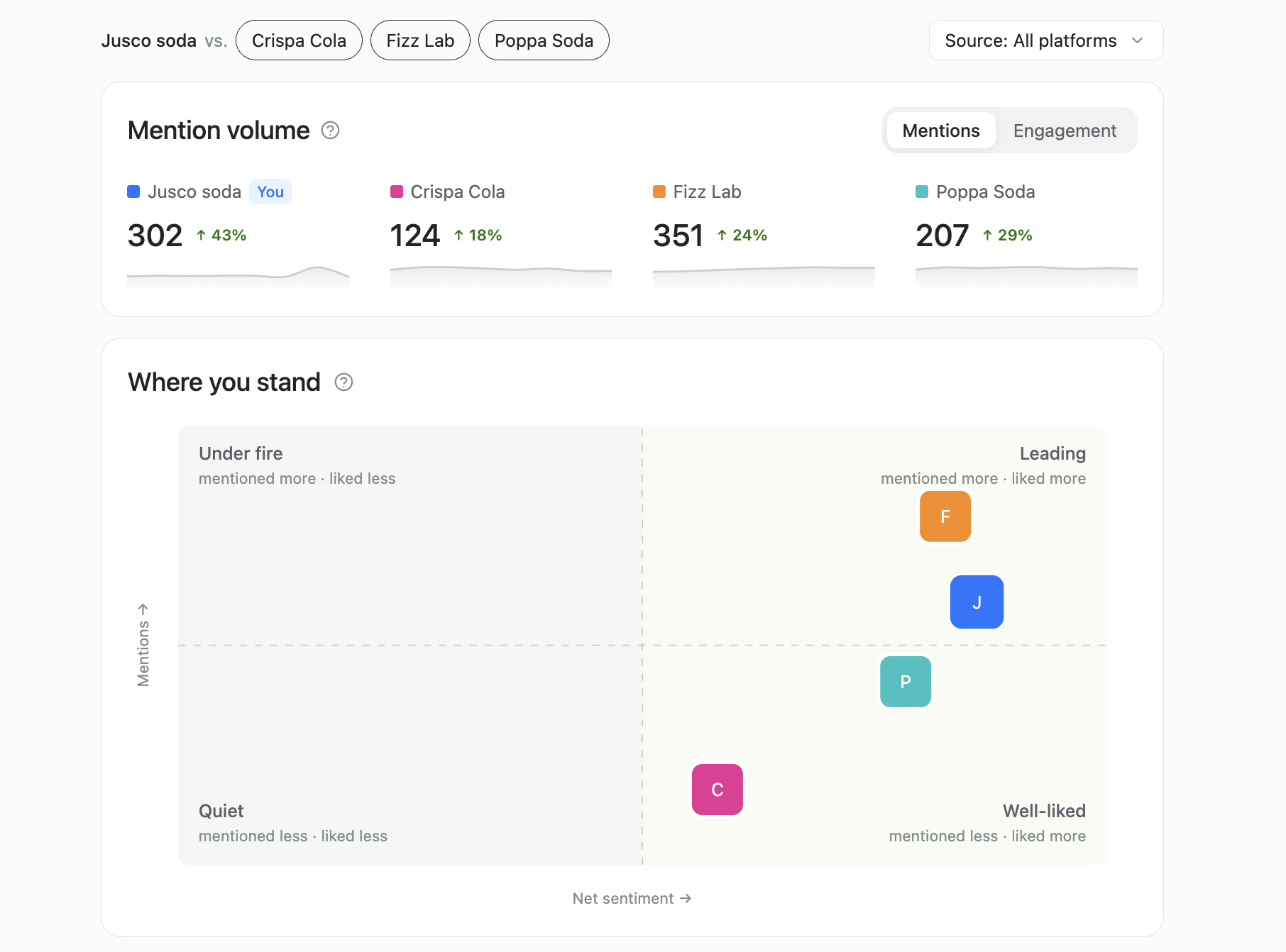
Mention volume and net sentiment per brand, a baseline to compare against later
Listen beyond your own brand
Not everything worth tracking is related to the brand name, and not every mention belongs with the social team.
17. Join conversations around a cause, not just a brand
A keyword doesn’t have to relate to the brand name. An organization built around a cause or a theme can track the topic, join the conversation, and find the people already advocating for it.
This helps make your contribution to the cause known and find potential collaborators for future actions.
18. Route mentions to the team that owns them
Not every mention belongs with social. A service complaint usually belongs with customer service, and a topic outside social’s own remit belongs with whichever team does own it. The fastest version of this is simply forwarding the mention the same day it shows up, rather than letting it sit in a feed nobody outside social ever opens.
A venue-dependent business can do the same with a venue complaint, passing it to the partner who actually runs the space instead of absorbing blame for something outside its control.
The same habit works in reverse for B2B teams: a company that sells to other businesses can watch its own customers’ brands for news worth acting on, often before the customer mentions it directly.
FAQs
Is social listening the same as checking comments and DMs?
No. That’s Social inbox, which manages comments and messages on pages already connected to Planable. Social listening looks the other way, at posts and pages that mention a brand, topic, or competitor without necessarily tagging it at all.
Does it only cover social platforms?
No. Alongside social, it monitors the web: news sites, blogs, forums, and newsletters, so a mention doesn’t have to happen on social media to reach the feed.
Do I need the Analytics add-on to use it?
No. Social listening is its own standalone add-on. It isn’t gated behind Analytics, though the two are often bought together since the value compounds.
Is this a real-time alert system?
Not in the default setup. In the self-service packaging, brand and competitor keywords refresh daily; topic keywords refresh weekly. It’s built for catching something a day or a week sooner than a brand otherwise would, not for monitoring an active, unfolding emergency.
However, a custom setup with faster refreshes and more keywords can be put in place. For this, book a demo to talk to the team directly.
Can I track a theme or a cause instead of a brand?
Yes. A keyword can be any word or phrase worth following, including a cause, an industry theme, or a client’s own brand name for anyone managing social on someone else’s behalf.
Can I see sentiment broken down by platform or by competitor?
Yes. Sentiment and mention volume can be viewed per keyword, and platforms can be isolated via the Source drop-down — which is what makes a platform-by-platform or competitor-by-competitor comparison possible.
What if I need more keywords or a faster refresh than the published package covers?
That’s a sales conversation rather than a self-serve setting. The published package is a starting point, and bigger needs get scoped from there. Book a demo to talk to the team directly.
See what’s already being said
The conversation covered in this guide is already happening, with or without a brand’s own account watching it. Add a keyword in Planable’s social listening, and start there.
Monica leads product marketing at Planable. She owns go-to-market for new features and shapes how Planable fits into the broader SE Ranking product family. She joined in 2023 as Planable's first product marketer, built the function from scratch, and now runs the team's competitive intelligence program. With a background in product management and Romania's startup scene (How To Web, MVP Academy), she writes about competitor analysis, product launches and marketing workflows from the builder's side. Before Planable, she spent almost five years managing Orange Fab Romania, Orange's startup acceleration program, where she supported 40 startups and helped generate over €2.2M in commercial value.






 Creation
 Scheduling
 Planning
 Social Inbox
 Collaboration
 Analytics
 Approval
 Social Listening