If your last Loomly renewal stung, the plan gap stings more: Starter stops at three users, custom roles and custom approval workflows only unlock on Beyond, and that upgrade is a big jump for a team that only needed one more seat or one more client reviewer. I’ve...
Redesign For multi-location brands
all your locations, one content flow
For multi-brand companies
content collaboration at scale
For agencies
impress your clients and take on more
“The team loved it from the start. Planable helps us overview the entire marketing efforts.“
If you’re running SEO for clients and managing their social media too, you already know the disconnect. One team tracks keyword rankings and AI search presence. Another builds social media content calendars. The two sides rarely talk in time to matter.
That gap costs you. When an AI visibility insight sits in a spreadsheet for two weeks before anyone turns it into a social post, the window closes. And when a social campaign runs without knowing what topics are gaining traction in AI search, you’re flying blind on the part of search that’s actually growing.
SE Ranking and Planable, used together, close that gap. SE Ranking tells you where your clients stand in AI and organic search: what topics, prompts, and competitors are shaping how they appear in ChatGPT, Gemini, Google AI Mode, AI Overviews, and Perplexity. Planable is where that intelligence becomes social content: drafted, reviewed, approved, and published across every client account without the usual chaos.
This article walks through how that workflow works in practice and why it matters more now than it ever did.
Why AI visibility and social media are now the same conversation
AI search engines (ChatGPT, Google AI Mode, Perplexity, Gemini) don’t just crawl websites. They synthesize what’s being said about a brand across multiple sources: articles, reviews, social content, citations. The more consistently a brand appears across those channels, the more likely it is to show up in AI-generated answers.
Social media is part of that signal. A brand that publishes consistent, topically relevant social content is building the kind of presence that AI search engines notice. This means your social calendar is no longer just a distribution tool, it’s infrastructure for AI visibility.
Agencies that treat SEO, AI search, and social media as separate tracks are leaving measurable value on the table.
What SE Ranking tracks
SE Ranking is an SEO platform with a dedicated AI search layer. For agencies managing multiple clients, the most relevant capabilities are:
AI Results Tracker — tracks how a brand appears across Google AI Overviews, Google AI Mode, ChatGPT, Perplexity, and Gemini. You can see how often the brand is mentioned, what competitors are appearing alongside it, and which pages and domains are influencing those AI-generated answers.
Keyword research — identifies gaps between what your client ranks for in organic search versus what appears in AI responses. Topics can overlap or diverge significantly, and the gaps are often the best content opportunities.
Competitive research for AI search — reveals which competitors dominate AI answers, what topics and prompts trigger their mentions, and where your client is underrepresented. The AI Search Add-on extends this to unlimited brand analysis across five AI engines.
SE Visible (available via the AI Search Add-on) — a standalone product that gives a strategic overview of brand visibility in AI search. It tracks visibility score, sentiment (positive/negative/neutral), competitor benchmarking, and which prompts and sources shape AI responses. Data updates weekly.
What Planable does with those insights
Planable is the social media management tool where the actual work of turning an insight into a post happens collaboratively, without the usual back-and-forth.
For agencies managing multiple clients, Planable gives each client their own workspace. Inside each workspace, you connect their social pages (Facebook, Instagram, LinkedIn, TikTok, X/Twitter, YouTube, and more), draft and schedule content, run it through approval flows, and track performance, all in one place.
The capabilities that matter most when you’re working from an AI visibility playbook:
Campaigns — group related posts by topic or strategic initiative. If you’re running a content push around a topic gap identified in SE Ranking, a Campaign keeps all those posts connected and visible as a single unit in your calendar.
Approval workflows — route content through internal review, then to clients for sign-off, without leaving the platform. Required approvals (Pro) or multi-level approvals (Enterprise) ensure nothing is published until it’s ready. Clients can even review via a shared link, which means no Planable account is needed.
Social Inbox — manage comments and DMs from Facebook, Instagram, LinkedIn, and TikTok in one place. Relevant when a campaign generates client-facing conversation that needs to be monitored and responded to quickly. Available as an add-on ($9/workspace/month).
Analytics — cross-channel performance view across Facebook, Instagram, LinkedIn, TikTok, YouTube, Pinterest, and X/Twitter. Engagement, follower growth, reach, top-performing posts. Shareable as customizable, client-ready reports. Available as an add-on ($14/workspace/month on Basic and Pro, included in Enterprise).
Universal content pages — plan blog posts, articles, press releases, and newsletters alongside social content. If an AI visibility push includes updating website content, you can coordinate that with social distribution in the same calendar view.
The agency workflow: from insight to published post
Here’s how a typical SE Ranking and Planable cycle looks for an agency with 5–10 clients:
Step 1. Discovery in SE Ranking
Run competitive research for both SEO and AI search. Use the AI Search in Competitive research to see where a client is missing from AI-generated answers. Identify the topics and prompts where competitors are getting mentioned and the client isn’t.
Step 2. Content clustering and prioritization
Using SE Visible (or the AI Results Tracker Sources tab), identify which content gaps have the highest potential impact. Look for topics where the client has authority but isn’t getting AI visibility; those are the fastest wins.
Step 3. Content planning in Planable
Open the client’s Planable workspace. Create a Campaign around the target topic. Draft social posts that reinforce the client’s authority on that topic (LinkedIn posts, Instagram carousels, short-form video scripts, Twitter/X threads). The feed view shows you exactly how each post will look on each platform before it goes anywhere.
Step 4. Internal review and client approval
Team members leave feedback directly on draft posts: comments, text suggestions, annotations on the visual. Once the team is aligned, posts are sent for client approval. The client receives a notification, reviews in Planable (or via a shared link), and approves or comments. No email chains.
Step 5. Content publishing
Approved posts go live on schedule. Planable publishes directly to connected social pages, with no manual copying or third-party scheduling tool needed.
Step 6. Performance tracking and feedback loop
Pull Planable Analytics to see how the campaign performed on social. Cross-reference with SE Ranking’s AI Results Tracker. Did the brand’s presence in AI answers improve? Did new sources start citing client content? Use SE Visible to measure before/after visibility scores. That data becomes the brief for the next content cycle.
Planable and SE Ranking use cases
Use case 1: Turn AI visibility gaps into a targeted content campaign
The situation: An agency’s client sells project management software to mid-size engineering firms. A quick look at AI Search in Competitive Research reveals the client gets mentioned for generic keywords (“project management tools“) but is almost invisible for the more specific prompts buyers actually use (“project management for construction teams“, “engineering project tracking software“). They set up AI Results Tracker to monitor those prompts and catch every time a competitor shows up where they don’t.
What you do in SE Ranking: Identify the specific prompts where competitors are appearing and the client isn’t. Use competitive research to see what types of content those competitors are getting cited for: long-form guides, case studies, LinkedIn thought leadership.
What you do in Planable: Create a Campaign called “Engineering audience — AI visibility push.” Build a 6-week content calendar targeting the identified topics: LinkedIn posts referencing construction case studies, Instagram carousels on project tracking frameworks, a YouTube short on common engineering PM pitfalls. Draft all of it collaboratively in Planable, run through internal approval, get client sign-off.
The feedback loop: After 6 weeks, return to SE Ranking. Has the client started appearing in those prompts? Are new pages being cited in AI answers? The data tells you whether to double down or pivot.
Use case 2: React to competitor moves in AI search before they compound
The situation: SE Visible’s weekly update shows a competitor has significantly increased their AI visibility score over the past 30 days. Their sentiment is trending positive. They’re gaining presence in prompts where your client was previously the only brand appearing.
What you do in SE Ranking: Pull the competitor’s AI visibility breakdown. Identify which topics and prompts drove the increase. Cross-reference with keyword data to see if there’s an SEO campaign behind it.
What you do in Planable: Move fast. Open the client’s workspace and draft a responsive campaign, posts that reinforce the client’s positioning in the topics the competitor is encroaching on. Use Planable’s internal notes to brief the team on the context (these are invisible to the client). Get content drafted, reviewed, and approved in days, not weeks.
This is where Planable’s approval speed actually matters. Waiting two weeks for email approval on a competitive response campaign defeats the point. Required approvals with automatic scheduling mean content can go live the moment the client signs off.
Use case 3: Build before/after proof for client reporting
The situation: An agency has been running a combined SEO + social content strategy for a client. They need to demonstrate the impact clearly; not just engagement numbers, but real evidence that the work is shaping the client’s presence in AI search.
The approach:
Before the campaign starts, export baseline metrics from both tools:
SE Visible: visibility score, average position in AI answers, sentiment breakdown, share of voice vs top 3 competitors
SE Ranking: AI Results Tracker for target prompts, and the Rankings tool for organic keyword positions
After the campaign, pull the same metrics and put them side by side.
The story you can tell: These topics were getting our client zero mentions in ChatGPT and Perplexity. After a 6-week content push coordinated in Planable, the brand started appearing in responses for these specific prompts. Here’s the data.
That’s a report clients don’t question.
How to set this up in practice
In SE Ranking:
Create a project for each client.
Run competitive AI research to identify gaps and opportunities.
Set up AI Results Tracker, add the target prompts you want to monitor across AI platforms.
If you need strategic AI visibility reporting for clients, add the AI Search Add-on to access SE Visible and expanded tracking limits.
In Planable:
Create a workspace for each client.
Connect their social pages (Facebook, Instagram, LinkedIn, TikTok, YouTube, X/Twitter, Google Business Profile, Threads, and Pinterest).
Set up your approval workflow: Required (Pro) if you need client sign-off before anything publishes, Multi-level (Enterprise) if content goes through team review first, then client.
Set up a Campaign for each content initiative tied to an AI visibility target.
Add the Analytics add-on to track social performance per client and generate shareable reports.
Bonus: Both SE Ranking and Planable can fit into a connected AI-assisted content workflow.
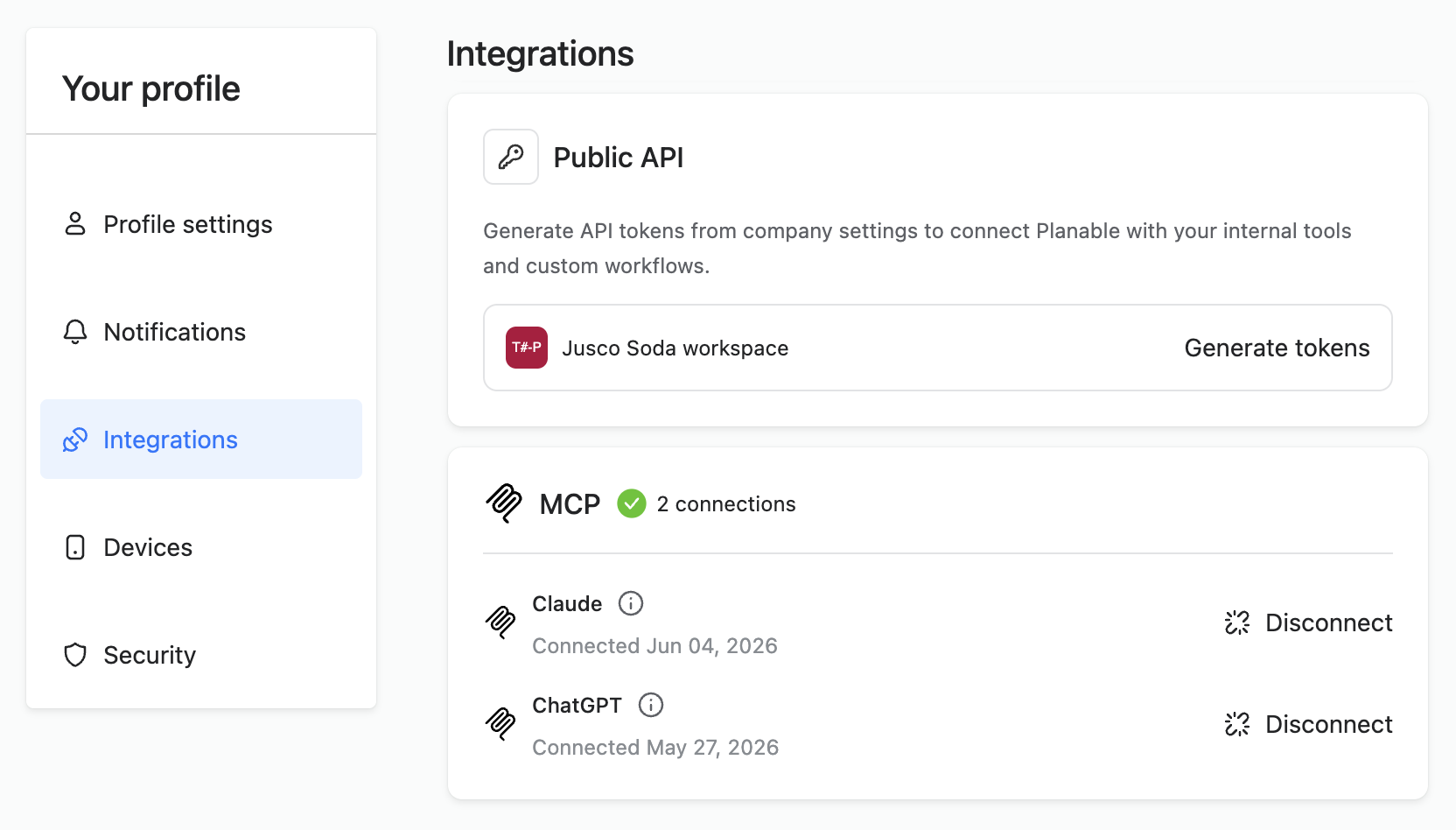
SE Ranking provides a public API and an MCP connector, while Planable also supports API and MCP-based integrations. Together, these options let teams move data between the two platforms, create custom automations, or connect both tools to an AI assistant such as Claude.
Planable integrations page with Public API tokens and MCP connections for Claude and ChatGPT.
This setup is especially useful for agencies or in-house teams managing multiple clients. For example, a team could monitor AI visibility changes in SE Ranking, then trigger a content review, social post draft, approval workflow, or publishing task in Planable.
The main benefit is workflow continuity: SE Ranking can surface visibility changes, while Planable can turn those insights into planned content actions without requiring teams to manually copy data between platforms.
Who this Planable and SE Ranking workflow is for
This workflow between Planable and SE Ranking is built for agencies and in-house teams that are running SEO and social media together, not as separate services, but as a coordinated strategy.
Specifically:
Social media managers who are juggling 10+ client accounts and need a faster way to turn strategic briefs into live content
Operations leads who are responsible for making the agency workflow repeatable and scalable
Agency owners and marketing directors who need to demonstrate clear ROI to clients and want data that connects content activity to AI search outcomes
If you’re only doing social media without SEO context, or only doing SEO without a social distribution layer, you’re using half the toolkit.
FAQs
Does Planable integrate directly with SE Ranking?
Not through a native integration yet, but moving in that direction. The two tools work as part of a coordinated workflow rather than a technical sync (for now). Insights from SE Ranking (topic gaps, AI visibility data) inform content strategy in Planable. Performance data from Planable (engagement, top posts) helps validate whether the strategy is working. The connection is the agency’s workflow, not an API.
As Planable and SE Ranking are one and the same company, there are plans of further integrations.
Which SE Ranking plan do I need for AI visibility tracking?
AI Results Tracker is available on SE Ranking’s Core, Growth, and Enterprise plans. The AI Search Add-on provides extended tracking limits and access to SE Visible — it’s priced separately, starting at $89/month for 200 checks (1 check = 1 prompt + 1 AI platform). See SE Ranking’s AI Search Add-on documentation for current pricing.
Which Planable plan do I need for this workflow?
For agency workflows with multiple clients, Pro ($49/workspace/month) covers most needs: 10 pages per workspace, required approvals, grid view, and campaigns. Analytics is an add-on at $14/workspace/month. Enterprise is the right choice if you need multi-level approvals, unlimited pages, or list view for bulk management.
How many clients can I manage in Planable?
There’s no limit on workspaces, each client or brand gets their own. Pricing is per workspace, so you scale as your client roster grows. Plans start at $33/workspace/month (Basic).
What social platforms can I publish to through Planable?
Facebook Pages, Instagram (Business and Creator accounts), LinkedIn company pages and personal profiles, X/Twitter, YouTube, TikTok (Personal and Business), Google Business Profile, Pinterest (Business), and Threads.
Can clients approve content without a Planable account?
Yes. Clients can approve via a shared link, so they don’t need to create an account or log in. Approver invites and guest links work for external stakeholders who just need to review and sign off.
What AI platforms does SE Ranking’s AI Results Tracker monitor?
Google AI Overviews, Google AI Mode, Gemini, ChatGPT, and Perplexity.
Monica leads product marketing at Planable. She owns go-to-market for new features and shapes how Planable fits into the broader SE Ranking product family. She joined in 2023 as Planable's first product marketer, built the function from scratch, and now runs the team's competitive intelligence program. With a background in product management and Romania's startup scene (How To Web, MVP Academy), she writes about competitor analysis, product launches and marketing workflows from the builder's side. Before Planable, she spent almost five years managing Orange Fab Romania, Orange's startup acceleration program, where she supported 40 startups and helped generate over €2.2M in commercial value.






 Creation
 Scheduling
 Planning
 Social Inbox
 Collaboration
 Analytics
 Approval
 Social Listening