SocialPilot works fine until your operation grows past one approver. The moment you add a second client, a brand-compliance check, or a legal reviewer, the cracks show up: single-tier approvals, no post-specific commenting, a 2018-era UI, and a pricing model that...
Redesign For multi-location brands
all your locations, one content flow
For multi-brand companies
content collaboration at scale
For agencies
impress your clients and take on more
“The team loved it from the start. Planable helps us overview the entire marketing efforts.“
Sked Social handles the basics. Schedule a post, queue it, hit publish. But if you run a team of 10+ across multiple clients or brand portfolios, you’ve probably hit the same ceiling everyone else hits: per-account pricing that climbs fast, approvals locked behind the Professional plan, and a calendar built for one brand at a time, not a dozen.
The teams that grow out of Sked Social aren’t looking for more features. They’re looking for a platform that holds up under governance pressure: clean approval audit trails, client-ready review links, multi-workspace separation, and pricing that doesn’t double every time a client signs.
This guide compares the 6 strongest Sked Social alternatives, ranked by what actually matters when you’re running content at scale: collaboration depth, approval workflow flexibility, multi-client architecture, and total cost of ownership across a team.
If you’re an operations manager evaluating ROI, a head of marketing setting quality standards across accounts, or an agency owner picking the next 3-year platform, this guide is built for you.
Why agencies and ops leads outgrow Sked Social
Three things tend to trigger the switch: pricing that punishes scale, approval workflows that don’t fit multi-client governance, and a feature set tilted toward Instagram-first solo creators rather than multi-brand operations.
Pricing scales the wrong way
Sked Social’s Essentials plan starts at $49/month for three accounts, with additional accounts at $7/month each (paid annually). For an agency managing 30+ profiles across 10 clients, that math gets ugly fast. Worse, the social media approval workflow, a non-negotiable for client work, sits behind the Grow plan ($124/month), which gates the feature you most need to evaluate during trial.
Approval workflows aren’t agency-grade
You can build a sequential approval chain in Sked Social, but reviewers using the public approval link can’t edit copy. For agencies that need clients to suggest tweaks rather than reject-and-explain, that’s a daily friction point. Audit trails are also limited because there’s no clean per-post change log to pull during a quarterly client review or compliance check.
Platform focus skews Instagram
Sked Social was built around Instagram and has expanded since, but LinkedIn, TikTok, YouTube, and Google Business Profile features still lag the leaders on this list. If your client mix has moved beyond visual-first content, you’ll feel the gap on every campaign that touches B2B or local SEO.
Reporting doesn’t roll up
Sked’s analytics are workable for a single brand but not for the cross-client, cross-channel rollups operations leads need to assemble for monthly reviews. Most teams end up exporting and rebuilding in Looker or Sheets, which is normal, but it kills the “all in one tool” promise that justified the platform spend in the first place.
Reliability gaps at the wrong moments
Users report intermittent issues with delayed posts, slow content loading, and image cropping inconsistencies. None of these are dealbreakers in isolation, but for agencies on the hook for client deadlines, they show up at the worst possible times.
Planable is a social media management tool built for the “messy middle” of agency content work: the stage between a creative idea and a client-approved, scheduled post.
Where Sked Social treats approval as a checkbox at the end of the process, Planable treats it as the workflow itself: every comment, suggestion, and approval is logged, attributable, and revocable.
Planable’s content approval interface with team comments on social media draft
For operations managers, the ROI shows up in two places. First, fewer back-and-forth emails: clients approve directly on the post, not in a parallel thread that someone has to reconcile manually. Second, faster social media client onboarding: each client gets a dedicated workspace with its own permissions, brand assets, and approval chain, so adding a new account is a 15-minute setup rather than a fork-the-process exercise.
Planable workspace dashboard with project cards and team members
For marketing leaders running multi-brand portfolios, the universal content calendar gives you a single view across every brand and channel without breaking governance.
Each workspace stays separate for billing, access, and audit purposes, but you can roll the calendar up to see what’s happening everywhere this week, making it useful for the leader who needs to spot conflicts or coordinate launches without micromanaging each team.
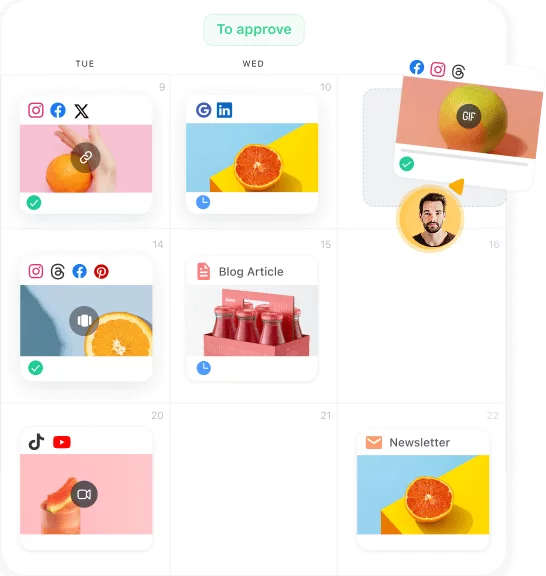
Planable content calendar with notes, scheduled posts, labels and campaigns
A concrete scenario: a multi-location franchise running 40 location pages can host each location as a workspace, give the local manager edit-only access, route approvals through regional marketing, and let the brand director see the full calendar, all without anyone seeing what they shouldn’t. That’s the kind of architecture that survives a security review.
Planable key features:
4-tier approval workflows configured per workspace: none, optional, required, or multi-level
Universal Content support to schedule social posts alongside blog drafts, email copy, and content briefs in the same calendar
Client-facing public links that don’t require an account login (useful for sporadic stakeholders like the client’s CEO or legal reviewer)
Media Library with brand-asset governance per workspace
Drag-and-drop calendar with custom labels, filters, and saveable views you can share with clients or keep private to your team
Native scheduling for 9 social platforms: Facebook, Instagram, LinkedIn, TikTok, YouTube, X, Pinterest, Threads, and Google Business Profile
Drawbacks: Even though Planable has intuitive social media analytics, the platform lacks social listening features.
Planable note: The strongest proof point for ops and leader personas is the dedicated client workspace architecture. Most tools treat “multi-client” as a tag or filter on top of a single shared workspace. Planable treats it as a separate workspace with its own approval chain, permissions, branding, and audit log, which is what your finance, security, and client-services teams actually need when an agency scales past 5–6 clients.
2. Hootsuite – established platform for enterprise social listening & reporting
Best for: Enterprise teams that need social listening at scale
Hootsuite has been around since 2008, and it shows in two ways. The breadth of integrations and listening capabilities is hard to match.
If you need to monitor brand sentiment across 20+ keywords in real time and pipe that into a custom report, Hootsuite handles it cleanly. The interface, however, has not aged gracefully. Users routinely cite a steep learning curve and a UI that feels heavier than it should for daily use.
For ops leads evaluating ROI, Hootsuite’s per-user, per-feature pricing model adds friction. The Team plan unlocks more seats, but advanced analytics, social listening, and approval workflows often sit on higher tiers.
Before committing, run the math at your full team size with the features you actually need turned on (the gap between sticker price and real cost is usually significant).
For leaders, Hootsuite earns its place when listening and reporting are non-negotiable. If your CMO needs a weekly sentiment briefing on brand mentions, competitor share-of-voice, and earned media reach, Hootsuite has the data depth to deliver it. Provided you’re willing to absorb the cost and the learning curve, and you have someone on the team whose job includes setting it all up.
Hootsuite key features:
Multi-account scheduling across 20+ networks
Social listening and brand sentiment tracking with keyword and competitor monitoring
Inbox unification for DMs, comments, and mentions across channels
Performance reporting with customizable templates and scheduled exports
Drawbacks: High effective price once you add the features most teams need. Steep learning curve. UI feels dated compared to newer tools.
3. Sprout Social – for cross-functional teams that need CRM-grade social
Best for: Mid-market and enterprise teams where social touches sales and support
Sprout Social has positioned itself as the platform for teams where social touches sales and customer support, not just marketing. The CRM layer (contact profiles, conversation history, lead tagging) is its real differentiator, and it’s the reason large B2B teams pick Sprout over Hootsuite or Buffer.
For operations managers, the calculus is straightforward: per-user pricing at $199/month makes Sprout one of the most expensive options on this list, but the bulk scheduling (up to 350 posts at a time) and the unified Smart Inbox can replace two or three separate tools.
Whether the math works depends on team size, the value of consolidation, and whether your sales or support teams will actually use the CRM layer.
For leaders, Sprout’s reporting and listening tools are genuinely strong, especially for tracking branded campaigns and competitor benchmarks. The trade-off is the learning curve, and a few user-reported reliability issues around scheduled posts failing to publish or accounts disconnecting unexpectedly.
Sprout Social key features:
Smart Inbox unifying messages, comments, and mentions across networks
Bulk scheduling for up to 350 posts in one upload
Listening and competitor benchmarking with sentiment analysis
CRM-style contact profiles tied to social conversations
Drawbacks: Highest effective per-user cost on this list. Steep learning curve. Reliability complaints around scheduled-post failures.
4. Buffer – for lean teams prioritizing simple scheduling
Best for: Small in-house teams with a tight tool budget
Pricing: $5/channel/month (Essentials, billed annually) + free plan (for three channels)
G2 rating: 4.3/5
Buffer is a social media management tool for small and medium-sized businesses. The interface is clean, scheduling is fast, and analytics give you what you need without overwhelming you.
For agencies, that simplicity becomes a limitation, Buffer’s collaboration and approval features are basic compared to Planable, and per-channel pricing stacks fast once you manage 30+ accounts.
For ops leads, Buffer’s pricing model is the cleanest on this list: $5 per channel per month, predictable to the dollar. Finance teams love that. The catch: features like approvals, advanced analytics, and team collaboration sit on higher tiers, and per-channel pricing can outpace per-workspace pricing once you cross roughly 10 channels.
For execution-heavy in-house teams, Buffer is hard to beat for daily scheduling. For operations leads building governance and approval chains across multiple clients, it’s not the right fit.
Buffer key features:
Per-channel pricing with predictable scaling math
Pablo image editor for fast asset creation
Engagement inbox for Instagram and Facebook
Browser extension for sharing content from anywhere on the web
Drawbacks: Limited approval workflows. No native multi-client workspace separation. Analytics depth limited to Facebook, Instagram, X, and LinkedIn.
5. Later – for visual-first content scheduling on Instagram and TikTok
Best for: Brands publishing primarily on Instagram and TikTok
Later started as an Instagram-first tool and remains the strongest visual planner on this list. The drag-and-drop grid preview, Linkin.bio commerce pages, and Best Time to Post recommendations are useful for visual brands and creator-led teams.
For ops leads, the limitation is the same as Buffer’s: Later is built for execution, not governance. Approval workflows are limited, multi-client workspace separation isn’t native, and analytics tilt toward Instagram-specific metrics. If your portfolio is Instagram-heavy and you need a creator-friendly tool, it works. If your team needs cross-channel governance, look elsewhere.
For leaders, the most useful Later capability is the grid-preview workflow.
For fashion, retail, and lifestyle brands where Instagram aesthetic is part of the brand standard, having stakeholders review the actual grid (not just individual posts) is the kind of detail that prevents off-brand publishing, and that’s hard to replicate in tools that only show post-by-post review.
Agorapulse‘s strength is the inbox. If your team’s primary social media task is managing inbound (DMs, comments, mentions across networks) Agorapulse builds the cleanest workflow for handling them at volume. Assignment, internal notes, queue routing, and CRM-style profiles all live in one panel.
For ops leads, Agorapulse’s per-user pricing is more reasonable than Sprout’s, and the Shared Calendar feature works well for client review. Clients can view, comment, and approve without needing a paid seat. ROI tends to come from inbox consolidation and reduced response times, not scheduling efficiency on its own.
For leaders, the limitation worth flagging: Agorapulse’s listening and competitive benchmarking are thinner than Sprout’s or Hootsuite’s. If your strategic reporting depends on share-of-voice or sentiment tracking, you’ll likely need to supplement with another tool.
Agorapulse key features:
Unified social inbox with assignment, queues, and internal notes
Shared Calendar for client review without paid seats
ROI tracking for paid and organic posts
Listening tool for keyword and competitor monitoring
Drawbacks: Limited advanced X (Twitter) functionality compared to specialized tools. No unified cross-network feed view.
How to choose the right Sked Social alternative for your team
Five criteria, in order of decision weight for the operations and leader personas this article was written for.
1. Multi-client architecture
If you run 5+ clients or brands, the difference between native multi-workspace separation and tag-based filtering is the difference between clean billing, permissions, and governance + the constant cleanup work. Ask the vendor directly: can each client have its own approval chain, asset library, and access list, or is everything shared with filters layered on top?
2. Approval workflow depth
Single-step approvals work for solo creators. Agencies and multi-stakeholder teams need at least three levels (creator → reviewer → client) and ideally a configurable chain. Test the approval flow during trial, don’t trust marketing copy. If the trial doesn’t include approval workflows (Sked Social does this), that’s itself a signal.
3. Total cost across the team
Per-user pricing punishes growth. Per-workspace or per-channel pricing scales more predictably. Run the math at 12 months at your projected team size and account count before committing. The cheapest sticker price is not always the cheapest 12-month bill.
4. Reporting that rolls up
For ops and leader personas, the question isn’t “does it have analytics”, it’s “can I export a single rollup across all my clients without rebuilding it in Sheets every month?” If the answer is no, factor that monthly reporting time into the cost.
5. Platform coverage
If your client mix is 80% Instagram, almost any tool here works. If you need LinkedIn thought leadership, TikTok creator content, YouTube, and Google Business Profile under one roof, narrow your shortlist to tools that natively support all of them at the tier you can afford.
Quick decision checklist
Use this to narrow your shortlist:
Do you manage 5+ clients or brand portfolios? → Prioritize Planable
Is enterprise listening and CRM your top need? → Prioritize Sprout Social or Hootsuite
Are you a small in-house team with a tight budget? → Choose Buffer or Later
Is high inbound message volume your daily reality? → Try Agorapulse
Do you need governance-grade approval audit trails for client billing or compliance? → Go with Planable
FAQs
Which Sked Social alternative is best for agencies managing multiple clients?
Planable is built specifically for agency multi-client work. Each client lives in a dedicated workspace with its own approval chain, asset library, and permissions, which keeps governance and billing clean as the agency grows. Agorapulse and Sprout Social are reasonable alternatives if your priority is inbox volume or CRM-style reporting rather than approval workflow depth.
How does Planable’s pricing compare to Sked Social?
Planable starts at $33/workspace/month billed annually, while Sked Social’s Essentials plan starts at $549/month for three accounts plus $7/month per additional account. For agencies managing 5+ clients, Planable’s per-workspace model typically scales more predictably than Sked Social’s per-account model.
Can I test advanced approval workflows on a Sked Social free trial?
No. Sked Social gates its full approval workflow capabilities behind the Grow plan, so the trial and Launch plans don’t let you test the feature you most need to evaluate during a tool selection process. Planable, by contrast, includes its full 4-tier approval system in the free trial.
What’s the main limitation of switching from Sked Social to Buffer or Later?
Both Buffer and Later are execution tools optimized for daily scheduling rather than agency governance. They have limited approval workflows, no native multi-client workspace separation, and shallower reporting compared to Planable, Sprout Social, or Hootsuite. Choose them only if your team is small, in-house, and doesn’t need client-facing approval flows.
What is the best free alternative to Sked Social?
Buffer offers a free plan that supports up to three social channels with basic scheduling, making it the best free starting point for solo or very small teams. For agencies that need approval workflows during evaluation, Planable’s free trial includes 50 scheduled posts with full feature access (including approval workflows) without requiring a credit card.
Choosing your Sked Social alternative
If you’re switching from Sked Social, the decision usually comes down to two paths.
For agencies and multi-brand teams that need governance, multi-client architecture, and approval workflows that hold up under client scrutiny, start with Planable. It’s the clearest match for the operations and leader personas this article was written for, and the free trial includes the approval workflows you most need to evaluate.
If your priority is enterprise-grade listening and CRM-style social, evaluate Sprout Social or Hootsuite first. If you’re a small in-house team with a tight budget and simple scheduling needs, Buffer or Later will get you there for less.
Try Planable free; no credit card required, 50 scheduled posts, full feature access including multi-level approvals.
Horea is a software reviewer and tester, content writer, and tech geek. He loves to fiddle with MarTech solutions to find what each software is best for and help you decide which one might be your best fit. His content is allergic to fluff and eats research for breakfast. If you’re on the fence about whether you should commit to a particular platform, Horea probably already wrote about it.








 Create
 Schedule
 Plan
Plan Engage
 Collaborate
 Analyze
 Approve