If you’re running social for an agency, managing content across multiple brand locations, or leading a creative team that answers to clients and CMOs simultaneously, you already know that “posting content on social media” is the smallest part of the job.
The real work is structural: keeping 12 brands on-message without constant firefighting, getting client sign-off before a campaign goes live, proving to leadership that your social efforts actually move the revenue needle, and doing all of this without your team burning out on tools that weren’t built for them.
This article covers the 10 best social media management tools for teams that operate at that level. I have evaluated each tool on the pain points that actually matter for senior practitioners: multi-account governance, team collaboration, approval workflows, automation, content consistency across locations, and ROI reporting.
Planable
Client approval workflows
$33/workspace/month
Visual grid, multi-level approvals
Sprout Social
Enterprise-level data
$199/user/month
Deep analytics, social listening
SocialPilot
Bulk scheduling
$17/month
White-label reports, bulk uploads
Hootsuite
Comprehensive monitoring
$199/month
Streams, extensive integrations
Later
Visual-first social platforms
$18.75/month
Linkin.bio, visual planner
Best social media management tools for 2026
1. Planable – best social media management tool for approval & collaboration
Planable is the social media management software I’d reach for when collaboration and approvals are the real bottleneck. It is built around the workflow that creates the most friction in agency and multi-stakeholder teams: drafting posts, routing them for review, collecting feedback, and publishing only what’s been approved.
The visual content calendar in Planable is genuinely one of the best in the social media software category. I could see exactly how an Instagram grid would look before anything went live, preview Facebook carousels with accurate formatting, and rearrange posts with drag-and-drop. That matters more than it sounds, the gap between what you schedule and what actually publishes is a daily source of errors in most social media tools.
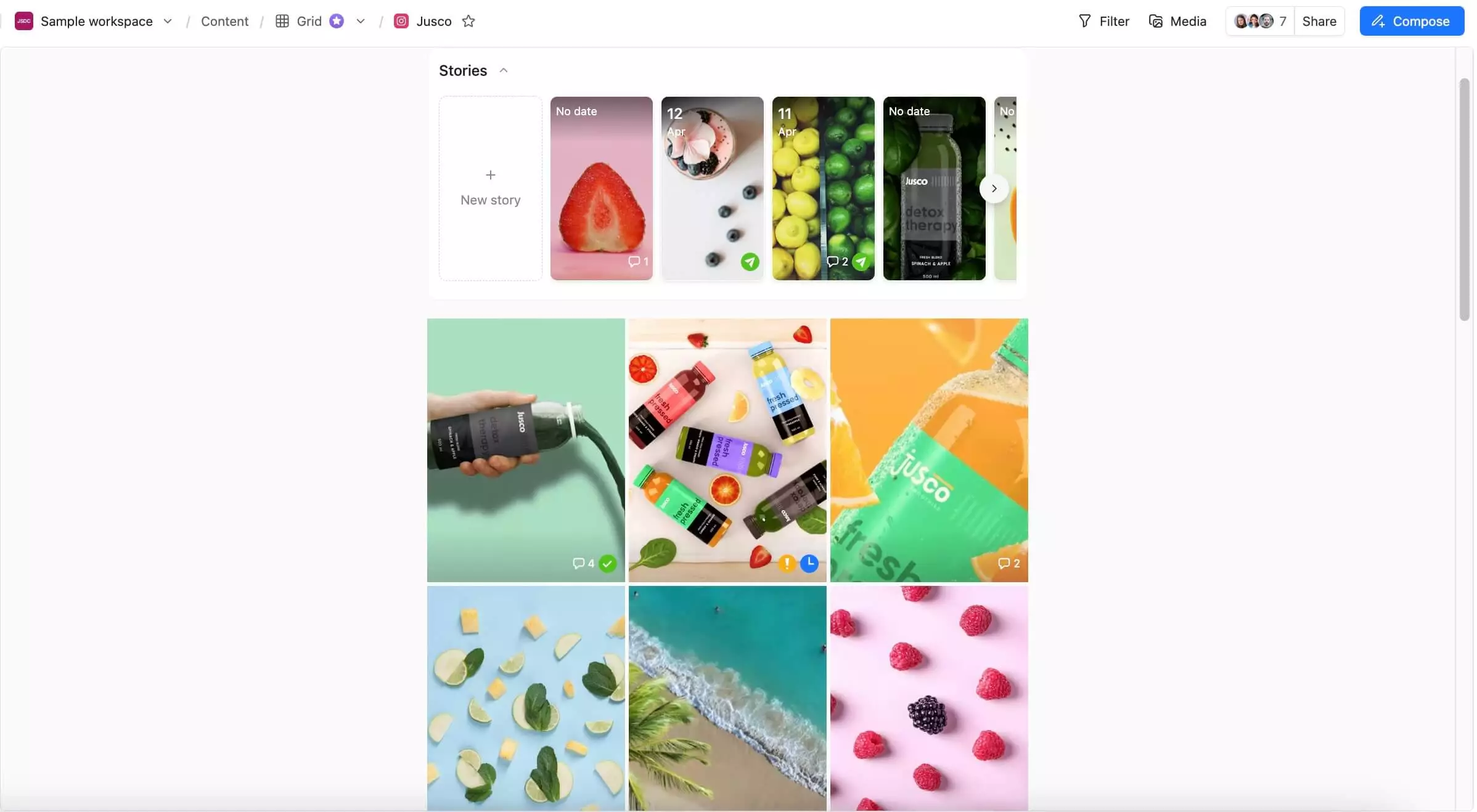
Instagram grid planner with stories and posts in Planable
Platforms: Facebook, Instagram (Reels + Stories), TikTok, LinkedIn, X (Twitter), YouTube, Pinterest, Threads, Google Business Profile
Integrations: Slack, Canva, Zapier
Planable’s standout features
- Multi-level approvals workflow: You can set sequential approval stages, assign multiple reviewers per stage, and keep content from publishing until it has cleared every required step. This is most valuable when different stakeholders need different types of sign-off (brand, legal, client, regional).
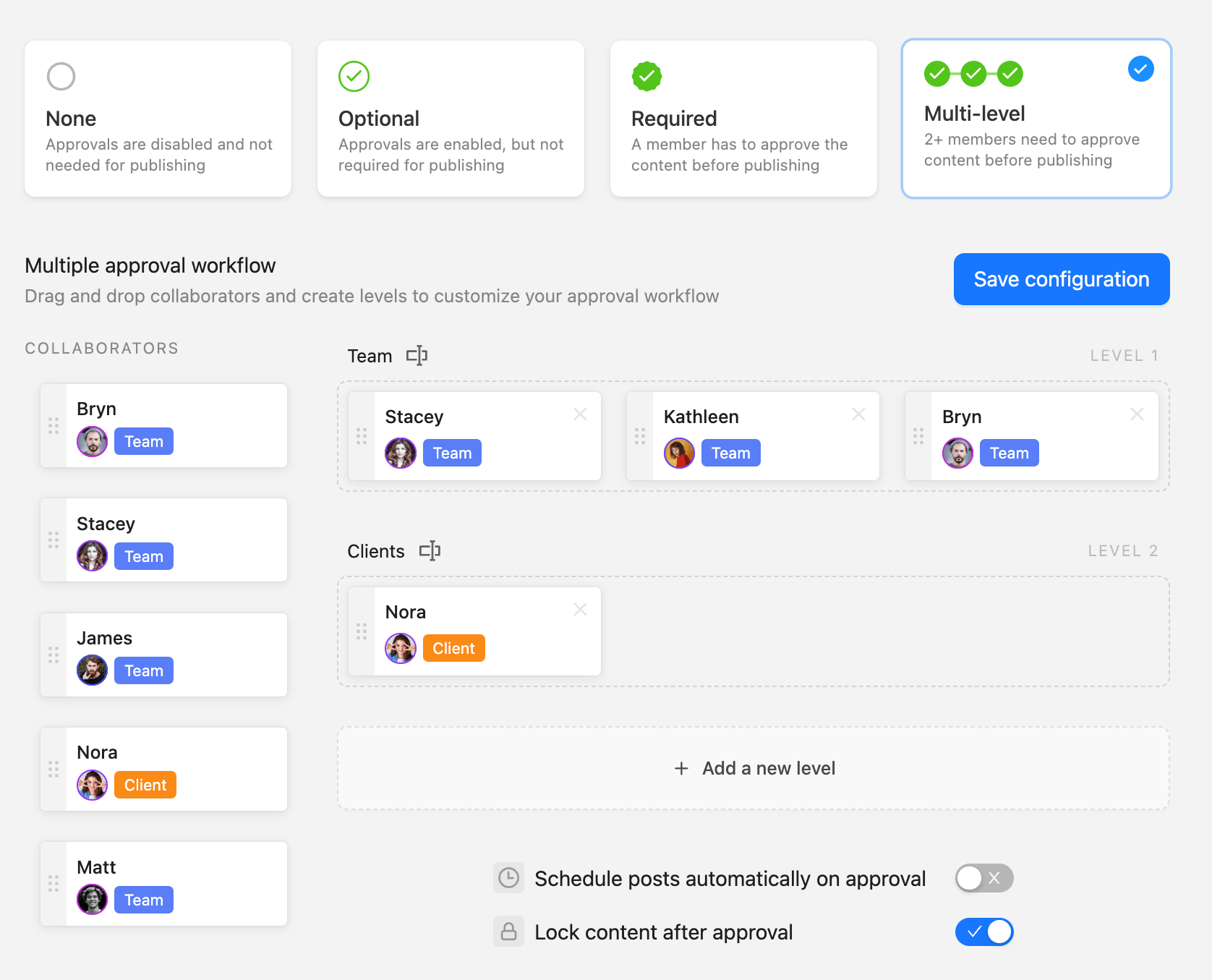
Multi-level approval workflow for content review in Planable
- Guest view links: Clients can review content through a shared link that shows a pixel-accurate preview of the live post, without needing a Planable account.
- Universal Content feature that extends the same draft → review → approval workflow beyond social posts to formats like blogs, newsletters, and email. This matters if your team wants a single approval system across channels, rather than separate tools and separate sign-off trails.
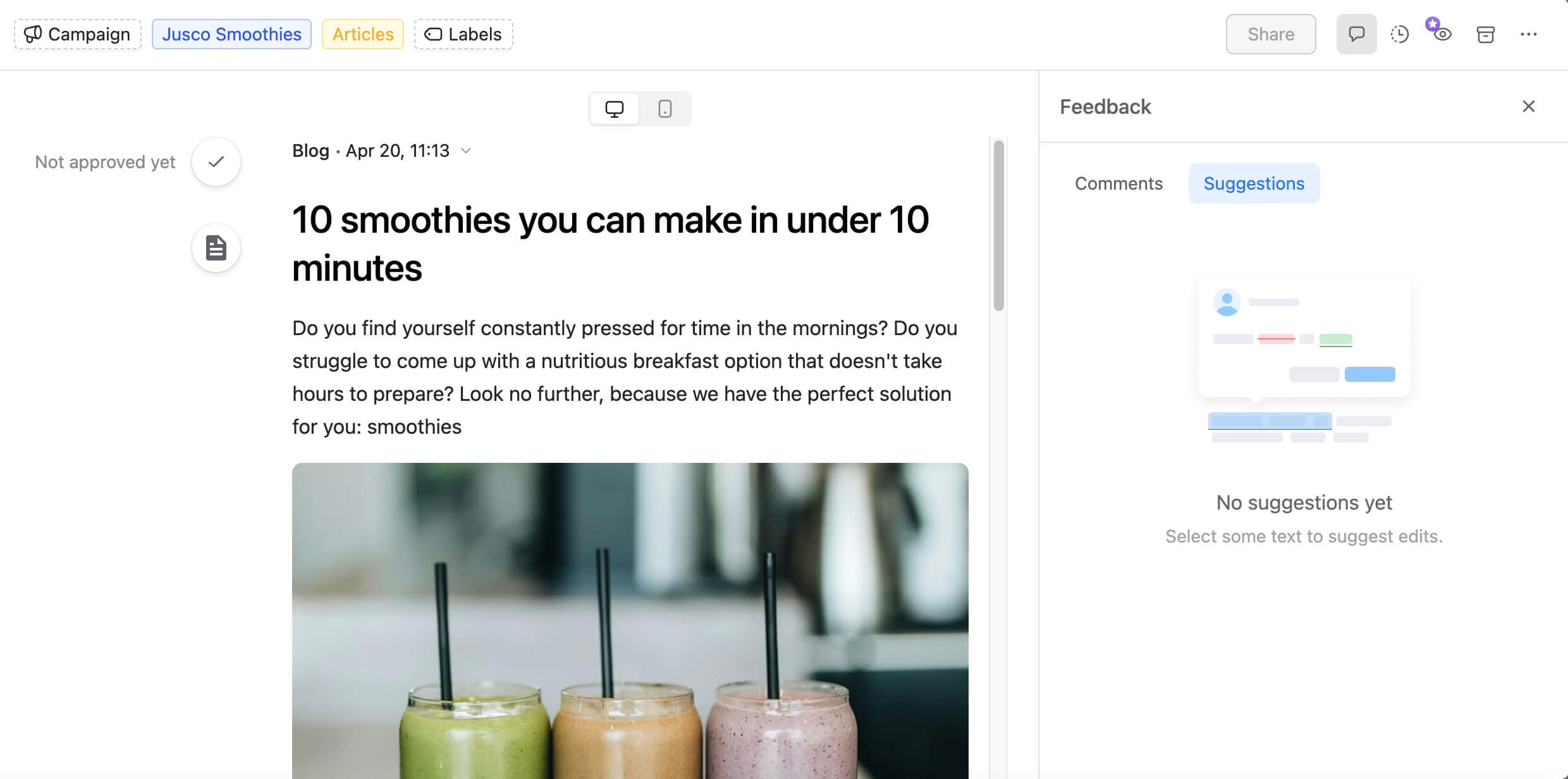
Blog draft editor with live feedback and suggestions in Planable
- A Social Inbox with sentiment-based triage, which can help teams prioritize replies and route messages faster.
- Baseline analytics for performance tracking with customizable reports build for clients.
- A built-in media library to keep approved creative organized and reusable.
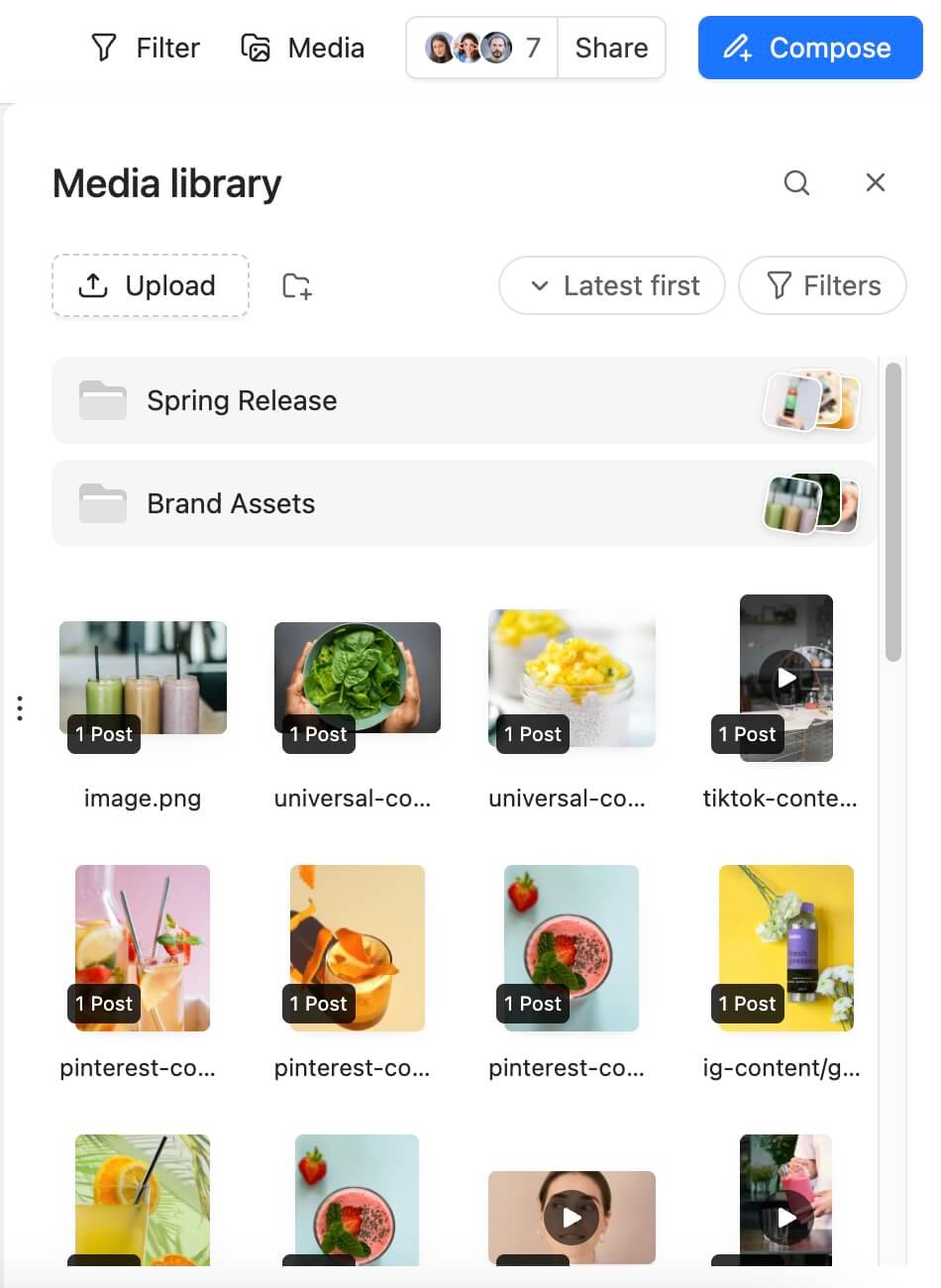
Media library with folders and content thumbnails in Planable
Planable pros and cons
- What-you-see-is-what-you-get post previews
- No native social listening
- Multi-level approval workflows built into the core product
- Guest review links with no client login required
- No review & reputation management workflows
- Universal Content extends workflows to blogs and newsletters
- Unlimited users on all paid plans
- What-you-see-is-what-you-get post previews
- Multi-level approval workflows built into the core product
- Guest review links with no client login required
- Universal Content extends workflows to blogs and newsletters
- Unlimited users on all paid plans
- No native social listening
- No CMS integration
- No review & reputation management workflows
Pricing: Free trial available (up to 50 posts). Planable is priced per workspace (typically one workspace per client/brand), not per user. Paid plans start at $33/workspace/month with annual billing.
Pricing can change, so it’s best to check their pricing page for the most current details.
Planable at a glance
⭐ Who it’s for: Marketing agencies and multi-brand teams where client sign-off and internal approval workflows are the primary bottleneck. Also a strong fit for any team managing multiple brands that needs all stakeholders (legal, brand, regional, client) in one structured review process.
2. Sprout Social – best social media management tool for enterprise analytics
Sprout Social is the social media management platform that’s especially strong at inbox and engagement management. It pulls DMs, comments, and brand mentions from multiple networks into a single, unified inbox, so teams can review and respond without jumping between platforms.
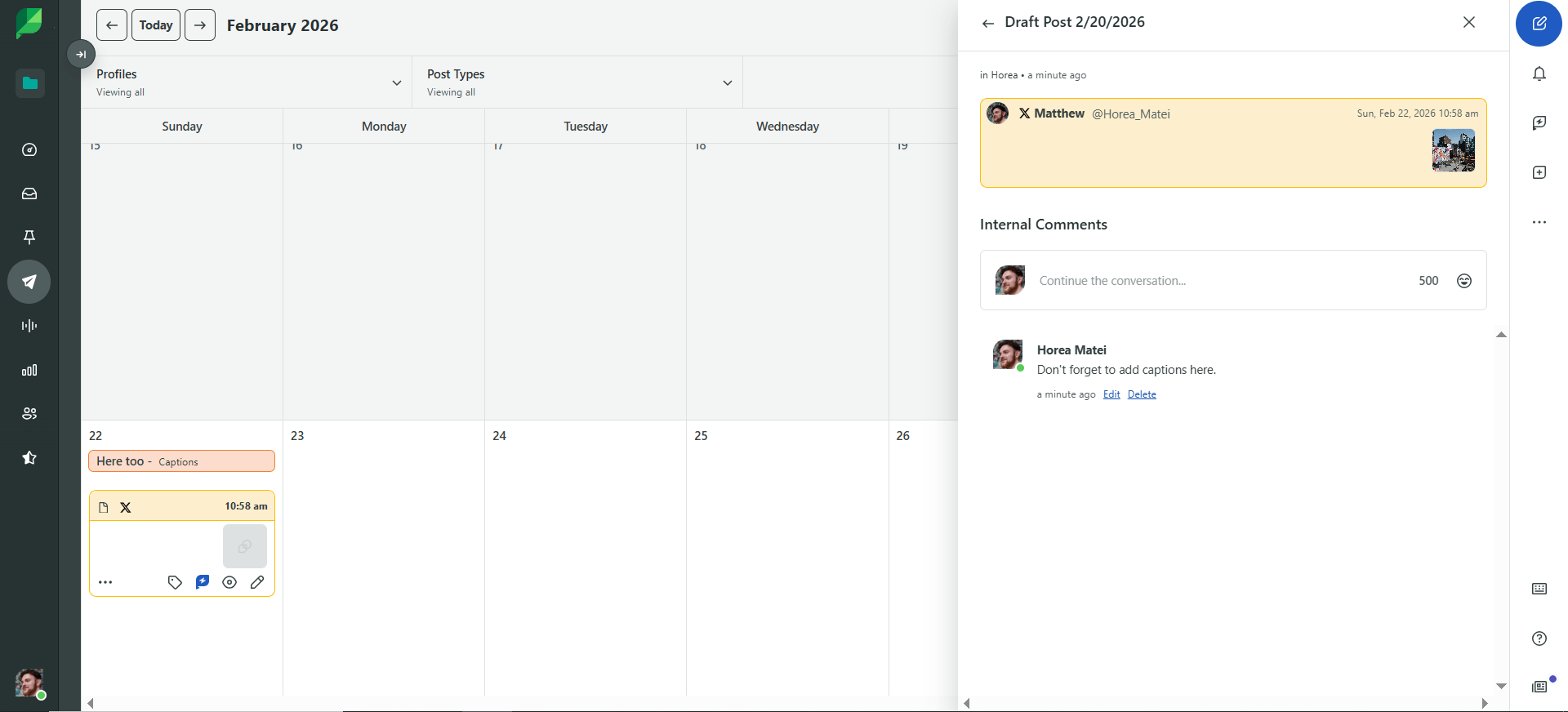
Sprout’s social calendar with draft post and comments panel
From there, Sprout’s sentiment analysis helps categorize messages by tone (positive, neutral, negative), and message spike alerts flag sudden increases in mentions, making it useful for catching potential issues early, before they escalate.
For teams, the workflow stays organized: you can assign messages to specific teammates and add tags and internal notes so the person replying has the context they need.
Platforms: Facebook, Instagram, X (Twitter), LinkedIn, TikTok, YouTube, Pinterest, Threads, Google Business Profile, and 10+ additional networks
Sprout Social’s standout features
- Social media publishing: Plan and schedule content with a clean, easy-to-use calendar, including optimal send time suggestions to help maximize engagement. For Instagram, you can also schedule Link in Bio updates to drive traffic to key pages.
- Analytics and reporting: Sprout’s analytics are where it most clearly earns its price tag. You can generate network-specific or cross-network reports with interactive charts, built to be presentation-ready without extra cleanup.
- Content curation: Use Content Suggestions to discover and share trending posts relevant to your brand, helping teams keep feeds active without starting from scratch every time.
- Social listening and CRM integrations: Sprout’s social listening is designed to inform strateg, so insights can feed directly into planning and messaging. When you pair that with native Salesforce and HubSpot integrations, social engagement can map more cleanly to CRM context, making it easier to connect social activity to pipeline and revenue.
Sprout Social pros and cons
- Best-in-class analytics with presentation-ready reports
- Very expensive when you want to scale
- Smart Inbox with AI sentiment analysis and spike alerts
- Listening, Premium Analytics, and Employee Advocacy are additional add-ons
- Social listening built into the platform (not a separate add-on on most plans)
- Per-user pricing escalates sharply for larger teams
- CRM integrations with Salesforce and HubSpot
- Best-in-class analytics with presentation-ready reports
- Smart Inbox with AI sentiment analysis and spike alerts
- Social listening built into the platform (not a separate add-on on most plans)
- CRM integrations with Salesforce and HubSpot
- Very expensive when you want to scale
- Listening, Premium Analytics, and Employee Advocacy are additional add-ons
- Per-user pricing escalates sharply for larger teams
Pricing: 30-day free trial, no credit card required. From $199/user/month (billed annually) for Standard with 5 social profiles.
Pricing can change, so it’s best to check their pricing page for the most current details.
Sprout Social at a glance
⭐ Who it’s for: Enterprise marketing teams and large in-house social departments where analytics, listening, and inbox management need to stand up in exec-level reporting conversations, and the budget exists to match.
3. SocialPilot – best social media management tool for high-volume publishing
SocialPilot sits at the intersection of volume and cost efficiency. It’s the platform I’d recommend to marketing teams that need to manage many accounts and publish a lot of content without paying enterprise rates to do it. It’s not the most polished tool on this list; the interface shows its age compared to Planable or Later, but for what it’s optimized for, it delivers reliably.
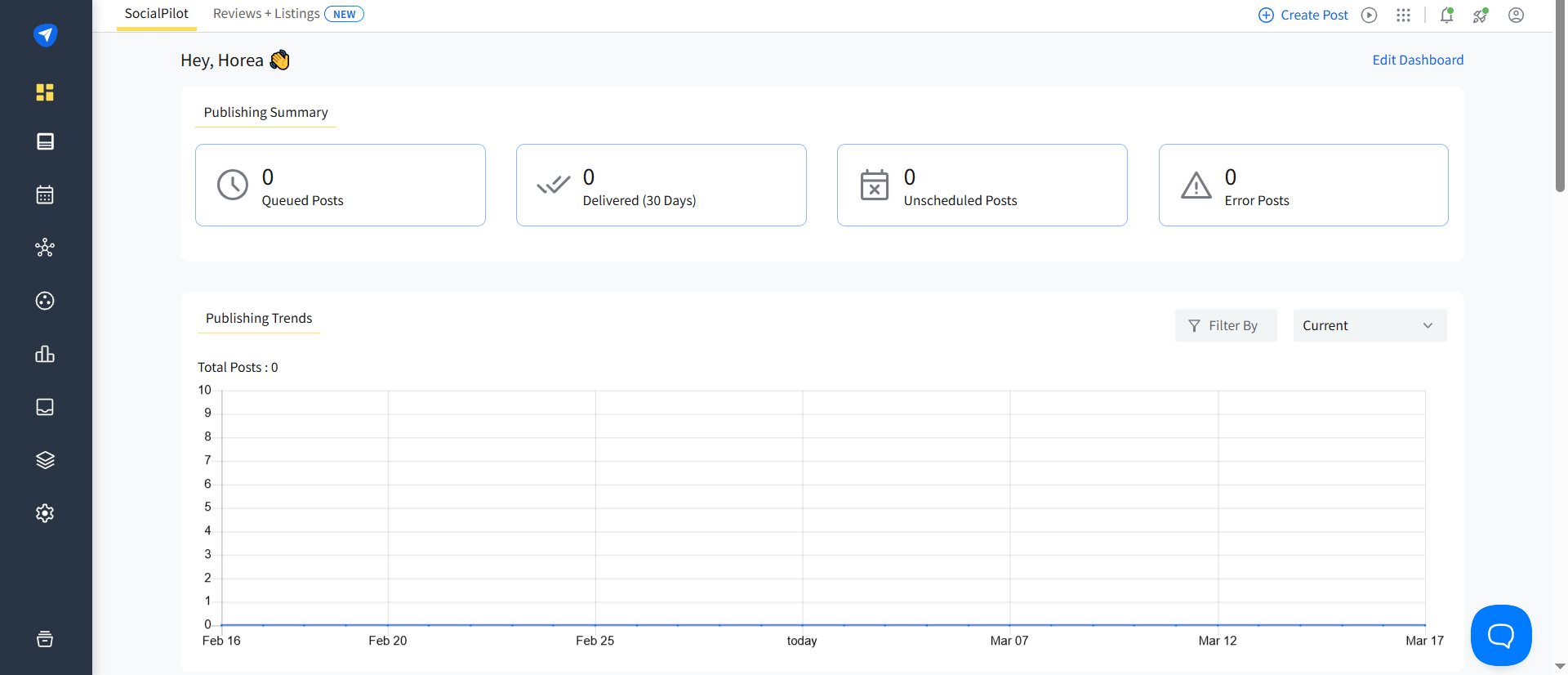
SocialPilot dashboard with publishing summary
The bulk scheduling capability is the headline feature: up to 500 posts in a single upload, with Smart Queues handling optimal timing automatically and Custom Fields injecting account-specific details into the same post across locations without duplicating effort.
Platforms: Facebook, Instagram, X (Twitter), LinkedIn, TikTok, Pinterest, YouTube, Google Business Profile, and more
SocialPilot standout features
- Social media scheduling: Automatically schedule posts across multiple social accounts at the right time for maximum engagement via Smart Queues. Schedule content in bulk or use the platform’s Custom Fields to automatically add social account-specific information for the same post, like contact details or physical addresses.
- Inbox management: Track and reply to comments, mentions, and DMs on Facebook, Instagram, and LinkedIn, as well as monitor Google Business Profile reviews.
- Analytics: Get ideal posting time suggestions and enhance the decision-making process via automated reports and get reports delivered to you monthly, weekly, or daily. Easily generate combined PDF reports to track performance on all your accounts.
- Custom reporting: Automated PDF reports can be delivered daily, weekly, or monthly across all connected accounts combined.
SocialPilot pros and cons
- Bulk scheduling up to 500 posts at once
- No multi-level internal approval workflows (client approval only)
- AI assistant for captions, hashtags, and multi-language translation
- Inbox management excludes TikTok and X
- White-label client reporting dashboard
- Interface feels dated compared to newer tools
- Smart Queue automation for optimal posting times
- Bulk scheduling up to 500 posts at once
- AI assistant for captions, hashtags, and multi-language translation
- White-label client reporting dashboard
- Smart Queue automation for optimal posting times
- No multi-level internal approval workflows (client approval only)
- Inbox management excludes TikTok and X
- Interface feels dated compared to newer tools
Pricing: 14-day free trial. From $25.50/month (billed annually).
Pricing can change, so it’s best to check their pricing page for the most current details.
Social Pilot at a glance
⭐ Who it’s for: Agencies managing a high volume of posts across many client accounts where cost efficiency and publishing throughput matter more than polished client-facing collaboration or multi-stakeholder approval chains.
4. Hootsuite – best social media management tool for competitive benchmarking
Hootsuite is a social media management tool with top-notch analytics capabilities. Aside from ideal posting time suggestions and cross-network reporting features, the platform handles analytics for paid social media marketing campaigns.
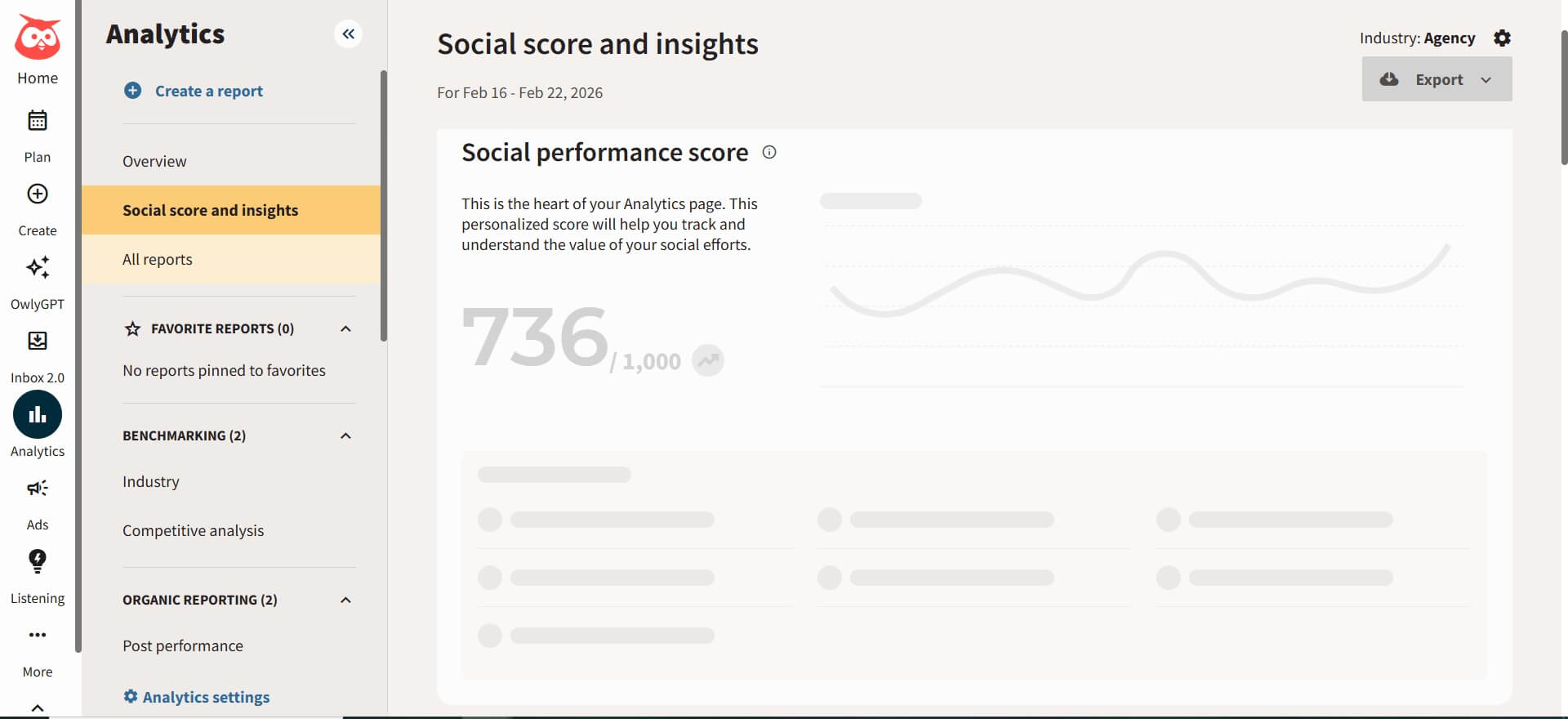
Hootsuite analytics dashboard with social score
That said, Hootsuite holds a legitimate position for teams that need specific capabilities. The competitive benchmarking feature is the strongest in this category: track performance against industry benchmarks or named competitors across posting frequency, audience growth, and impressions, then generate reports on their top-performing content and hashtags.
You can then add specific competitors to your watchlist and generate reports that cover their top-performing posts, content formats (for Facebook and Instagram only), and hashtags.
Platforms: Facebook, Instagram, X (Twitter), LinkedIn, TikTok, YouTube, Pinterest, and 35+ additional integrations
Hootsuite standout features
- Content curation: Use Hootsuite’s Content Discovery Streams to find and share relevant posts by searching a hashtag, keyword, or phrase, then reviewing the stream of suggested content tailored to your topic and audience.
- Ad campaign management: Create and manage paid social campaigns directly in Hootsuite, apply tags to track performance in real time, and quickly boost high-performing organic posts to extend reach without rebuilding campaigns from scratch.
- Inbox management: Strengthen follower relationships with Hootsuite’s inbox tooling, including contact management, auto-responders, and skill-based routing to ensure messages go to the right person on your team.
Hootsuite pros and cons
- Strong competitive benchmarking against peers and direct competitors
- Dashboard feels cluttered and dated in daily use
- Integrated paid social campaign management
- Social profile reconnect issues mid-campaign
- AI-powered content tools (OwlyGPT) throughout the platform
- Entry-level plan still lacks core agency features (approval workflows, media asset libraries, and campaign planning)
- Cross-network analytics with paid vs. organic comparison
- Strong competitive benchmarking against peers and direct competitors
- Integrated paid social campaign management
- AI-powered content tools (OwlyGPT) throughout the platform
- Cross-network analytics with paid vs. organic comparison
- Dashboard feels cluttered and dated in daily use
- Social profile reconnect issues mid-campaign
- Entry-level plan still lacks core agency features (approval workflows, media asset libraries, and campaign planning)
Pricing: 30-day free trial. From $199/user/month (billed annually) for the Professional plan.
Pricing can change, so it’s best to check their pricing page for the most current details.
Hootsuite at a glance
⭐ Who it’s for: Marketing leaders who need competitive intelligence and paid social management in one platform, and whose teams have the experience to absorb a steeper learning curve. Not the right default choice based on name recognition alone.
5. Later – best social media management tool for visual-first brands
Later is the strongest purpose-built tool for teams where Instagram and TikTok are the center of gravity. It’s clearly optimized for visual content planning and creator-friendly workflows, and that focus makes it excellent at what it does.
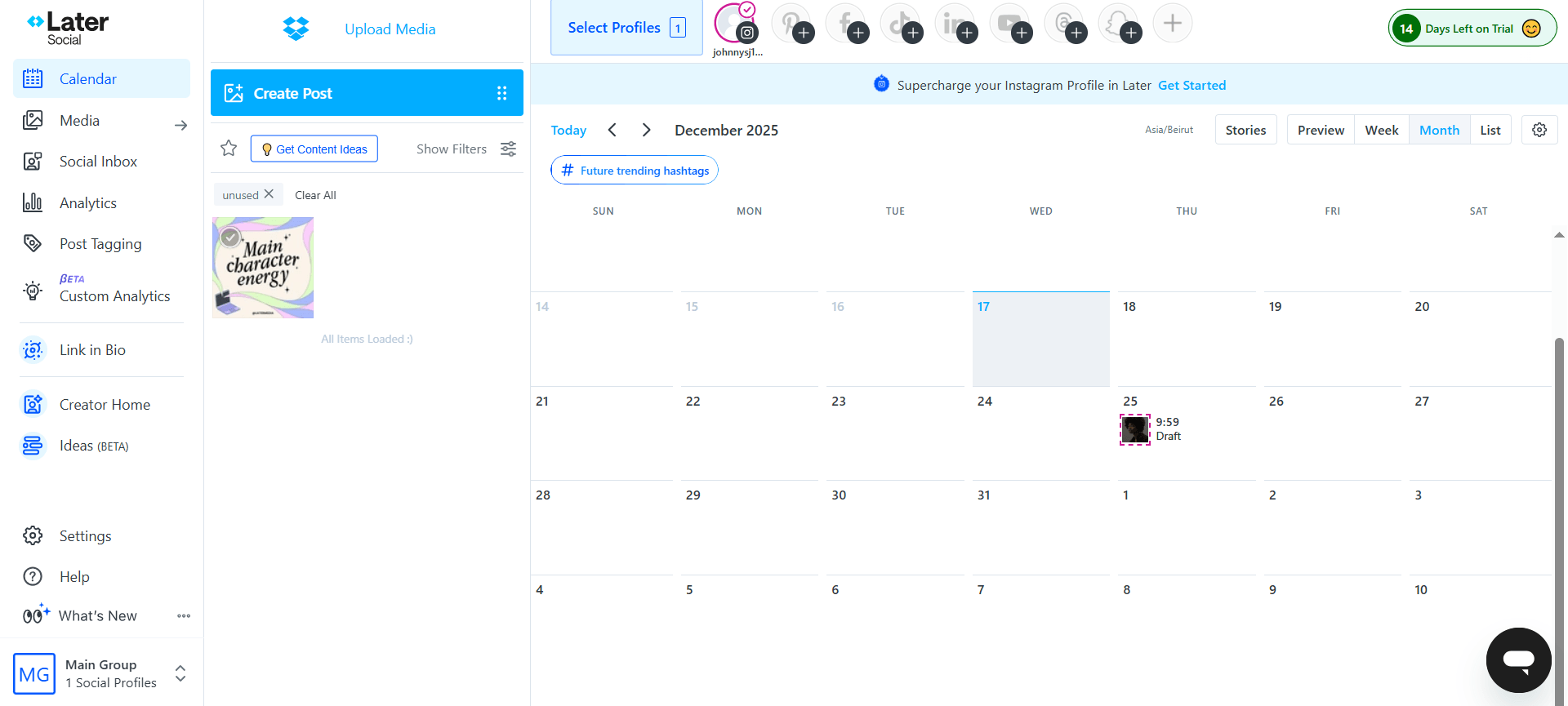
Later calendar with scheduled posts and drafts
Planning content in Later felt more like arranging a layout than filling in a spreadsheet. The visual grid view shows the Instagram feed exactly as it will look, lets you rearrange posts with drag-and-drop, and makes sequencing decisions visible before anything goes live.
That visual clarity solved a problem I kept running into in analytics-first tools: making creative decisions about a visual feed inside a text-heavy interface. Later removes that mismatch entirely.
You can also get all the insights necessary to grow your site and boost email subscriptions through Later’s native integrations with Google Analytics and Mailchimp.
Platforms: Instagram (Reels + Stories), TikTok, Facebook, LinkedIn, X (Twitter), Pinterest, YouTube
Later standout features
- Content creation and curation: Create on-brand assets using Later’s built-in photo and video editing tools and its native Canva integrations. For curation, you can find and share user-generated content by searching hashtags, brand mentions, or specific social profiles, and Later automatically adds creator attribution to captions when you reshare.
- Content scheduling: Schedule the same post across multiple social platforms, with recommendations for ideal posting times and hashtags to support reach and engagement. Later also supports scheduling short-form formats like YouTube Shorts, Instagram Reels and Stories, and Facebook Reels.
- In-depth analytics: Analyze the social media performance with audience demographic insights, and evaluate how different formats (like Instagram Reels and Stories) are performing over time.
Later pros and cons
- Best-in-class visual grid planning for Instagram
- Audience analytics and inbox management largely limited to Instagram and TikTok
- Most conversion-aware Link in Bio implementation in the category, with Mailchimp and Google Analytics integration
- Approval workflows lighter than other social media management tools; less configurable for multi-stakeholder review
- Deep Instagram and TikTok audience analytics
- Scaling to multiple accounts across many networks gets expensive
- UGC discovery with automatic creator attribution in captions
- Less useful if visual platforms aren’t your primary channels
- Native Canva integration and hashtag recommendations
- Best-in-class visual grid planning for Instagram
- Most conversion-aware Link in Bio implementation in the category, with Mailchimp and Google Analytics integration
- Deep Instagram and TikTok audience analytics
- UGC discovery with automatic creator attribution in captions
- Native Canva integration and hashtag recommendations
- Audience analytics and inbox management largely limited to Instagram and TikTok
- Approval workflows lighter than other social media management tools; less configurable for multi-stakeholder review
- Scaling to multiple accounts across many networks gets expensive
- Less useful if visual platforms aren’t your primary channels
Pricing: 14-day free trial, no credit card required. From $18.75/month (billed annually).
Pricing can change, so it’s best to check their pricing page for the most current details.
Later at a glance
⭐ Who it’s for: Brand and creator teams where Instagram and TikTok are the strategic center of gravity, and where visual feed planning and Link in Bio conversion tracking are daily workflow requirements.
6. Loomly – best social media management tool for campaign & UTM tracking
Loomly fills a gap that most social tools handle poorly: campaign-level organization. Most platforms let you schedule posts. Loomly lets you organize those posts into named campaigns with custom UTM parameters, color-coded labels, hashtag collections, and approval status tracking, all visible in the calendar without clicking into individual posts.
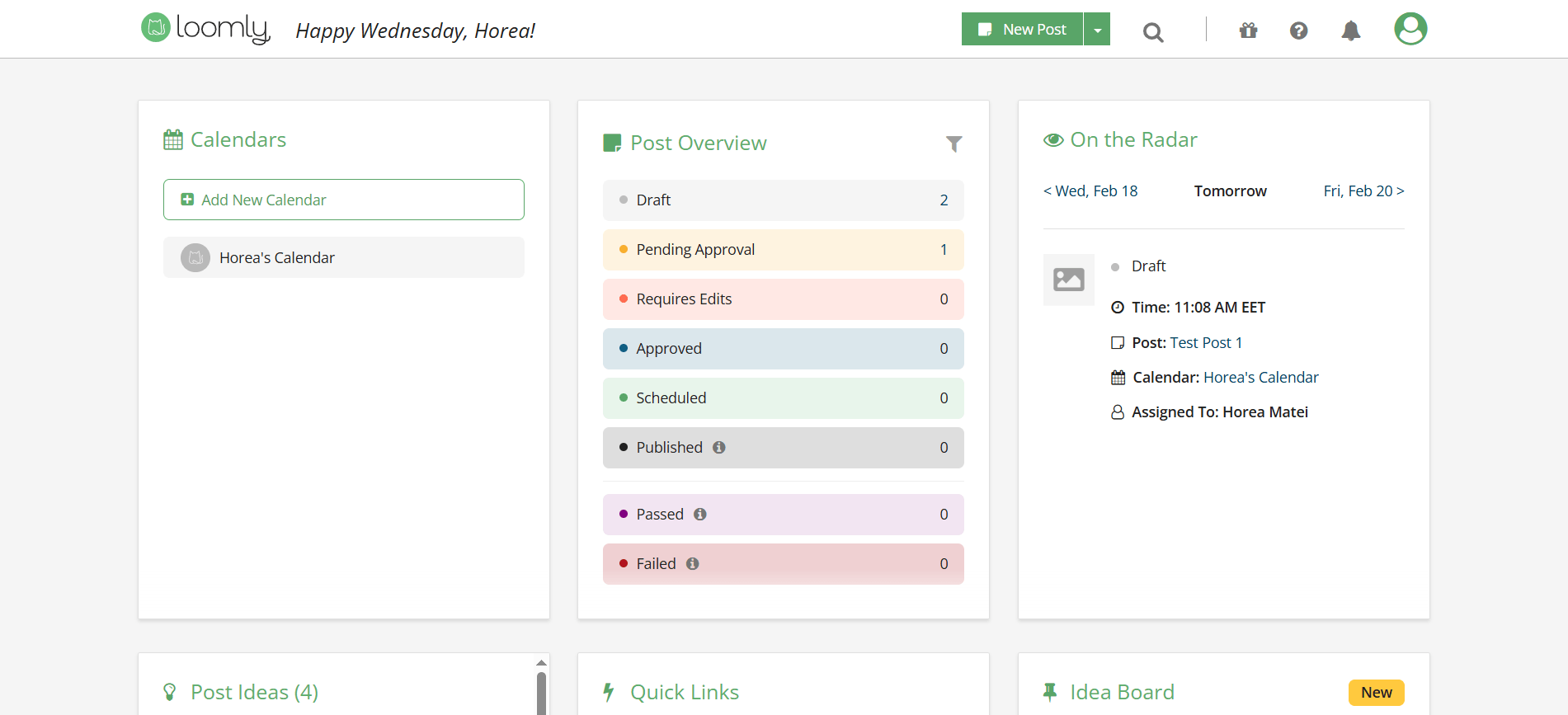
Loomly dashboard with approvals and upcoming posts
For teams managing several concurrent campaigns with different stakeholders, the structural clarity that Loomly provides is a genuine operational advantage.
You can also sift through campaigns through the platform’s numerous filtering options, like date range, post type, assignee, or social channel, for instance.
Platforms: Facebook, Instagram, X (Twitter), LinkedIn, TikTok, Pinterest, YouTube, Snapchat, Google Business Profile, Threads, Bluesky
Loomly standout features
- Community management: Manage conversations from multiple channels in a unified inbox, reply directly, or assign specific threads to teammates. Loomly also lets you save and reuse common replies, which helps teams respond faster while keeping tone and messaging consistent.
- Content creation: Find what to post faster with Loomly’s Post Ideas, speed up discovery with automated hashtag suggestions, and create on-brand visuals using Loomly Studio with image/video filters and fine-tuning tools.
- Custom UTM parameters: Add custom UTM parameters using Loomly’s built-in URL shortener to track campaign performance, including click counts, traffic sources, and audience location.
Loomly pros and cons
- Campaign-level UTM tracking built directly into the platform
- Pricing not transparent on the official site; requires digging to find real costs and the gaps between tiers are large enough to make scaling feel punishing
- Advanced Analytics available on all paid plans, not locked behind top tiers
- Large gaps between pricing tiers make scaling expensive
- Post Ideas feature for daily content inspiration
- TikTok and YouTube analytics not included; a meaningful gap for video-first strategies
- Campaign-level UTM tracking built directly into the platform
- Advanced Analytics available on all paid plans, not locked behind top tiers
- Post Ideas feature for daily content inspiration
- Pricing not transparent on the official site; requires digging to find real costs and the gaps between tiers are large enough to make scaling feel punishing
- Large gaps between pricing tiers make scaling expensive
- TikTok and YouTube analytics not included; a meaningful gap for video-first strategies
Pricing: 15-day free trial. Plans from approximately $49/month (billed annually).
Pricing can change, so it’s best to check their pricing page for the most current details.
Loomly at a glance
⭐ Who it’s for: Teams managing several concurrent campaigns with different stakeholders who need campaign-level organization, UTM attribution, and traffic source reporting without stitching together multiple platforms.
7. Buffer – best social media management tool for simple scheduling
Buffer made its name by doing one thing exceptionally well and not overcomplicating it. After signing up, I didn’t have to navigate streams, configure settings, or watch tutorial videos.
I connected accounts and started scheduling. That sounds like a low bar, but it’s rarer in practice than it should be as most tools in this category impose a meaningful learning curve before they become useful.
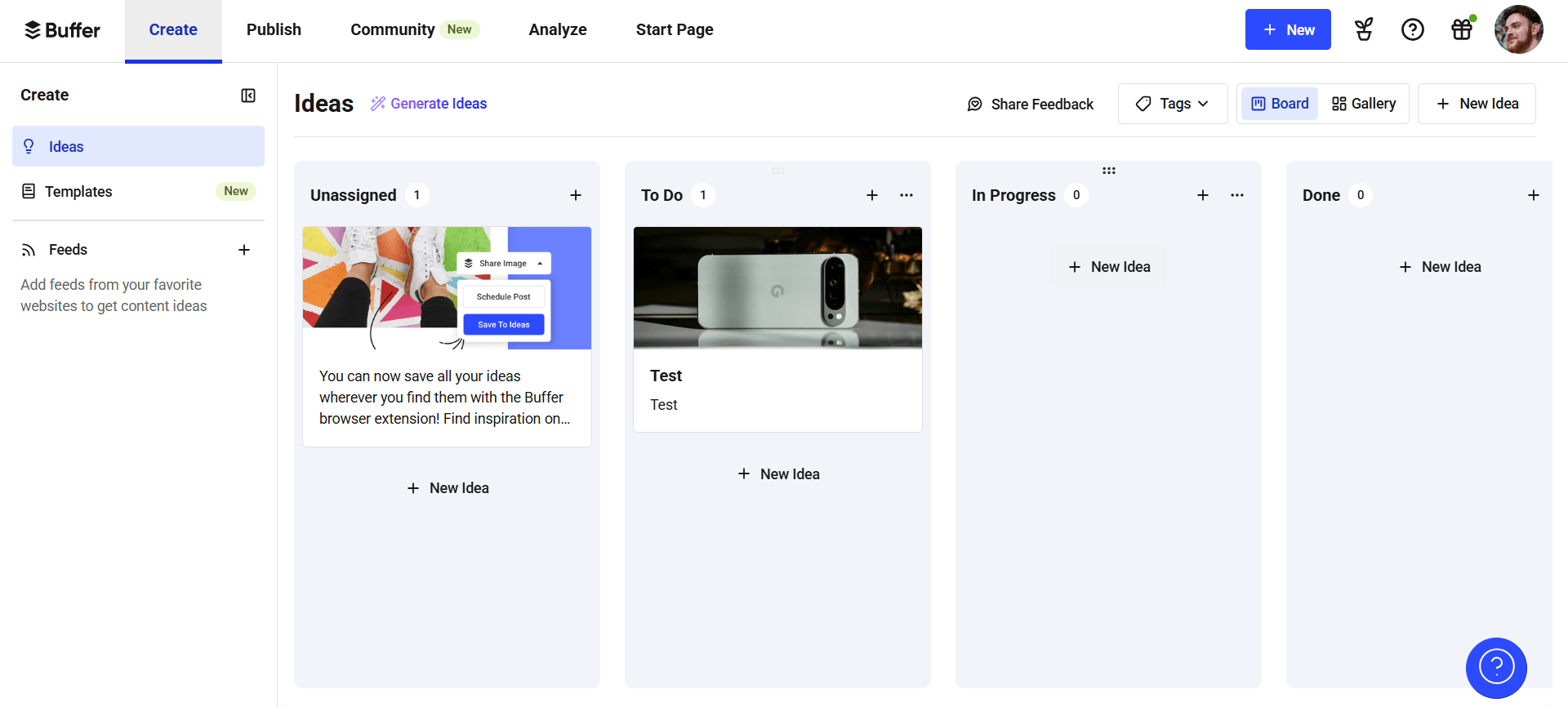
Buffer ideas board with cards by workflow stage
Buffer also allows you to stack up boosted posts against your organic content to see which strategy brings you better results, while its custom reports help you track any type of social media metrics relevant to your campaigns; be it reach, follower growth, impressions, audience demographics, and so on.
Platforms: Facebook, Instagram, X (Twitter), LinkedIn, TikTok, YouTube, Pinterest, Mastodon, Bluesky, Threads, Google Business Profile
Buffer standout features
- Start Page: Use Buffer’s Start Page to build Link in Bio landing pages from ready-made templates, publish quick updates as needed, and connect Shopify to see store performance signals like referral traffic and top-selling products tied to your links.
- Scheduling: Keep posting consistent with automatic publishing or reminder-based publishing, cross-post the same content across multiple social networks, and plan everything in a highly visual content calendar.
- Content creation: Organize production with Kanban boards that show project status at a glance, capture ideas and save them as drafts inside Buffer, and use Buffer’s AI assistant to refine draft copy when you need a faster starting point.
Buffer pros and cons
- Start Page (Link in Bio) included at every tier
- No multi-level approval workflows
- Ideas space for collaborative content capture before scheduling
- Per-channel pricing compounds for agencies managing many accounts
- Permanent free plan for up to 3 channels
- Analytics not deep enough for enterprise reporting or client-facing decks
- Customer support response times inconsistent
- Start Page (Link in Bio) included at every tier
- Ideas space for collaborative content capture before scheduling
- Permanent free plan for up to 3 channels
- No multi-level approval workflows
- Per-channel pricing compounds for agencies managing many accounts
- Analytics not deep enough for enterprise reporting or client-facing decks
- Customer support response times inconsistent
Pricing: Permanent free plan (3 channels, 10 posts per channel). From $5/channel/month for Essentials (billed annually); from $10/channel/month for Team.
Pricing can change, so it’s best to check their pricing page for the most current details.
Buffer at a glance
⭐ Who it’s for: Small in-house teams, solo operators, and early-stage brands that need reliable, predictable scheduling without a steep learning curve or high per-user cost. Not the right fit once approval workflows or agency-scale account management become requirements.
8. Publer – best social media management tool for multi-platform breadth
Publer stands out for its platform coverage. Alongside major social networks, it supports Telegram, Threads, WordPress, Mastodon, and Bluesky, so teams publishing to both mainstream and niche channels can manage everything in one tool.
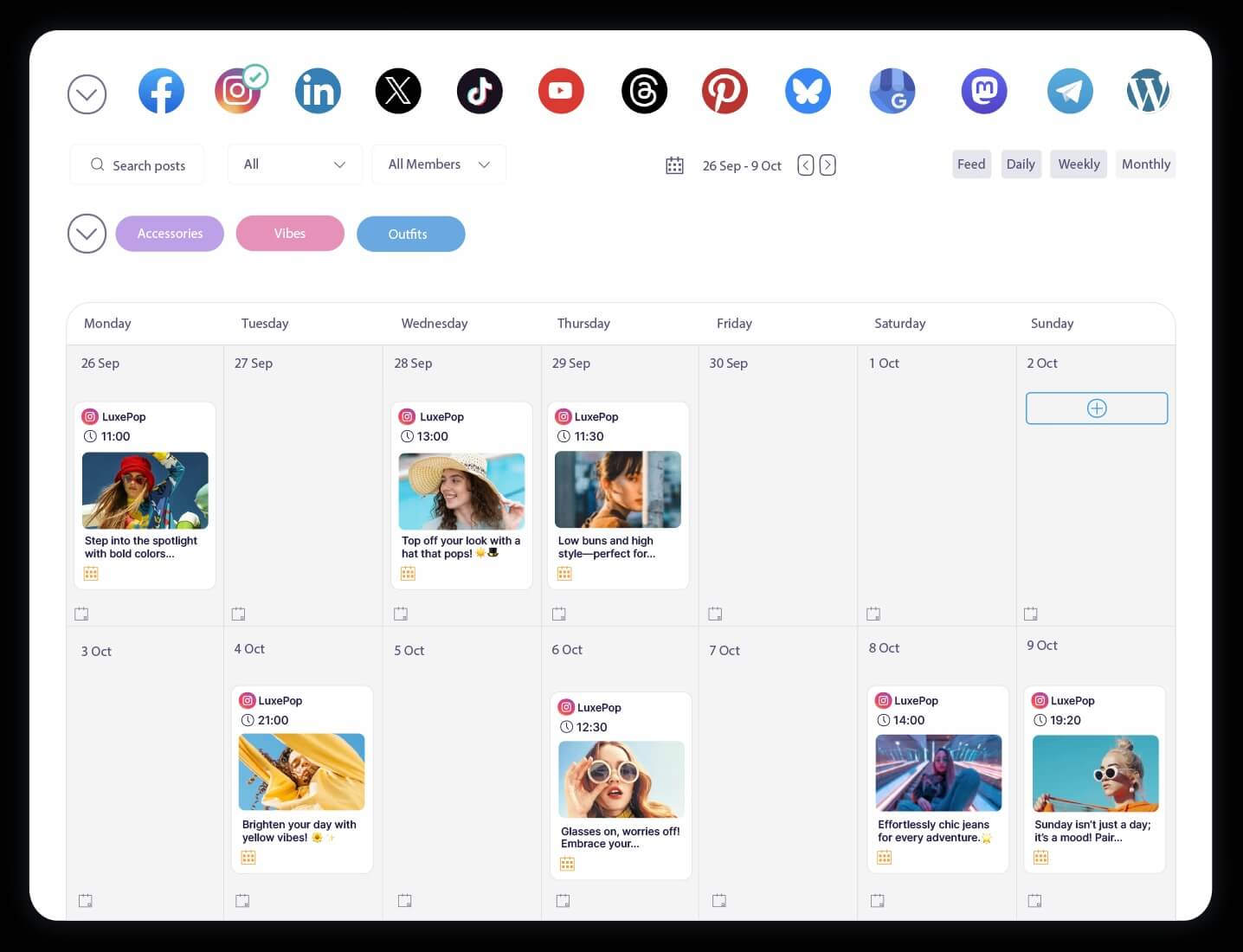
Publer’s social media calendar with weekly scheduled posts
The evergreen content recycling system lets you tag high-performing posts in the analytics dashboard and set them to republish automatically, with custom frequency controls and start/end dates. Once configured, evergreen content essentially manages itself.
Platforms: Facebook, Instagram (Reels + Stories), X (Twitter), LinkedIn, TikTok, Pinterest, YouTube, Google Business Profile, Telegram, Threads, WordPress, Mastodon, Bluesky
Publer standout features
- Automated content recycling: Find high-performing evergreen posts inside the analytics dashboard, then automatically reshare them to extend reach over time. You can control recycling with custom posting frequencies plus start and end dates so content stays relevant and doesn’t overwhelm your feed.
- Analytics: Understand who your audience is by tracking location, age, and gender distribution, and measure performance across click-through, reach, and engagement. Publer also includes recommendations (like hashtag suggestions, ideal posting times, and other automated optimization prompts) to help improve reach and engagement.
- AI assistant: Use Publer’s AI assistant to handle common workflow tasks like replying to comments, translating posts, brainstorming ideas, or generating content. It can also produce longer-form outputs, including WordPress articles, when you need to move from social planning to content production.
Publer pros and cons
- Broadest platform support on this list
- Approval system limited to two layers (internal + client)
- Automated evergreen content recycling with custom frequency controls
- Interface less polished, with a steep navigation curve
- AI assistant covers captions, comment replies, translations, and WordPress drafts
- Analytics lighter than enterprise alternatives
- Broadest platform support on this list
- Automated evergreen content recycling with custom frequency controls
- AI assistant covers captions, comment replies, translations, and WordPress drafts
- Approval system limited to two layers (internal + client)
- Interface less polished, with a steep navigation curve
- Analytics lighter than enterprise alternatives
Pricing: Free plan (1 workspace, 3 social accounts). From $4/month (billed annually).
Pricing can change, so it’s best to check their pricing page for the most current details.
Publer at a glance
⭐ Who it’s for: Brands with a publishing presence across both mainstream and niche channels (especially those including Telegram, WordPress, or Mastodon), where consolidating everything into one tool is the primary operational goals.
9. Agorapulse – best social media management tool for ROI reporting & inbox
Agorapulse is an all-rounder with two areas where it genuinely leads: inbox management and ROI reporting.
With Agorapulse the content workflow is build around community management. The unified inbox pulls everything, DMs, comments, mentions, reviews, into a single triage-first flow, with the Inbox Assistant automatically labeling and routing incoming messages so nothing gets missed in a busy multi-account environment.
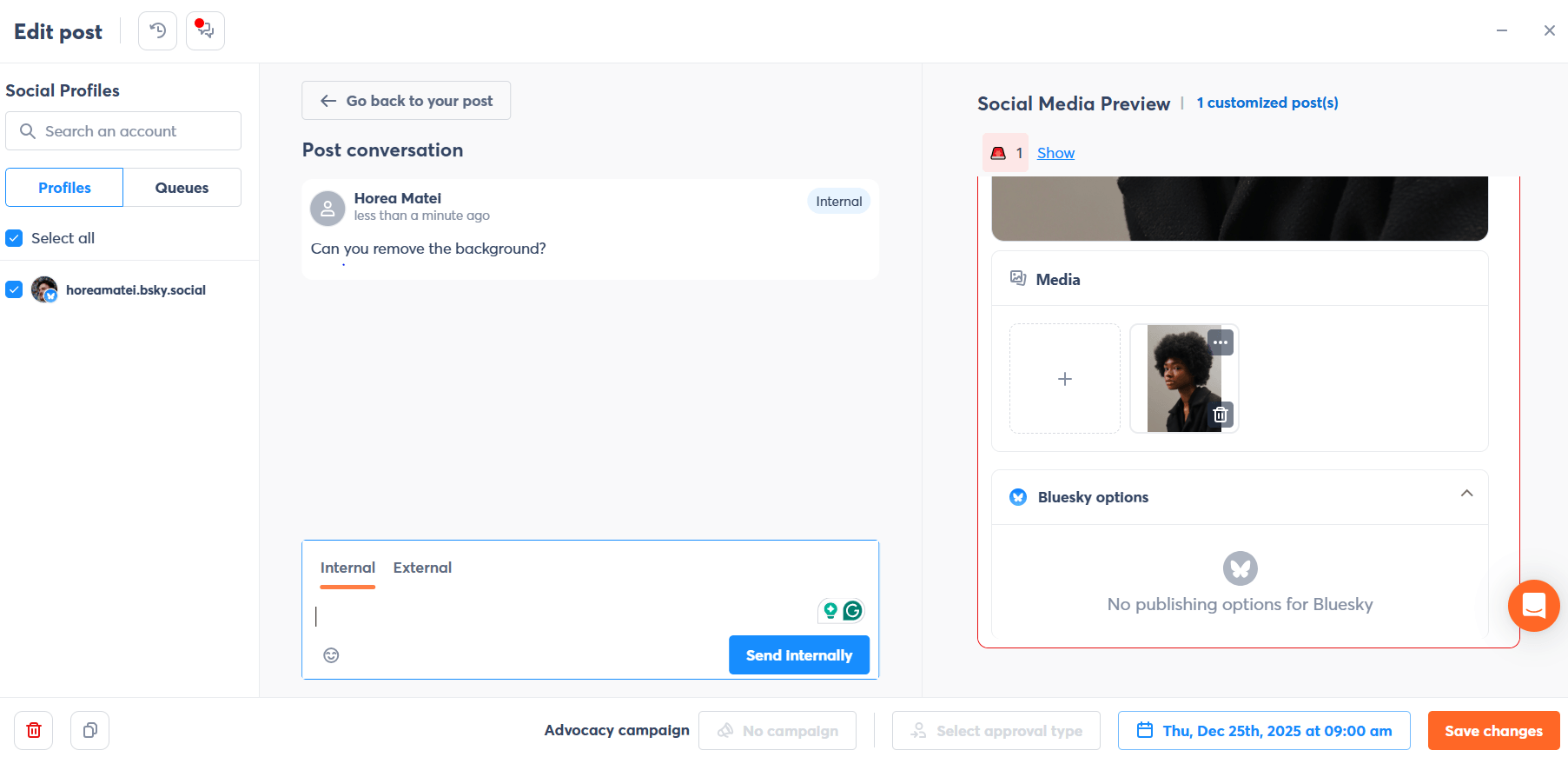
Agorapulse post editor with comments and preview
The ROI reporting feature is the clearest differentiator at this price point. By integrating natively with GA4, combined with UTM tracking, the platform maps specific social campaigns and channels directly to revenue within a defined period.
Platforms: Facebook, Instagram, X (Twitter), LinkedIn, TikTok, Pinterest, YouTube, Google Business Profile, Threads, Bluesky
Agorapulse standout features
- Inbox management: Get a unified view of comments, reviews, DMs, and mentions across your social networks. Use the Inbox Assistant to automatically label messages and assign specific comments to the right teammates, and connect Agorapulse with Salesforce and HubSpot via native CRM integrations to support sales or customer service workflows.
- Social media publishing: Publish posts automatically across supported platforms, and use Custom Fields to add small, platform-specific text variations without rewriting the whole post. You can also schedule first comments on LinkedIn, X (Twitter), Facebook, and Instagram to drive early engagement.
- Reports: Build fully customized reports with Power Reports, choosing the metrics, social networks, profiles, and date ranges you care about. Agorapulse can then deliver automatic reports that include visualizations (graphs) and performance changes over time (increase/decrease percentages).
Agorapulse pros and cons
- Native Google Analytics and GA4 integration for social-to-revenue attribution
- Per-user pricing escalates quickly for larger teams and agencies
- Best-in-class unified inbox with Inbox Assistant for auto-labeling and routing
- Approval workflows require Professional tier or above
- Social listening included in the platform
- TikTok community management has coverage gaps
- CRM integrations with Salesforce and HubSpot
- Native Google Analytics and GA4 integration for social-to-revenue attribution
- Best-in-class unified inbox with Inbox Assistant for auto-labeling and routing
- Social listening included in the platform
- CRM integrations with Salesforce and HubSpot
- Per-user pricing escalates quickly for larger teams and agencies
- Approval workflows require Professional tier or above
- TikTok community management has coverage gaps
Pricing: Plans starts at $79/user/month (billed annually) for Standard with 10 social profiles and unlimited posts.
Pricing can change, so it’s best to check their pricing page for the most current details.
Agorapulse at a glance
⭐ Who it’s for: Social media managers and agency leads who need to prove the revenue impact of social activity to clients or leadership, and for whom inbox management across multiple accounts is a daily operational requirement.
10. Birdeye Social AI – best social media management tool for multi-location brands
Birdeye Social sits in a different category from everything else on this list. It’s not primarily a social media management tool, it’s a multi-location customer experience platform with a powerful social component.
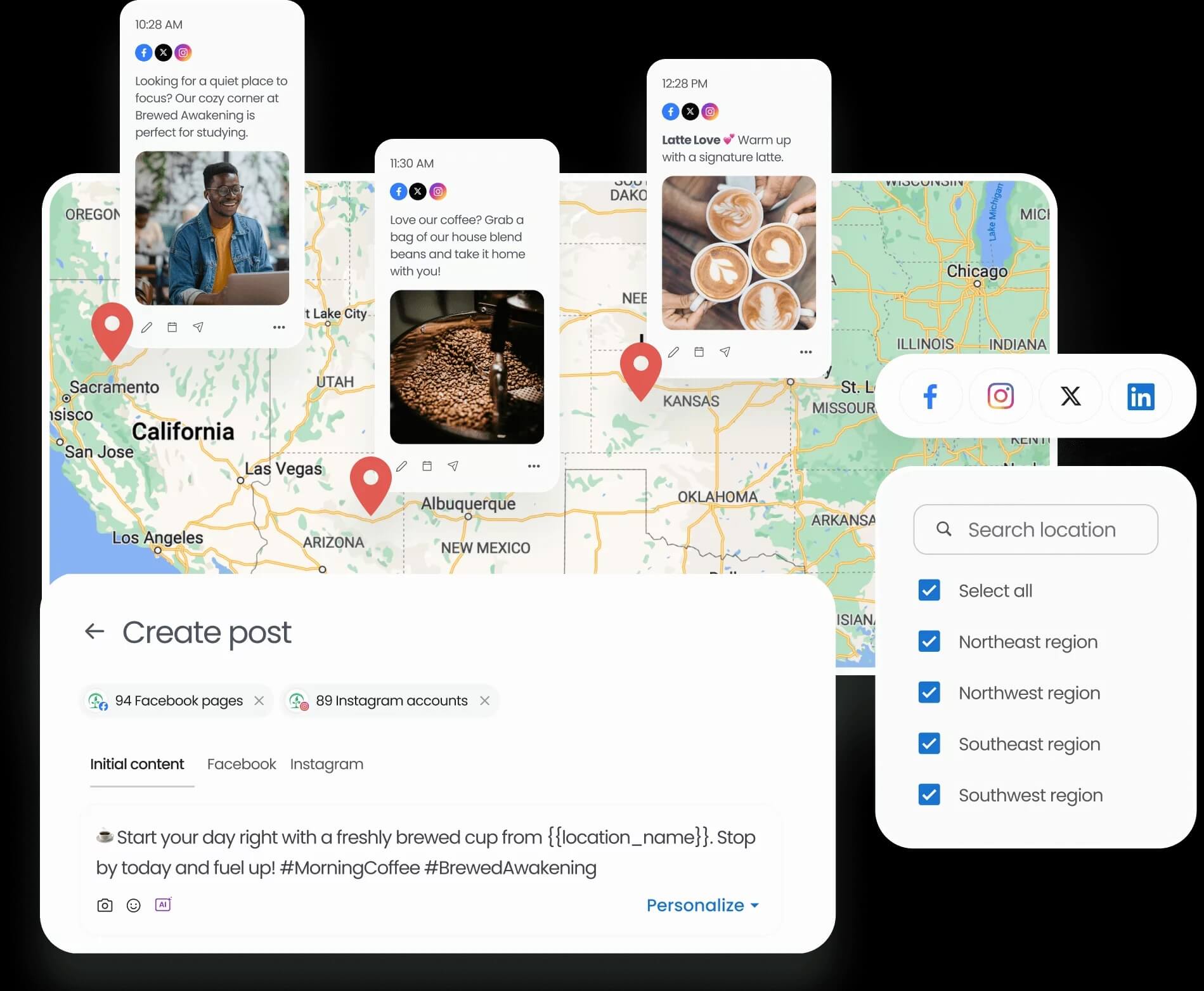
Birdeye’s social scheduling dashboard with map targeting and post previews
Birdeye integrates social publishing with reputation management, review monitoring, and local listings management in a way specifically designed for franchise brands, retail chains, healthcare networks, and any organization where individual locations need localized content alongside centralized brand governance.
The AI content generation engine creates and schedules location-specific posts from a single dashboard, automatically optimizing per channel with industry-specific suggestions.
Platforms: Facebook, Instagram, X (Twitter), LinkedIn, TikTok, Google Business Profile, Apple Business Connect
Birdeye Social standout features
- Allows personalized social posts for multiple locations from a single dashboard.
- Automatically creates engaging posts, optimizes them for different channels, and offers industry-specific suggestions.
- Users can upload posts in bulk via XLS, making planning and scheduling content efficiently easy.
- Provides a comprehensive view of scheduled posts across all locations and networks.
- Curate a library of pre-approved posts for quick access and repurposing, enabling efficient content management across multiple locations.
- Utilize GenAI to determine the best times to post, maximizing engagement and reach on social media platforms.
- Seamlessly manage and schedule posts for Google Business Profiles and Apple listings, ensuring consistent branding across all channels.
- Manage your social media presence from anywhere with a mobile app, allowing for real-time updates and engagement.
Birdeye Social pros and cons
- Location-level AI content generation from a single dashboard
- Custom pricing; no public rates, requires a sales conversation before you know the cost
- Manages Google Business Profiles and Apple listings alongside social channels
- AI content generation needs meaningful setup and ongoing human oversight
- Pre-approved content library for brand-consistent local publishing
- Overkill and cost-inefficient for single-location businesses or small agencies
- 3,000+ integrations including CRM and POS systems
- Steeper onboarding than any other tool on this list
- Bulk XLS upload for mass scheduling across hundreds of locations
- Location-level AI content generation from a single dashboard
- Manages Google Business Profiles and Apple listings alongside social channels
- Pre-approved content library for brand-consistent local publishing
- 3,000+ integrations including CRM and POS systems
- Bulk XLS upload for mass scheduling across hundreds of locations
- Custom pricing; no public rates, requires a sales conversation before you know the cost
- AI content generation needs meaningful setup and ongoing human oversight
- Overkill and cost-inefficient for single-location businesses or small agencies
- Steeper onboarding than any other tool on this list
Pricing: Custom pricing based on number of locations and requirements. 30-day free trial available.
Pricing can change, so it’s best to check their pricing page for the most current details.
Birdeye Social at a glance
⭐ Who it’s for: Franchise brands, retail chains, healthcare networks, and any multi-location organization with 50+ locations that each need their own localized content presence and Google Business Profile managed centrally. Not the right fit for any use case outside that specific operational reality.
Which social media management tool is right for you?
Most tools on this list can do broadly similar things because they’re operating within the same constraints set by each social network’s API. The real differentiation is in the workflow infrastructure: how content gets created, reviewed, approved, and measured.
Here’s the honest way to choose:
- Choose Planable if your day-to-day work is drafting content, collecting feedback, and getting sign-off (especially with clients in the loop). It’s the clearest fit when approvals are the bottleneck, because approval workflows are treated as a first-class capability.
- Choose Sprout Social if you’re operating at an enterprise level and need analytics, listening, and inbox management that can stand up in an exec conversation (and you have the budget to match).
- Choose Agorapulse if you want strong analytics depth but don’t need Sprout-level spend; it gets you most of the way there for noticeably less per user.
- Choose Later if your strategy is primarily on Instagram and TikTok and you want a social media tool built around how those platforms actually run.
- Choose Publer if you need to publish across niche channels that many tools skip (especially if you care about coverage for platforms like Telegram, WordPress, and Mastodon alongside the majors).
- Choose SocialPilot or Buffer if your main constraints are budget efficiency and publishing volume.
- Choose Loomly if you’re managing multiple concurrent campaigns and need stronger campaign organization and UTM tracking than most scheduling-first tools provide.
- Choose Birdeye Social AI if you’re a franchise or multi-location brand and need a platform designed for that specific operational reality.
Every social media management tool here has a free trial, use them. The right choice is the one that fits how your team actually works, not the one with the most impressive demo.
Beyond scheduling: what matters in social media management tools
I’ve onboarded into enough of these platforms to know where they actually break. It’s rarely the scheduling itself. The failure points are the systems around it: approvals, permissions, reporting, and reliability under real operational load.
If your work looks anything like agency delivery, multi-location coordination, or a team with real sign-off requirements, these capabilities matter most:
Multi-account governance
- Can you manage 10, 20, or 50+ brand profiles without friction?
- Look for separate workspaces, permission controls, and fast account switching that doesn’t turn daily work into admin overhead.
Approval workflows
- Content that bypasses approval is a liability.
- Prioritize multi-level, configurable approvals with stakeholder access and clear “approved vs. not approved” states.
Team collaboration at scale
- A calendar isn’t a workflow unless feedback is handled cleanly.
- Look for comments, annotations, internal notes, role-based access, and real-time collaboration that keeps review cycles in one place.
Automation and scheduling intelligence
- Publishing consistency is often a resourcing problem, not a strategy problem.
- Features like bulk scheduling, queues, optimal send times, and content recycling reduce manual effort and prevent gaps.
Content consistency across locations
- Multi-location teams need local flexibility without brand fragmentation.
- Look for templates, shared libraries, and custom fields/sync features that support location-specific variants while staying on-brand.
ROI and stakeholder reporting
- Analytics that stop at likes won’t satisfy clients or leadership.
- Prioritize UTM tracking, Google Analytics integration, white-label reporting, and exportable dashboards that are ready to share.
FAQs
What’s the best social media management software for agency-client collaboration?
Planable is the top pick for agencies due to its dedicated approval tiers, per-client workspaces and visual planning views. SocialPilot is worth considering if publishing volume and price efficiency are the primary constraints.
What’s the cheapest social media tool on this list?
Buffer has the most affordable entry point: a permanent free plan for up to three channels, and paid plans from $5/month per channel. Publer also has a free plan for a single workspace. If you’re optimizing for value rather than just lowest price, SocialPilot at $25.50/month offers significantly more capability for agencies managing multiple clients.
Which software is best for managing multiple social media accounts?
If you’re handling different clients or brands, go with Planable for the workspace isolation. If you’re a single person managing your own personal brand across 3–4 platforms, Buffer will likely be your most cost-effective and stress-free option.
Horea is a software reviewer and tester, content writer, and tech geek. He loves to fiddle with MarTech solutions to find what each software is best for and help you decide which one might be your best fit. His content is allergic to fluff and eats research for breakfast. If you’re on the fence about whether you should commit to a particular platform, Horea probably already wrote about it.








 Create
 Schedule
 Plan
Plan Engage
 Collaborate
 Analyze
 Approve