Social media management for agencies is high-stakes work. You have to keep every client's brand consistent, coordinate approvals across multiple stakeholders, and publish a high volume of content across several channels. To do that reliably, agencies need more than a...
Redesign For multi-location brands
all your locations, one content flow
For multi-brand companies
content collaboration at scale
For agencies
impress your clients and take on more
“The team loved it from the start. Planable helps us overview the entire marketing efforts.“
You just signed a new social media client, congrats! Now comes the part that actually determines whether this partnership succeeds: onboarding.
After the promises made during the sales process, you need to deliver, starting with establishing authority, setting boundaries, and avoiding the dreaded scope creep. But there’s hope! With the right social media collaboration system, you set the stage for long, profitable retention.
In my roles as a Social Media Specialist at Zitec and as a contract-based collaborator, I’ve learned that even the smartest strategy fails without a solid system behind. So I chatted with Social Media Specialist Hayley Rodgers from Paddle to pinpoint the bottlenecks that drain our creativity and margins. Together with Hayley, I built an onboarding workflow that is repeatable, prevents misunderstandings and turns first-time clients into long-term partners.
Why social media client onboarding matters
We have all seen the alternative. An agency takes on a new client, skips the formal setup, and dives straight into content creation. Two weeks later, the client hates the tone of voice, the designer is frustrated because they don’t have the high-res logos, and the account manager is chasing approvals via personal social media platforms, like WhatsApp.
Social media management is not for the weak. Effective onboarding creates a “velvet rope” effect. It tells the client that you are the expert, you have a process, and they are in safe hands. It shifts the dynamic from “service provider” to “strategic partner.”
What social media client onboarding actually is
Social media client onboarding is the standardized process of integrating a new client into your agency’s workflow. It spans the period from signing the client contract to publishing the first post. Process-wise, it involves:
Gathering access to the client’s social media accounts.
Setting strategic goals tied to their wider marketing strategy.
Establishing communication channels to reach and connect with the client’s target audience.
Configuring the necessary tools and project timeline to execute the social media strategy.
Key steps to social media client onboarding
To keep this organized, let’s use a framework we can call the A.C.E. Onboarding Method: Align, Connect, Execute.
This helps you cover the strategy, the relationship, and the tech stack to run your client’s social media profiles like a pro.
1. Align (the audit and questionnaire part)
Before you schedule a kick-off call, you need data. Walking into a meeting without understanding the client’s social media profiles or current social media presence is a missed opportunity to show expertise.
When I asked Hayley how she sets expectations with clients around timelines, deliverables, and results from the very beginning, she told me:
I start with a questionnaire and a bit of digging into their current socials. It helps me understand what they’re trying to achieve and what’s been working so far. I’ll also ask for any brand bits like logos, fonts, images, and access to their accounts.
And I agree. Your client onboarding questionnaire (or social media questionnaire) is the most critical document in this phase. It should extract:
Client’s goals (e.g., lead generation vs. website traffic vs. follower growth).
Target audience and client’s target audience specifics.
Brand vision and brand voice guidelines.
Payment details to ensure the administrative side is handled.
Access to the Brand Kit (logos, fonts).
My tip: Use your preferred tool and a friendly format to organize your initial findings from the social media audit before presenting them to your client.
2. Connect (allow time for kick-off and setting boundaries)
This is where you set the rules of engagement and manage clients’ expectations. If you don’t define how you work, the client will define it for you.
Hayley Rodgers, who is also the Paddle’s Community Manager, says you should keep it simple but firm:
We’ll have a call to talk through goals, timelines, and how we’ll stay in touch. I mainly use Slack for communication because it keeps things quick and organized. I also set some boundaries early on, like feedback timeframes, when I’m available… and what success actually looks like for them.
Key agenda items:
Confirming the social media strategy and marketing strategy.
Defining communication channels (e.g., “Slack and Planable only”).
Agreeing on payment terms and approval processes (e.g., “We need feedback within 48 hours”).
3. Execute (implement the technical setup)
Once the strategy is agreed upon, you move to the tools. This is where you migrate the client from their chaos into your structured workflow.
Hayley’s stack is simple, but efficient:
I run pretty much everything in a project management tool like Notion for progress tracking. I will then use a social media management tool for my content scheduling and reporting.
I’m used to an omnichannel architecture approach, as in B2B, clients usually manage multiple social media accounts and mediums. So, while Hayley’s setup is perfect for agility, my work may require a heavier strategic layer before we start scheduling. When managing multiple business lines, I need a view that goes beyond the calendar.
Here is the exact stack I use to make sense of everything:
Excel/Drive
Before I touch a scheduler, I map the first month in a simple, intuitive Excel sheet. We agree on topics, themes, TOV, and publishing dates here. I keep this in a shared Drive folder alongside all their raw assets. This allows design and email teams to see what’s coming without needing access to the publishing tools.
MindMeister (optional)
For clients requiring an omnichannel strategy, a list isn’t enough. I use MindMeister to intuitively map out how content branches out across socials (LinkedIn, Meta, etc.), email, SEO & Website, and ads. Here’s a snippet from my system at large (since all items are expandable in multiple layers, consider this a “bird’s eye” overview)
The AI assistant (Gemini)
I keep a “Gemini Gem” open, pre-loaded with specific details about the client’s brand voice and audience. This acts as my brainstorming partner and helps me create briefs for collaborators (designers, videographers, influencers, partners).
Planable
Once the strategy is approved in Excel, I move execution to Planable. This is where the content calendar, approval process, and scheduling social posts happen.
A quick note on quality metrics
While I use Planable Analytics for impact, I keep a separate tab for “soft power” metrics like earned media, offline mentions, and event invites. These qualitative signals tell a powerful story of brand growth.
Once you have access to the client’s social media profiles, you can set up your social media calendar and invite the client to view the first batch of social media posts.
If this setup works, you’ll also love Hayley Rodgers’s very own social media client onboarding checklist, which goes more in-depth with the steps behind the ACE method:
5 red flags to watch for in a client’s questionnaire answers
My experience in working for both SMEs and large clients across industries tells me this: A questionnaire is a screening tool that you need to take super seriously if you want to set expectations, see if you’re ready to align with your client’s brand, and set the stage for a healthy working relationship. Watch out for these answers:
“We want to go viral.” Viral is not a strategy, but an outcome. This shows they have unrealistic expectations regarding measuring success and rely on vanity metrics as KPIs.
“Our target market is everyone.” If you try to speak to everyone, you speak to no one.
“We don’t have brand guidelines.” This usually means you will spend weeks going back and forth on design preferences.
“We needed this started yesterday.” A client in a rush is often a client who doesn’t respect the project timeline.
“Just do whatever you think is best.” This sounds nice, but it usually results in “That’s not what I had in mind” later. Clear expectations set the stage for a win-win and better client feedback later on.
4 common challenges during client collaboration (and how to avoid them)
Even with a plan, things go wrong because there are many parts involved. Here is how to mitigate the most common issues that derail a project timeline and how to fix them before they eat into your margins.
Challenge #1: scope creep
The client asks for “just one extra Reel” or “a quick blog post” that wasn’t in the original agreement. It starts small, but unbilled work can silently kill agency profitability.
Fix it by referring back to the client contract deliverables established during the Connect phase.
Instead of a flat “no,” use the “Yes, and…” technique: “Yes, we can definitely add that. Since it’s outside the current retainer, I’ll send over a separate quote for that asset.”
Experience tells me you can always keep a “Future Ideas” document shared with the client. When they ask for something extra, add it there. It validates their idea without wrecking your current sprint and the existing client’s strategy.
Challenge #2: the blocked approval
Content stalls because the client forgets to provide feedback. This forces you to rush production later or miss optimal posting times.
Industry data suggests business teams spend up to 36% of their managing administrative tasks like chasing approvals (time that should be spent creating).
Tools like Planable allow you to set automated reminders and lock posts once approved, which sets clear expectations on deadlines.
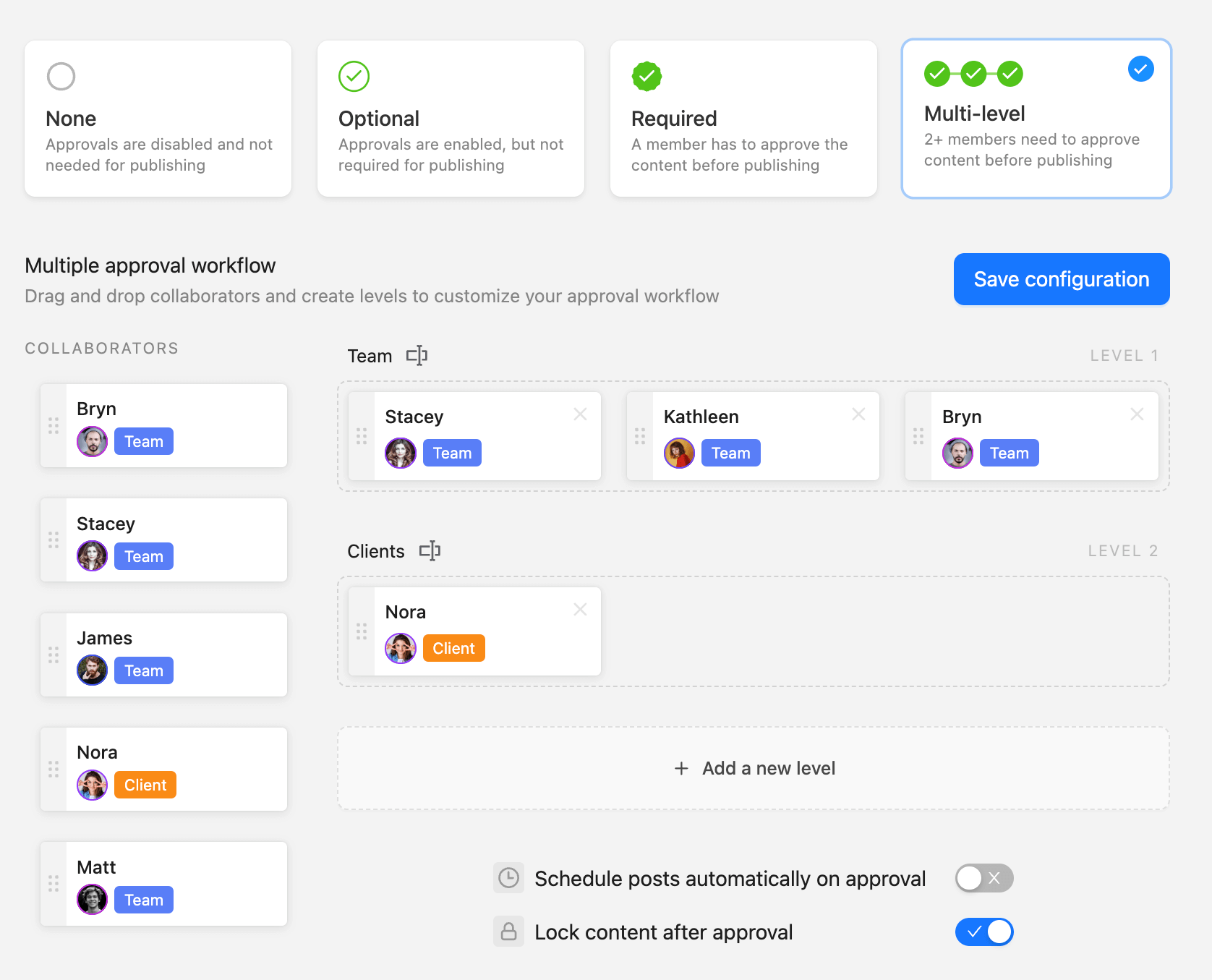
Set up custom multi-level approval flows in Planable to streamline content publishing with ease.
Pro tip: Implement a “Passive Approval” clause in your contract. If the client doesn’t provide feedback within 72 hours, the content is considered approved and scheduled.
Challenge #3: phantom assets
So, you start creating, but the high-res logo never arrives, or you’re working with pixelated screenshots from their website. This happens all too often, which is why you must make asset delivery a prerequisite on your client onboarding checklist.
Adopt a “No Logo, No Launch” policy. You cannot build a house without bricks, and you cannot build a brand presence without assets. To overcome this bottleneck, set up a shared folder in Planable’s Media Library immediately. It acts as a central repository where clients can drop assets, ensuring your designers always have the right files.
Challenge #4: vague feedback loops
Don’t you hate it when the client leaves comments like “Make it pop” or “I don’t like the vibe,” which leads to endless revision rounds? Me too. Which is why you must move feedback out of email and onto the content itself. Visual context is key.
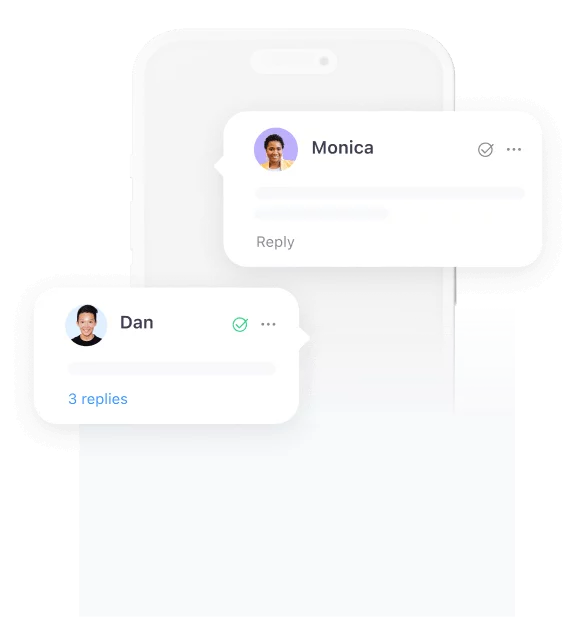
Encourage clients to use specific annotations. In Planable, they can click exactly on the part of the image or text they want changed and leave a comment right there.
Collaborate in real time on copy and visuals with Planable’s in-context feedback and editing tools.
Social media client onboarding in action with Planable
Theory is great, but let’s look at a real-world scenario. Imagine a social media agency signs a mid-sized e-commerce brand. The client has a marketing manager and a founder who both need to sign off on content. They have assets scattered across Dropbox, email, and a forgotten Google Drive.
Without a system, this is a recipe for a 10-email thread about a font color. Here is how the agency uses Planable to bring immediate order to the chaos and establish a smooth social media onboarding and professional working relationship from day one.
Day 1-3: centralize the asset library
Planable’s media library keeps visual assets organized and easy to access during post creation.
You can’t start designing because the logo is missing, and the client just emailed you a blurry JPEG. Instead of hunting for files, the agency invites the client to Planable immediately. The client drops their logos, brand kit, and approved imagery directly into the Shared Asset Library.
The agency’s social media managers now have a verified repository of the client’s brand assets before work starts. Consistency is guaranteed because everyone is pulling from the same source.
Day 3-5: kickstart the visual content calendar
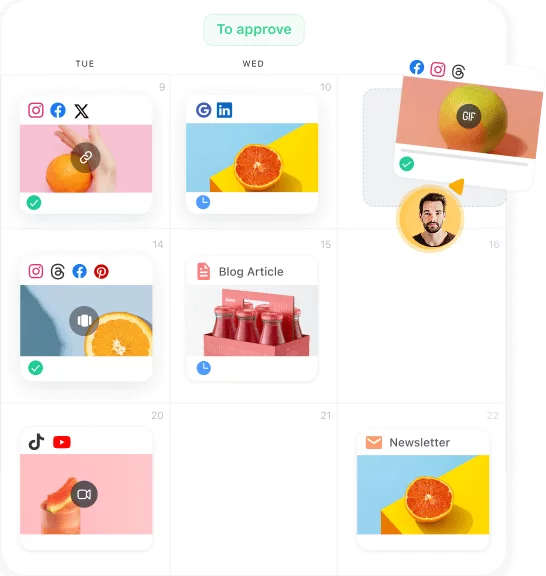
Planable’s campaign calendar helps teams manage and visualize social content across all channels.
Sending a spreadsheet to a client who can’t visualize how the grid will look works, but there’s a better way to do it and avoid poor feedback after it goes live.
The agency drafts the first week of social media posts using the Centralized Content Calendar. Because Planable offers previews, the client sees exactly how the Instagram grid, Stories, and LinkedIn posts will render on the actual social platforms.
Day 5-7: get real-time feedback & approvals
Planable simplifies the approval process by aligning team and client feedback in a visual workflow.
If you want to avoid getting these types of texts via WhatsApp: “Can we change the caption on the blue one?” and spend 20 minutes figuring out which “blue one” they mean, hear me out.
Invite the client to the workspace with a clear rule: “All feedback happens here.” The client leaves comments directly next to the specific post, so you can reply in-thread.
With guest view links feature, your client or stakeholder views the live plan, and adds feedback exactly where it belongs. No accounts. No forgotten passwords. No chasing logins.
Let’s go back to our scenario. The marketing manager needs to approve first, but the founder also wants final say. Using real-time feedback & content approval workflows, the agency can set a custom rule, meaning the marketing manager must approve first, then the founder.
Once feedback is incorporated and the founder clicks “Approve,” the post is locked and ready for publishing. Some posts might get instant approval, others need a few rounds of revisions, but everything happens in one centralized location.
Days 7-30: Multi-platform scheduling & content execution
With the workflow set and the first round of content approved, the agency ramps up production. Posts move through multi-platform scheduling on their own, and the team can focus on planning and creating work for the weeks ahead. The system stays steady, so the team isn’t stuck chasing approvals or digging through scattered feedback.
Day 30: report & measure
Track performance and engagement across platforms with Planable’s cross-channel analytics view.
When the client asks, “Is this working?” it’s time to pull an auto-generated report from Planable.
Instead of a messy spreadsheet, show a clean, professional breakdown of the top-performing posts.
This helps validate the project timeline and onboarding effort with data and proves that you are on top of industry trends, delivering value, and serving what the clients expect.
Best practices for social media client onboarding
To make this process repeatable and scalable, you need to stop treating every new client like a unique puzzle and start using a standard procedure.
It’ll do both of you a favor. Follow these tactical rules found in any social media onboarding process:
Batch the “homework” into digestible stages.
Nothing kills momentum like a 50-question social media client questionnaire sent on Day 1. It feels like homework. Instead, break it down. Send a high-level strategic form first (Business Goals, Target Audience), then follow up with a tactical form later (Logos, Access, Social Media Accounts).
Templatize everything for repeatability.
If you are writing a kick-off email from scratch, you are wasting billable hours. Use outlines for your emails, a social media strategy template, and standardized audit reports. Consistency saves time and helps you avoid missing critical steps.
Set a 90-day horizon, but review often.
Onboarding isn’t just week one. Present a project timeline that covers the first quarter. This shows the client you are thinking about long-term follower growth and lead generation, not just next post.
Make the client feel like an insider.
The “Black Box” agency model is dead. Share your kick-off agenda early, show them the social media posts in the draft stage using a client-friendly view (like Planable), and invite them to provide feedback. Transparency builds trust faster than results do.
Define the “Silence Clause” in approvals.
To maintain workflow efficiency, clearly define approval processes. If you don’t receive feedback within 48 hours, does the date slip, or does the post go live? Set these clear expectations in writing to avoid creeping deadlines.
Create a “Welcome Packet” (The User Manual).
Maintain a simple PDF or Notion page that outlines who does what, your payment terms, communication channels, and FAQs. When a client asks, “How do I send you this video?”, you should be able to say, “Check the Welcome Packet.”
Secure access the professional way.
Never ask a client to text you a password. It’s a security risk and looks amateur. Use secure delegation tools or the built-in integration features within your social media management tool to connect to the client’s social media profiles. Explain why you need access to build trust and make sure both you and the client are on the same page.
How to onboard a small business vs. an enterprise client
Small businesses crave speed and agility, while enterprise clients will prioritize security and compliance (not that agility doesn’t matter here, too).
If you try to force an enterprise client into a “move fast and break things” workflow, you will lose it. If you force a small business into a six-stage approval process, they will ghost you.
Here is how to adjust your approach:
Feature
Small Business Client
Enterprise Client
Approvals
Simple (The owner approves via text/app). Speed is the priority.
Multi-level (Legal -> Marketing -> Director). Brand safety is the priority.
Communication
Direct and informal (Slack or WhatsApp). They want to feel like you’re part of the team.
Formal and documented (Weekly Status Calls, Jira tickets). They want a paper trail.
Content Volume
High frequency, reactive. They want you to schedule posts on the fly based on daily events.
Strategic, planned weeks in advance. Content is locked long before publication.
Reporting
High-level growth metrics and valuable insights for the business (Sales, Follower Count).
Granular detail. They expect performance reports covering Share of Voice and Sentiment, among traditional metrics.
Tools
All-in-one access. They just want it to work.
Enterprise-grade. They require SSO, 2FA, and strict compliance logs.
Approvals
Small Business Client
Simple (The owner approves via text/app). Speed is the priority.
Enterprise Client
Multi-level (Legal -> Marketing -> Director). Brand safety is the priority.
Communication
Small Business Client
Direct and informal (Slack or WhatsApp). They want to feel like you’re part of the team.
Enterprise Client
Formal and documented (Weekly Status Calls, Jira tickets). They want a paper trail.
Content Volume
Small Business Client
High frequency, reactive. They want you to schedule posts on the fly based on daily events.
Enterprise Client
Strategic, planned weeks in advance. Content is locked long before publication.
Reporting
Small Business Client
High-level growth metrics and valuable insights for the business (Sales, Follower Count).
Enterprise Client
Granular detail. They expect performance reports covering Share of Voice and Sentiment, among traditional metrics.
Tools
Small Business Client
All-in-one access. They just want it to work.
Enterprise Client
Enterprise-grade. They require SSO, 2FA, and strict compliance logs.
Get started with your social media client onboarding tool for free
A structured onboarding process is the difference between a chaotic freelance gig and a scalable agency operation. It makes the client feel secure, aligns expectations, and removes the friction from collaboration.
So, remember m takeaways. Use a clear method like A.C.E. with a visual platform like Planable to maximize the time spent creating content, instead of admin work.
Move away from guessing and start making data-driven decisions based on valuable insights gathered from a unified workflow, then act on what works. “Rinse & repeat” works for a reason.
When your process is solid, you can focus on what actually makes sense. That is increasing audience engagement, boosting the engagement rate, and delivering the kind of results that keep clients around for years.
Ready to organize your client workflows? Try it for free!
Maria is a content marketer, SEO copywriter, and social media specialist with experience working for a wide range of B2B businesses. She loves to keep up with the evolution of digital marketing, particularly in areas such as social media management, content, SEO, and PR. She is passionate about her work and loves to add a unique spin to any topic.







 Create
 Schedule
 Plan
Plan Engage
 Collaborate
 Analyze
 Approve