AI copywriting tools are changing the game for marketers. They help you create content faster, keep your messaging consistent, and even improve your SEO rankings. Whether it’s generating catchy headlines or automating A/B testing, these AI marketing tools save your...
Redesign For multi-location brands
all your locations, one content flow
For multi-brand companies
content collaboration at scale
For agencies
impress your clients and take on more
“The team loved it from the start. Planable helps us overview the entire marketing efforts.“
If you’re running a small business, you don’t need another reminder that social media matters, but a system that actually drives growth without eating up your time.
After years of working on digital growth strategies for SaaS companies and small businesses, with a strong focus on social media, SEO, and online visibility, I’ve developed a practical, results-driven approach to social media marketing.
In this guide, you’ll learn how to build a social media marketing strategy designed specifically to help small businesses scale. I’ll break down the tactics that consistently deliver results, show how to apply them with limited resources, and share real-world examples of brands using these approaches to grow faster.
Most importantly, I’ll walk you through the social media management tools I’ve personally tested. Software that help automate posting, improve engagement, track performance, and make social media manageable as your business grows. By the end, you’ll know exactly which tools are worth paying for, which ones to skip, and which options make sense at each stage of growth.
Why social media marketing is important for small businesses
Social media marketing strategies can help small businesses build loyal customer bases and even reach viral status. Here’s how:
It wins your audience’s trust: Most potential customers will check your online presence when they first learn about your business. Limited online activity or a lacking presence altogether is a huge deal-breaker.
Boosts reach and brand awareness: Social media helps you tap into huge audience pools, which would otherwise be difficult to reach through other marketing methods, especially if you run a local business.
Helps with community-building: Socials let you engage in two-way conversations with your audience, useful for establishing strong relationships and building communities around your brand.
It influences purchase decisions: most users are more likely to purchase a product after seeing reviews on social media.
It’s a great feedback channel: Users commonly address complaints or praises. Tracking and responding to them is critical to maintain a positive brand image and make customers feel that you genuinely listen to them.
5 best social media marketing tools for small businesses
Small businesses have different needs when it comes to social media tools. The right platform should meet three non-negotiable criteria:
Be easy to use, so you’re not wasting time on setup or training.
Be powerful enough to replace multiple tools, not add another subscription to your stack.
Be cost-effective, because ROI matters more than feature bloat.
I’ve spent years working in content and digital marketing, which has given me hands-on experience with a wide range of social media management tools.
The list below includes the platforms that consistently stood out as the best options for small businesses, based on usability, features, and real-examples results.
1. Planable – best for content planning, collaboration & scheduling
Best for: Unified social media management workflows
Rating: 5/5 (strikes a perfect balance between functionality and ease of use)
Why I picked it
I picked Planable because it packs a fully-loaded social media management suite under a user-friendly platform at a fair price.
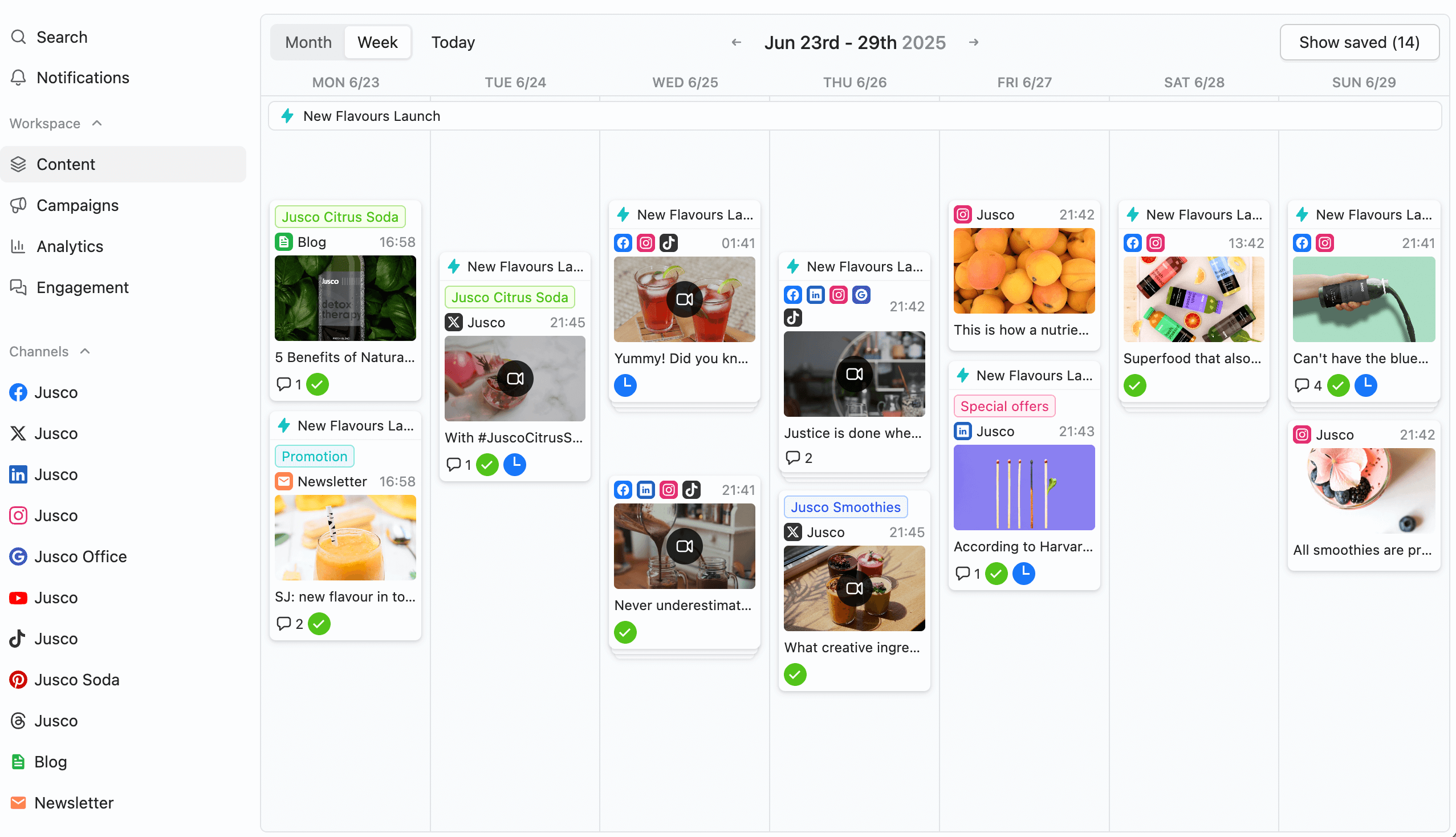
Planable’s content planning and collaboration tools are some of its top hallmarks. You can plan posts across multiple social media platforms via a unified calendar, complete with color-coded labels and campaign tagging.
Planable calendar showing scheduled weekly posts.
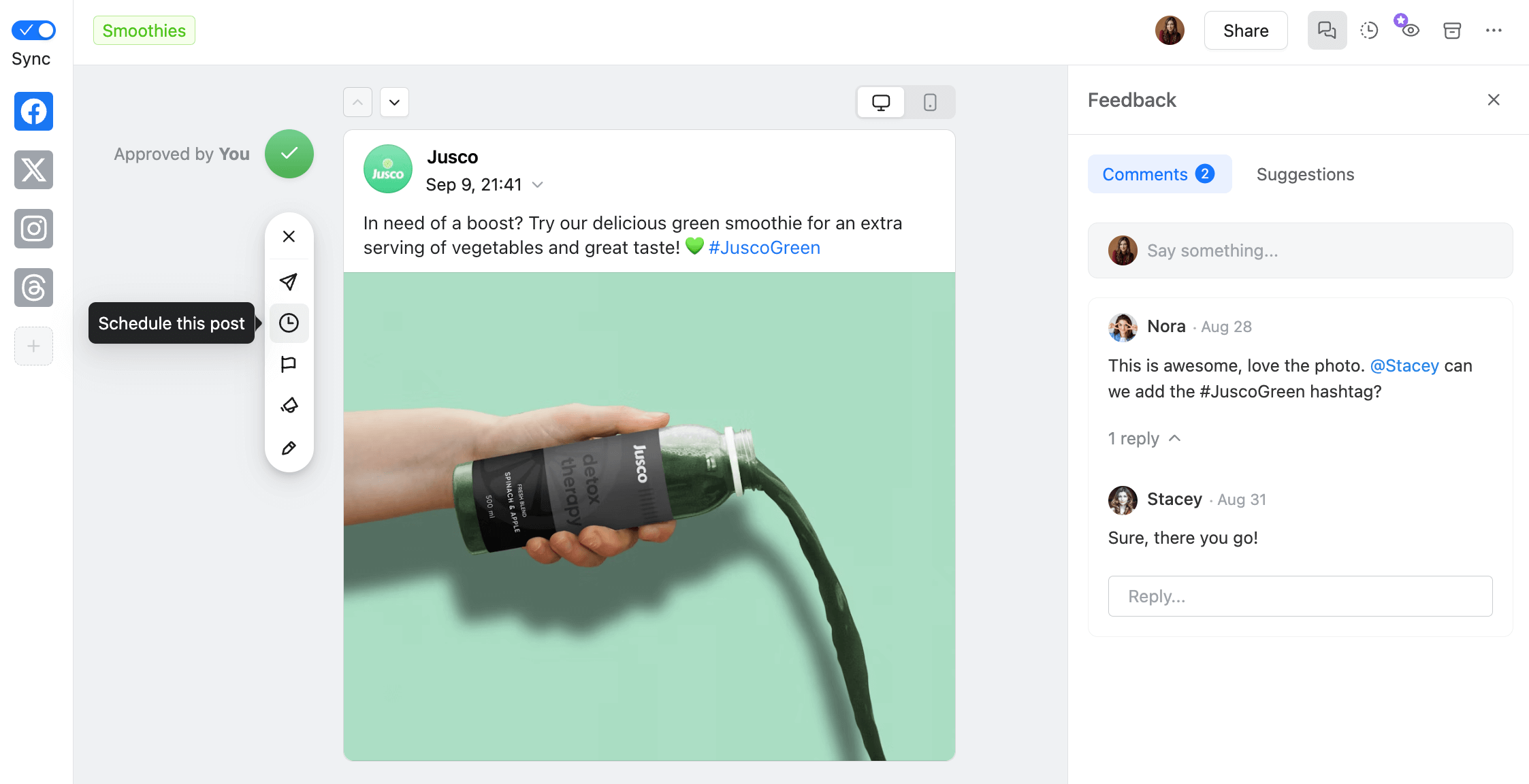
As for collaboration, Planable works a lot like Google Docs, but better. You can work on and collaborate on posts through regular comments, direct annotations, and clear-text suggestions. Plus, its custom approval workflows prevent you from accidentally publishing unpolished posts.
Post approval and feedback interface showing real-time team collaboration and comment threads on a Facebook post.
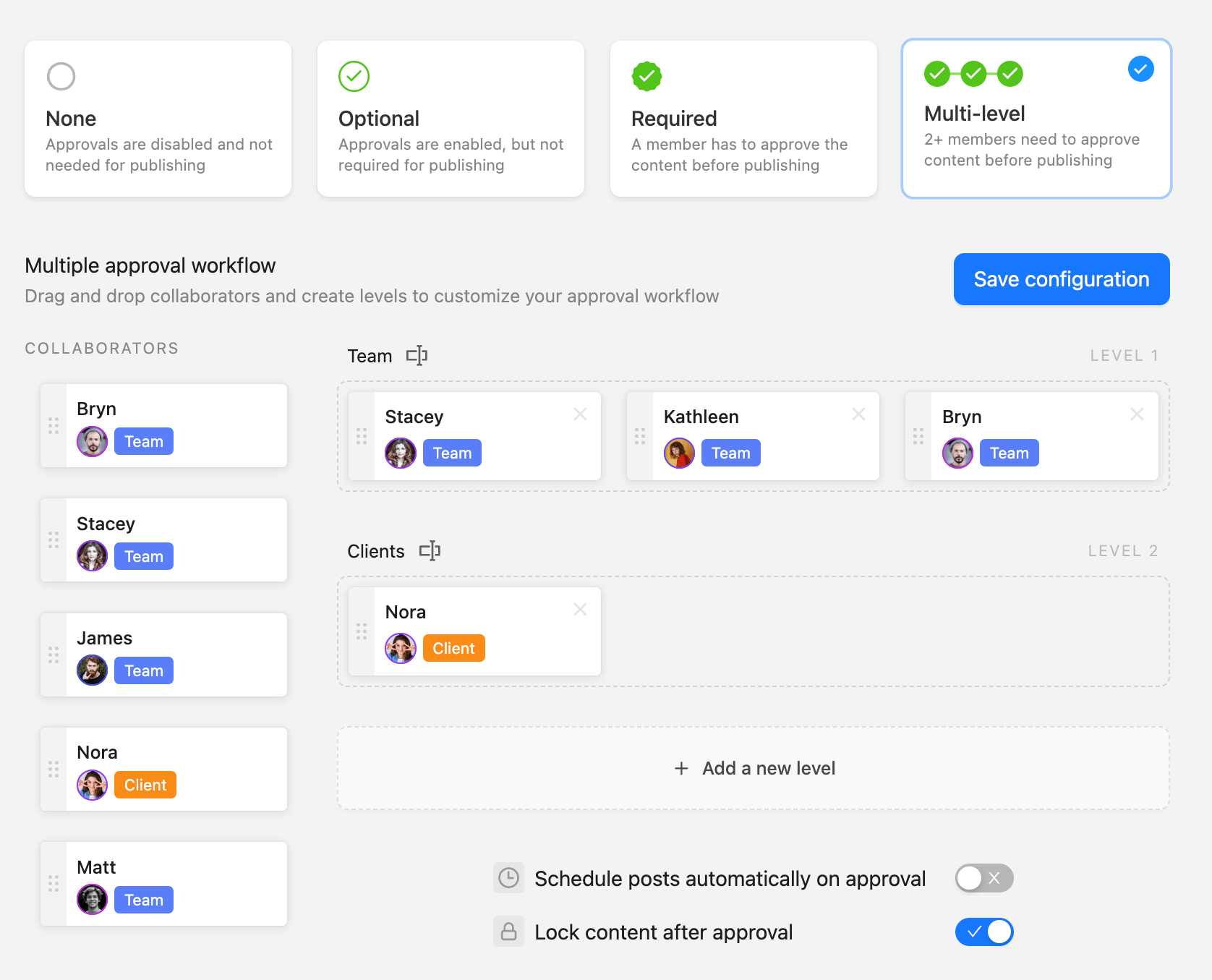
There are four approval workflow types: none, optional, required, and multi-level. Multi-level approvals establish step-by-step review processes involving multiple team members.
Content must pass through each layer before publishing and that’s why is ideal if your social media strategy is primarily based on quality content.
Custom multi-level approval workflows, letting teams define reviewers by role and stage.
Planable’s collaboration and approval tools alone will save you hours worth of hiccups and searching for feedback on long-lost email threads.
Key features:
Universal Content: Go beyond organic social media posts with Universal Content. Collaborate and work on blog posts, email marketing copy, ad copy, video scripts, and everything else in between.
Native visual editors: Polish TikTok and Instagram content with the platform’s native image and editing tools or via its Canva integration.
Planning views: Visualize planned content through numerous format-specific views: Grid (purpose-made for Instagram), feed (for blog posts), and list views (for multiple formats).
Planable AI: Speed up content creation even more with automated caption generation, editing, and repurposing.
Add-ons: Use Planable’s Analytics and Engagement add-ons to gain full control over your social media presence. Stay in touch with communities as well as measure social media performance or audience demographics.
Integrations: Instagram (Reels and Stories included), Threads, Facebook, X (formerly Twitter), Pinterest, YouTube, TikTok, LinkedIn, and Google Business Profile.
Pricing: Paid plans start at $33/month/workspace (billed annually) with no user cap whatsoever. There’s also a free plan that lets you schedule up to 50 posts.
Pros
Cons
One-click access to most of the platform’s features
Currently lacks social media listening tools
Calendar notes and one-click approvals are super handy
Doesn’t publish blogs or emails directly
Top-notch team collaboration and approval tools
Pros
One-click access to most of the platform’s features
Calendar notes and one-click approvals are super handy
Top-notch team collaboration and approval tools
Cons
Currently lacks social media listening tools
Doesn’t publish blogs or emails directly
2. Buffer
Best for: Solo users, freelancers, and micro-businesses
Rating: 4.5/5 (great entry-level platform, but you might outgrow it)
Why I picked Buffer
Buffer is a social media management tool specifically designed to make solo social media work easy.
The platform’s AI tracks your social content performance and uses the gathered details to provide ideal posting time, frequency, and content type suggestions.
You can also respond to social media comments, while Buffer tracks and scores your response rate, speed, and consistency to nudge you to stay engaged with your community.
But the platform’s feature set may not be enough to cover your needs once your business grows.
Set up microsites with shoppable products or lead magnets, and filter through link clicks or page views by social channel to identify top conversion sources.
Use analytics to track growth across multiple social media accounts and pinpoint top-performing posts.
Engage with communities faster with canned responses and AI-assisted replies.
Integrations: Instagram, Facebook, Threads, X, Bluesky, Mastodon, TikTok, YouTube, Pinterest, LinkedIn, Google Business Profile.
Pricing: There’s a free forever plan. Paid plans start at $5/channel/month (billed annually).
Pros
Cons
Minimal learning curve
The per-channel pricing model makes the platform expensive if you work with multiple social media profiles
Microsites are a big plus, especially for influencers
Limited collaboration and approval features
Native WordPress integration for blog publishing
Basic reporting outside AI-powered suggestions
Pros
Minimal learning curve
Microsites are a big plus, especially for influencers
Native WordPress integration for blog publishing
Cons
The per-channel pricing model makes the platform expensive if you work with multiple social media profiles
Limited collaboration and approval features
Basic reporting outside AI-powered suggestions
3. Social Pilot
Best for: small businesses or marketing agencies that manage many social accounts
Rating: 4/5 (diverse, but rather shallow feature set)
Why I picked Social Pilot
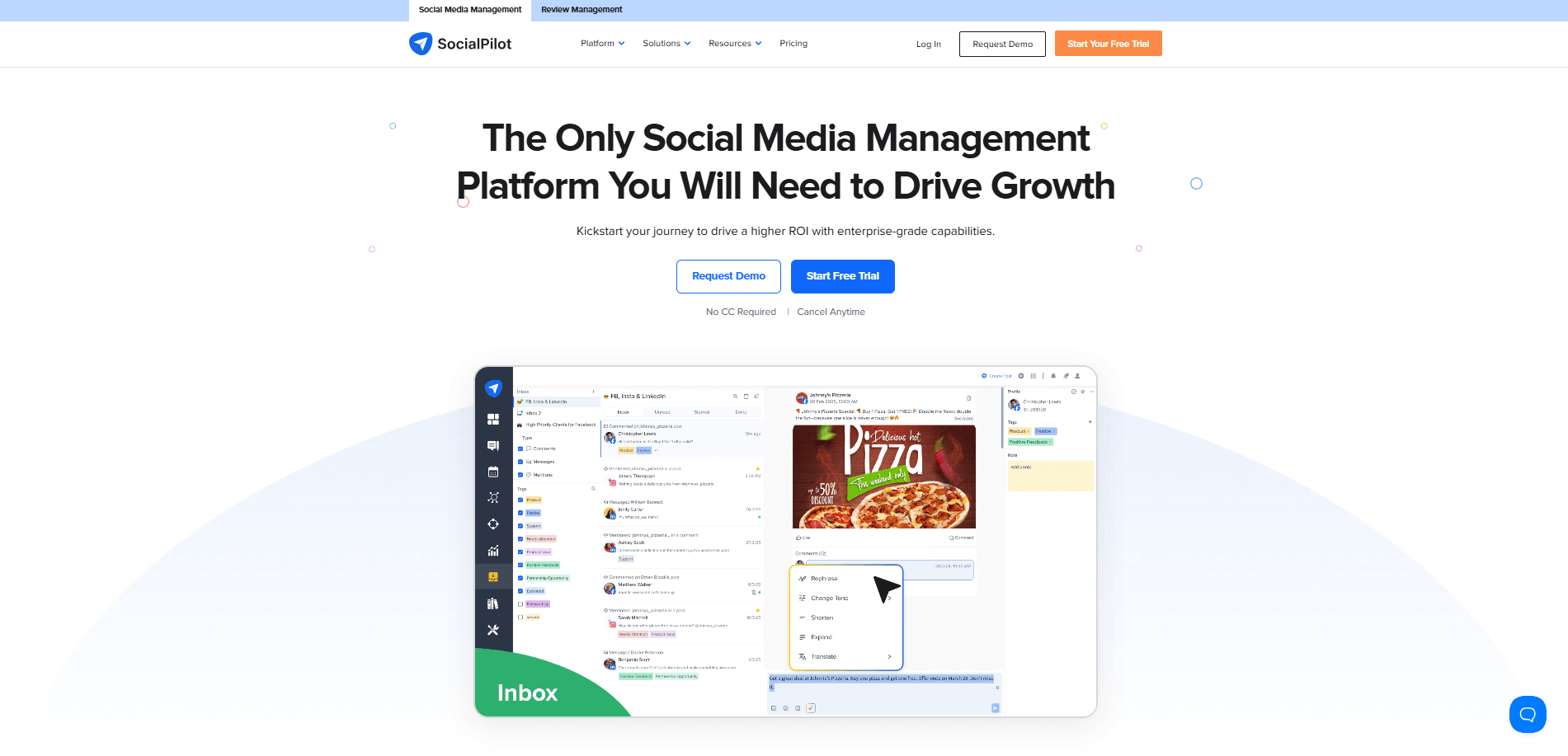
With 24 social media profiles and 4 users at $89/month (billed annually), Social Pilot packs a lot of value for small-sized businesses and agencies with audiences spread across multiple platforms. Its feature set is also really diversified.
It includes scheduling, content collaboration, and inbox management tools in unified dashboards.
But Social Pilot’s feature set is not as in-depth. For example, its social media inbox is only available for Facebook and Instagram. The platform also places otherwise basic features behind a paywall.
“One thing that stands out as a downside is the need to constantly upgrade your subscription to access platform-specific features—like tagging or using the collab tool on Instagram.” Rhea R., Owner/Founder of Yachting International Radio.
Key features:
View cross-network and network-specific social performance under custom reporting dashboards
Use the Content Library to set up reusable content components for faster production
Schedule content in bulk and organize posts via a drag-and-drop calendar
Integrations: Instagram, Facebook, Threads, Bluesky, X, TikTok, Pinterest, YouTube, LinkedIn, Google Business Profile
Pricing: Social Pilot starts at $25.50 per month (billed annually) with one user included.
Pros
Cons
Custom UTM parameters for link tracking
Quite limited collaboration and approval tools
Solid set of supported social networks
Steep price hikes between packages
Detailed analytics
Entry-level plan lacks analytics
Pros
Custom UTM parameters for link tracking
Solid set of supported social networks
Detailed analytics
Cons
Quite limited collaboration and approval tools
Steep price hikes between packages
Entry-level plan lacks analytics
4. SocialBee
Best for: AI-assisted campaign management
Rating: 4/5 (many advanced features, but has a steeper learning curve)
Why I picked SocialBee
SocialBee stood out to me through its AI features. The platform can speed up ideation by developing full-on social media campaign drafts, complete with target platforms, content pillars, and posting plans.
You can also use the AI to repurpose content across networks or generate content from scratch.
But SocialBee is quite complex, and it has a rather steep initial learning curve.
“Initial setup can feel a bit overwhelming. There are lots of features and options to configure, and bulk settings sometimes need a careful approach to avoid posting errors.” – Mark D., Business Consultant.
Key features:
Get unified overviews of content and profile performance, as well as audience breakdowns and follower growth
Create and store different variations of the same post to easily repurpose content
Respond to mentions, comments, and DMs across all supported social networks
Integrations: Instagram, Facebook, Threads, X, Bluesky, TikTok, YouTube, Pinterest, LinkedIn, Google Business Profile
Pricing: Plans start at $25 per month (billed annually) for one user. There’s also a free trial available.
Pros
Cons
Solid social engagement tools
Entry and mid-level plans are limited to one user
Versatile and in-depth feature set
Charges extra for users, workspaces, and social profiles
Universal Posting plans (but not posts) content across networks outside social media
Calendar is not drag-and-drop
Pros
Solid social engagement tools
Versatile and in-depth feature set
Universal Posting plans (but not posts) content across networks outside social media
Cons
Entry and mid-level plans are limited to one user
Charges extra for users, workspaces, and social profiles
Calendar is not drag-and-drop
5. Zoho Social
Best for: cross-departmental expansion possibilities
Rating: 4/5 (packs loads of social media features, but it’s slow)
Why I picked Zoho Social
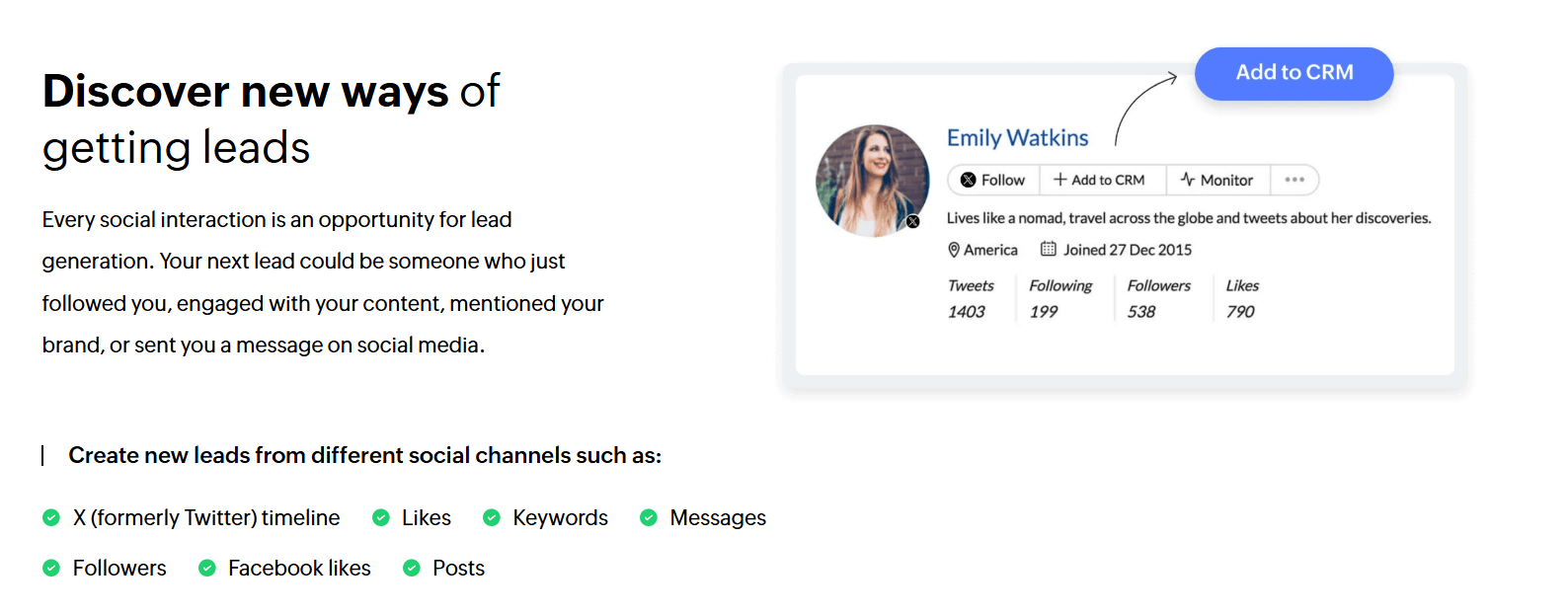
Zoho Social stands out because it’s part of the Zoho ecosystem. That means you can link the social media management solution with Zoho’s CRM, helpdesk, and marketing platforms.
This tool is perfect if you want to unify sales, service, and marketing workflows, and set up omnichannel marketing campaigns once your business grows.
Plus, Zoho Social is quite in-depth. It includes inbox management, social listening, and solid analytics. But the platform is prone to occasional performance issues.
“The analytics dashboard, though comprehensive, sometimes takes time to load when handling multiple brand accounts. Bulk scheduling can occasionally lag, and integrations with certain third-party platforms are limited compared to competitors.” – Vatstech Business Solutions, Founder and Managing Director.
Key features:
Transfer incoming messages to sales or support teams via Zoho’s native CRM and helpdesk integrations
Set up monitoring dashboards to track competitor posts and audience interactions in real time
Establish content review processes through approval workflows
Integrations: Facebook, Instagram, Threads, X, Bluesky, Mastodon, YouTube, TikTok, Pinterest, LinkedIn, Google Business Profile
Pricing: There’s a free forever plan. Paid packages start at $10 per month (billed annually).
Pros
Cons
Native CRM integration is a huge plus
Significant price hikes between plans
Supports a diverse set of social networks
Social network support depends on your selected plan
Social listening tools included
Team collaboration and social inbox tools only available in the top-tier plan
Pros
Native CRM integration is a huge plus
Supports a diverse set of social networks
Social listening tools included
Cons
Significant price hikes between plans
Social network support depends on your selected plan
Team collaboration and social inbox tools only available in the top-tier plan
6. FeedBird
Best for: Small businesses that want social media done for them, not another tool to manage
Rating: 4.3/5 (affordable done-for-you social media with a real creative team, but less control than managing it yourself)
Why I picked Feedbird
Unlike every other tool on this list, Feedbird isn’t software you log into to create and schedule posts yourself. It’s a fully managed service: a dedicated team of designers, copywriters, and strategists creates your social media content each month, and you simply review and approve it before it goes live.
The platform combines agency-level creative with a tech-enabled workflow. After a detailed onboarding questionnaire about your brand, audience, and preferences, Feedbird’s team – over 200 members, mostly based in Europe, produces a full month of content within 10 business days.
You review everything through a built-in dashboard, request revisions, and approve. Once approved, they handle the scheduling and posting to your channels.
The model works especially well for small business owners who know they need consistent social media but don’t have the time, skill, or desire to produce it themselves. It’s significantly cheaper than hiring a traditional agency or even a part-time social media manager.
The tradeoff is that you’re handing over creative control. If you want to craft every caption yourself or post spontaneously, a self-serve tool likePlanable is a better fit.
Key features:
A dedicated creative team designs branded posts, writes captions, and selects hashtags. You review and approve through Feedbird’s dashboard before anything goes live.
Add short-form videos, email design, SEO blog posts, and more as your needs grow, all managed through the same platform and team.
Flexible month-to-month subscriptions with no contracts; scale up, pause, or cancel directly from your dashboard at any time.
Integrations: Instagram, Facebook, TikTok, LinkedIn, Threads, YouTube, Pinterest, Google Business Profile.
Pricing: Plans start at $99/month. No contracts, cancel anytime. Free demo available.
Pros
Cons
Real people create your content, not a tool you have to learn and operate yourself
Less real-time control than managing your own posts with a scheduling tool
80% cheaper than traditional agencies, with no long-term contracts
Content requires a review cycle, so spontaneous or same-day posts aren’t the strength
Built-in review and approval workflow keeps you in control without doing the work
Initial onboarding takes time for the team to fully capture your brand voice
Pros
Real people create your content, not a tool you have to learn and operate yourself
80% cheaper than traditional agencies, with no long-term contracts
Built-in review and approval workflow keeps you in control without doing the work
Cons
Less real-time control than managing your own posts with a scheduling tool
Content requires a review cycle, so spontaneous or same-day posts aren’t the strength
Initial onboarding takes time for the team to fully capture your brand voice
How to use social media marketing for a small business in 5 steps
Social media virality is rarely an overnight success. It requires a carefully crafted social media strategy and a lot of behind-the-scenes work.
Step 1. Focus on the social networks where your target audience is
You don’t need to be on every social platform. Spreading yourself across too many networks drains time and budget, two resources small businesses can’t afford to waste.
Instead, concentrate on the platforms where your target audience is already active and engaged. For most businesses, one or two channels are enough to drive meaningful traffic and results.
For example, if your customers spend their time on TikTok or Instagram, there’s little reason to invest resources into building a Facebook presence just for the sake of “being everywhere.”
Dominic Edmundson, Marketing Manager at AMRIT Restaurants Berlin, highlights:
You need to know where your audience is, so your initial research is vital. Who’s your target audience, and which platform do they typically use? It’s not necessary to be on every platform, and that’s OK. Better to do two platforms well than four to an average standard.
This focused approach saves time and effort, allowing you to create more compelling content and tailored marketing campaigns.
Case in point, Timberland is mostly active on Facebook, Instagram, and YouTube.
Their approach makes sense. Most of the company’s site traffic consists of late millennials and early Gen Zers. Facebook, Instagram, and YouTube are popular platforms for audiences within this age group.
Plus, Timberland’s social media strategy mainly relies on high-quality photos that put its products in the spotlight. Social networks that primarily focus on visuals, like those mentioned above, are perfect for this particular content format.
Step 2. Structure content creation with social media pillars
Social media trends are fun, but you need substance for your content strategy to be effective.
And that’s what content pillars and brand pillars are for:
Content pillars are the main themes or topics your content will touch on.
Brand pillars define the essence of your brand and contribute to your social media aesthetic, setting your company apart from other businesses.
Aligning your SM strategy with content and brand pillars helps you ensure every post tells part of your brand’s story and works toward your business goals.
Millie McKenzie, Founder of Ugly Chicken Social, puts it this way:
“You can’t solely rely on trends to build a brand. It’s great if you manage to have fun and go viral once or twice, but without a foundation of brand storytelling content, you’re just seeing numbers on a screen and no conversion into loyal brand advocates or customers”.
For example, the Manchester-based Onda Pasta Bar banks on authenticity.
They post a consistent mix of behind-the-scenes content that highlights their team and quick recipe how-tos. This content mix humanizes Onda’s brand and wins its audience’s trust through authentic, value-packed posts.
Once again, Millie McKenzie explains the team’s success:
“Onda Pasta Bar connects with the general public of Manchester by moving away from overly polished restaurant content and into storytelling content that feels authentic and natural.”
Researching and brainstorming future posts is much easier when you have specific topics. You can even ask your colleagues to come up with ideas and work those into your strategy.
Step 3. Plan batches of social media content ahead of time
Consistency in posting content is the key to stable growth on social media.
Setting up a content calendar helps you organize and schedule your post ideas in advance to avoid content gaps. Regular posting brings more engagement and visibility. Batch planning ensures you always have something to post.
Planning your posts ahead of time also streamlines content creation. With more time to prepare content, you get to explore and test various formats instead of sticking to whatever’s faster to create.
Justin Clark, Founder of SocialNorth, suggests trying out different types of content to see what works best:
“How do you know which content types to use? Try everything. Test, test, and test again. Trial and error is your friend. Learn what works and repeat. It’s that simple.”
SURREAL, a London-based cereal company, uses humor and sarcasm-heavy content to engage with its audience on LinkedIn.
Still, this approach does require a lot of careful testing and a thorough understanding of your target audience to make it work. Otherwise, you may risk rubbing your followers the wrong way.
The best-performing formats depend on many factors. Different industries, audiences, and products have different preferences. So you’ll want to test formats and monitor social media metrics before batch-scheduling a month’s worth of video content only.
Step 4. Schedule social media posts when they are ready
There’s always something more important than posting another social media update. And that’s how you break the consistency.
To stay consistent and save time for more urgent things, schedule your social posts as soon as you mark them ready.
Femke Brüll, Comms and Social Media Manager at Cinetree, recommends investing in an idea calendar:
“In a small business, social media has a tendency to become a sideshow. By planning ahead of time and scheduling your content, you will prevent this from happening. Make a calendar with post ideas and all the important dates for your business, add any relevant content days you can think of.”
Use scheduling tools to plan your content batches up to one or two weeks ahead. This way, you won’t need to log in to every social platform and post at a specific time, because the tool will do everything for you.
You can also accomplish your hashtag strategy by including hashtags in the post or scheduling the first comment.
Step 5. Engage with your community
A community means people connect with your brand and each other, not just follow your posts. This connection creates more meaningful interactions, increases social media engagement, and builds brand loyalty.
Communities can advocate for your brand, defend it, and provide valuable feedback. However, if you don’t actively engage with your community through comments, content, and DMs, people might feel ignored and be less likely to support you.
You can support your community both online and offline. Lauren Grubb, Social Media Specialist at StrategiQ, highlights the importance of investing in both:
“In the online space, community management and engagement are key to growing your brand and being seen. You can build relationships with your customers, get to know them better, and give them a reason to return. Physically, ensure you are being seen in your community. Whether you are volunteering, working, or collaborating with other businesses, this gives you a great opportunity to post about these moments, tag the business, and see the engagement off the back of their community.”
POPFLEX Active does this perfectly. The inclusive sportswear fashion shop created by fitness influencer Cassey Ho. Cassey uses Instagram to:
Reach out to the target market and ask for their opinion on new designs.
Showcase their products for old and new audiences to see and understand.
POPFLEX is an excellent example of the ‘You asked, we delivered’ approach.
For example, in this video, the audience asks if the brand has less revealing swimsuit options. Not only did the brand create a more modest model, but it also demonstrated how the new swimsuit looks on girls of multiple sizes and heights.
Small business social media management FAQs
How much do social media management tools cost for a small business?
Pricing varies based on the platform, its plans, and features. In general, a small business-specific social media management platform can cost anywhere from just a few dollars per month up to $100 or $200 per month for fully-featured packages.
How to manage social media for a small business?
As a small business, you first have to pick the social media channels where your audience is most active. You also have to regularly engage with your audience and find the content type that works best for them. Social media management tools like Planable also help handle all these tasks quicker through built-in audience engagement and analytics features.
What is the 70/20/10 rule for social media?
The 70/20/10 rule acts as a guideline for your social media efforts. It’s a formula that indicates the type of content you should post on socials and how often for maximized engagement.
More specifically: 70% of posts should cover brand-building posts (tips and tricks, behind-the-scenes); 20% of posts should be curated from others (industry insights and news, posts from authoritative figures), while 10% should be self-promotional.
Implement a social media marketing strategy for your small business
A small business can and should leverage social media presence and the opportunities social media marketing offers. If cooked right, the recipe above can make your small business relevant on any social media platform and help you with brand awareness, lead generation, and ROI.
Planable might be just what you need. Its to-notch content collaboration, approval, and planning features help roll out high-quality posts on the right platform, to the right people, at the right time.
Put your business on the social media map with Planable and use 50 free posts to start your journey!
Horea is a software reviewer and tester, content writer, and tech geek. He loves to fiddle with MarTech solutions to find what each software is best for and help you decide which one might be your best fit. His content is allergic to fluff and eats research for breakfast. If you’re on the fence about whether you should commit to a particular platform, Horea probably already wrote about it.








 Create
 Schedule
 Plan
Plan Engage
 Collaborate
 Analyze
 Approve