Whether you’re on desktop or mobile, you can schedule TikTok posts in advance. It’s a smart way to stay organized, maintain a consistent posting schedule, and keep your creative flow uninterrupted. If you only need to schedule TikTok posts occasionally, TikTok’s...
Redesign For multi-location brands
all your locations, one content flow
For multi-brand companies
content collaboration at scale
For agencies
impress your clients and take on more
“The team loved it from the start. Planable helps us overview the entire marketing efforts.“
Your client’s name turns up in a Reddit thread on Friday evening, and the first person to notice isn’t you: it’s the actual client itself. That’s not a good look and might even lead to an awkward future client call.
But social media monitoring tools exist to prevent that from ever happening: they track the web to catch mentions nobody tagged you in, on networks and sites where your audience is present.
If you manage social for clients or several brands, you know where monitoring workflows fall flat: alerts land in one tool, replies get drafted in another, while clients sign off on responses somewhere else again.
Every hand-off is a few more hours the thread stays unanswered: hours in which a potential PR crisis may occur.
This guide compares eight social media monitoring tools by what happens after a mention lands: what each one tracks, how fast it tells you, and whether you can act on the mention in the same place.
What are the best social media monitoring tools at a glance?
The best social media monitoring tool depends on what your team does once a mention lands. If mentions turn into client posts that need approval, a management platform with listening built in or added on keeps that loop in one place. If they feed a crisis desk or multi-year research, a dedicated listening suite earns its price.
Here’s the short version, by job:
Tool
Best for
What it monitors
Standout monitoring feature
Starting price
Planable
Agencies turning mentions into approved client content
8 sources across social networks and the web
Competitors tab with share of voice, next to the client’s calendar
$99 per workspace per month for the Social Listening add-on; base plans from $33
Sprout Social
In-house teams already publishing in Sprout Social
Keywords and locations on Standard, deeper topics with the Listening add-on
Smart Categories and Spike Alerts
$79 per seat per month, billed annually (Essentials); Listening is an add-on from Standard up
Agorapulse
Moderation-heavy teams reporting to clients
Six social networks plus news sites and blogs
Listening Screening to filter out coincidental keyword matches
$79 per user per month, billed annually (Standard); Listening is an add-on
Brand24
Dedicated social listening reports
Social networks plus news sources and podcasts
Storm Alerts and Anomaly Detection
$199 per month, billed annually (Individual)
Mention
Brands tracking reviews alongside social
75+ review sites alongside social and the web
Boolean alerts of up to 2,000 characters
Not disclosed: single Company plan via demo request
Lumen
Brands with mentions in images and video
150 million websites and 30+ social channels
Brand detection in images, video and audio
Custom pricing: contact sales for a quote
Meltwater
PR teams pairing social and earned media
Social and news sources, plus forums and Reddit
48-hour conversation forecasting
Custom pricing: contact sales for a quote
Brandwatch
Consumer research with deep history
100 million unique sites, with conversations back to 2010
Iris AI assistant plus image analysis
Custom pricing: contact sales for a quote
Planable
Best for
Agencies turning mentions into approved client content
What it monitors
8 sources across social networks and the web
Standout monitoring feature
Competitors tab with share of voice, next to the client’s calendar
Starting price
$99 per workspace per month for the Social Listening add-on; base plans from $33
Sprout Social
Best for
In-house teams already publishing in Sprout Social
What it monitors
Keywords and locations on Standard, deeper topics with the Listening add-on
Standout monitoring feature
Smart Categories and Spike Alerts
Starting price
$79 per seat per month, billed annually (Essentials); Listening is an add-on from Standard up
Agorapulse
Best for
Moderation-heavy teams reporting to clients
What it monitors
Six social networks plus news sites and blogs
Standout monitoring feature
Listening Screening to filter out coincidental keyword matches
Starting price
$79 per user per month, billed annually (Standard); Listening is an add-on
Brand24
Best for
Dedicated social listening reports
What it monitors
Social networks plus news sources and podcasts
Standout monitoring feature
Storm Alerts and Anomaly Detection
Starting price
$199 per month, billed annually (Individual)
Mention
Best for
Brands tracking reviews alongside social
What it monitors
75+ review sites alongside social and the web
Standout monitoring feature
Boolean alerts of up to 2,000 characters
Starting price
Not disclosed: single Company plan via demo request
Lumen
Best for
Brands with mentions in images and video
What it monitors
150 million websites and 30+ social channels
Standout monitoring feature
Brand detection in images, video and audio
Starting price
Custom pricing: contact sales for a quote
Meltwater
Best for
PR teams pairing social and earned media
What it monitors
Social and news sources, plus forums and Reddit
Standout monitoring feature
48-hour conversation forecasting
Starting price
Custom pricing: contact sales for a quote
Brandwatch
Best for
Consumer research with deep history
What it monitors
100 million unique sites, with conversations back to 2010
Standout monitoring feature
Iris AI assistant plus image analysis
Starting price
Custom pricing: contact sales for a quote
Read the last column before anything else. Four of these tools won’t show you a full price until you talk to sales or book a demo, which matters if you’re budgeting per client.
What should you look for in a social media monitoring tool?
A social media monitoring tool earns its place when it covers the sources your audience uses, tells you fast enough for the job, and hands each mention to someone who can act on it. Four checks separate the tools in this list:
Sources covered. Reddit and forums matter as much as the big networks. X is the source to check tool by tool: in February 2026 X moved to usage-based API pricing, and Mordor Intelligence ties that shift to a 23% cut in data pulls by mid-market advertisers.
Refresh speed and alerts. A daily refresh covers a monthly brand report. A crisis needs hourly or real-time updates and alerts in Slack or Teams, where someone sees them within minutes.
How listening is priced. A plan price tells you what monitoring costs only when listening sits inside it. Add-ons, seats and annual contracts change the math.
What happens after the mention. Can the person who spots a complaint reply where it lives and send a response post to the client for sign-off without switching products?
Brand mentions outweigh trend research: the same report puts brand health tracking at 32.53% of 2025 social listening spend. If research-grade listening is your main job, the social listening tools roundup goes deeper, and our guide to social media monitoring covers the basics.
How do the top social media monitoring tools compare in detail?
Each tool below was checked against its vendor’s own product and pricing pages in October 2026, with G2 ratings linked to each product’s G2 page and reviewer quotes linked to the individual reviews. Each tool is judged on three questions:
What does it monitor, and where?
How fast does it tell you something changed?
What can you do with a mention once you have it?
The third question rarely makes it into comparisons, and it’s where the tools split.
Best social media monitoring tools compared
1. Planable: listening next to approvals and publishing
Planable is a social media management platform with collaboration and approvals at its core. A mention its Social Listening add-on picks up can become a drafted post that goes through the client’s required approval without leaving that client’s workspace.
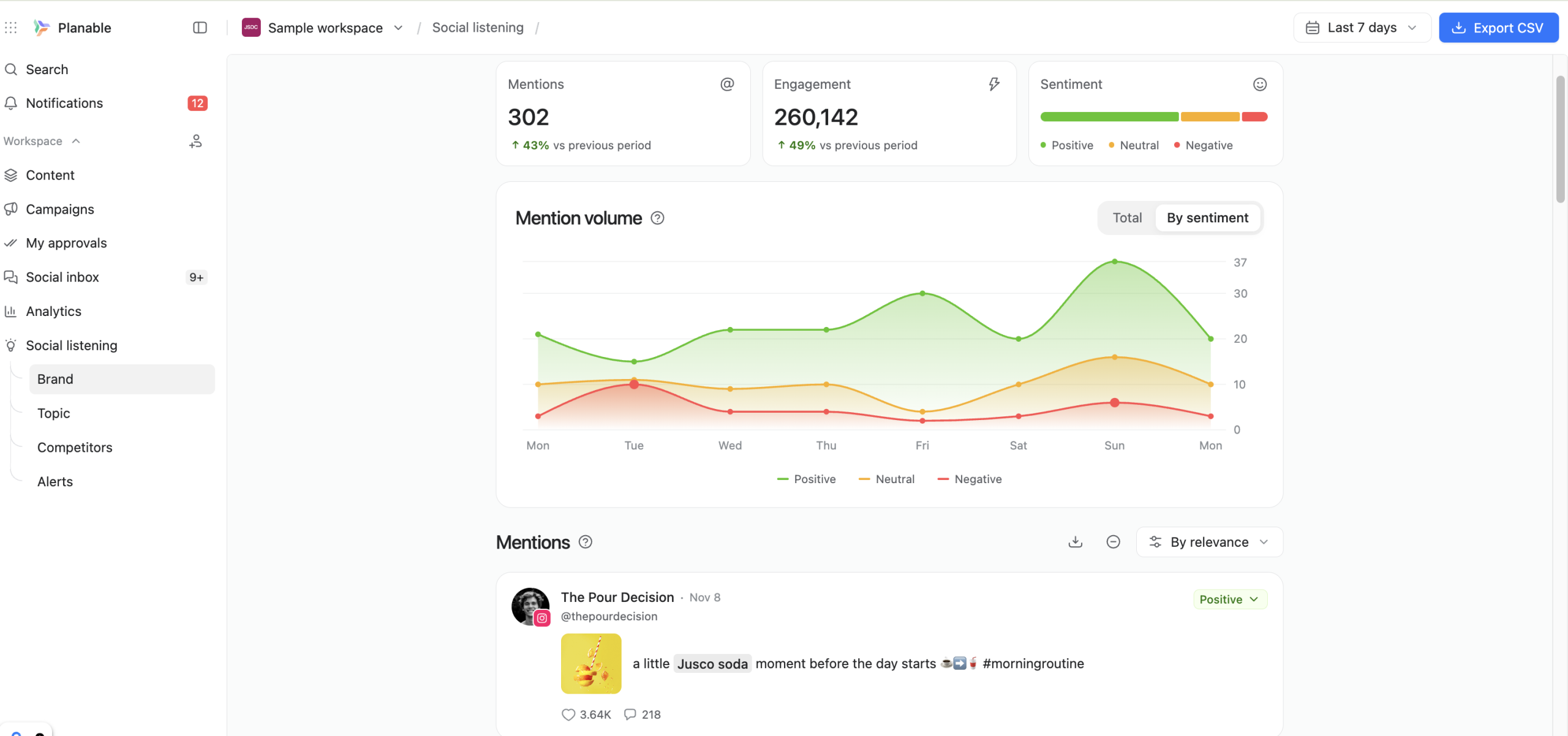
Planable’s Social Listening dashboard with brand mentions and sentiment in one workspace
Standout features
Coverage: Tracks 8 sources, with X and YouTube via API and the rest through search discovery, from Reddit and TikTok to LinkedIn and the web.
AI sentiment tagging: Analyzes sentiment, labels each brand mention individually, and gives you the option to edit the sentiment on a specific mention by hand.
Competitors tab: Compares your brand keyword against the competitor keywords you track, including a share-of-voice card and a channel-mix card.
Alert rules: Sets volume and sentiment-based alert rules on brand keywords; alerts show immediately via in-app notifications, while email and Slack alerts go out at 09:00 workspace time.
Social Listening is an extra add-on, outside Social Inbox and Analytics. It monitors what people say about your brand, your competitors, and the topics you follow across social media and the web. You can monitor mentions across all supported sources or on particular channels.
For example, to track Reddit mentions specifically, open Social Listening from the left sidebar, pick the brand or topic, and filter by source.
Filtering Planable Social Listening mentions by source to track Reddit
Because the mentions feed shares a workspace with the client’s content calendar, nobody pastes screenshots from one tool into another. For an agency, that’s the difference between a mention that turns into a published post this week and one that turns into a line in next month’s report.
It’s lighter listening, though: teams that need deep historical analysis or enterprise-level query volume should pair it with a dedicated listening tool.
Planable pros & cons
Pros
Cons
One workspace per client: A workspace is a collaborative space for one brand or client, so 3 clients means 3 workspaces, each with its own listening keywords, content calendars, and approval workflows; perfect for agency work.
Not real-time: Brand and competitor keywords refresh every 24 hours and topic keywords every 7 days, so it’s not a fit for hour-by-hour crisis monitoring.
Approval workflows: You can choose between optional, required, and multi-level approval workflows to establish review processes tailored to your specific needs.
Tight keyword caps: Each workspace tracks 1 brand keyword (plus 3 aliases) and 3 topic keywords, with a separate cap of 3 competitor keywords.
Client sign-off without a login: Clients who are already set up as approvers can approve from a link, with no Planable account required.
Pros
One workspace per client: A workspace is a collaborative space for one brand or client, so 3 clients means 3 workspaces, each with its own listening keywords, content calendars, and approval workflows; perfect for agency work.
Approval workflows: You can choose between optional, required, and multi-level approval workflows to establish review processes tailored to your specific needs.
Client sign-off without a login: Clients who are already set up as approvers can approve from a link, with no Planable account required.
Cons
Not real-time: Brand and competitor keywords refresh every 24 hours and topic keywords every 7 days, so it’s not a fit for hour-by-hour crisis monitoring.
Tight keyword caps: Each workspace tracks 1 brand keyword (plus 3 aliases) and 3 topic keywords, with a separate cap of 3 competitor keywords.
Pricing: Social Listening costs $99 per workspace per month or $990 per workspace per year, and it starts with a 30-day free trial. Base plans start with Basic at $39 per workspace per month and Pro at $59 per workspace per month, with unlimited users on every workspace.
Best for: agencies running listening for several clients that want mentions to turn into drafted posts inside the workspace where each client already signs off.
2. Sprout Social: listening as an add-on to a publishing suite
Sprout Social is a social media management platform priced per seat, with keyword monitoring on its Standard plan and deeper listening sold as a paid add-on.
Sprout Social Listening’s AI topic summary and conversation breakdown
Standout features
Monitoring on Standard: The Standard plan includes basic keyword and location monitoring tools (no Listening add-on required).
Smart Categories: Listening identifies influential topics with Smart Categories.
Spike Alerts: Flags sudden volume or sentiment changes with custom Spike Alerts.
API and helpdesk integrations: Advanced adds the Sprout API and helpdesk integrations.
Spike Alerts also display messages from social media posts within the same dashboard, which suits in-house teams that also handle community management. Whoever sees the alert can answer from the same inbox, so the reply doesn’t require hand-offs.
Sprout Social pros & cons
Pros
Cons
Centralized replies: Built-in inbox management and collaboration tools make it easy for social customer care teams to route messages, attach feedback, and engage with audiences simultaneously.
Per-user pricing structure: Sprout Social charges for each team member using the platform, which can get quite expensive. For example, the Standard plan with five seats adds up to $995 per month on annual billing, without the Listening add-on.
Custom dashboards: Heidi E., a Social Media Manager, praised its customization on G2: “Sprout Social does a great job at making it easy and simple to create custom reporting dashboards, calendars, inboxes, etc.”
Tricky to use AI tools: Heidi E. also wanted more from the AI: “AI could be more intuitive to creating custom listening dashboards, analyzing these dashboards, pulling our top-level insights, etc.”
Pros
Centralized replies: Built-in inbox management and collaboration tools make it easy for social customer care teams to route messages, attach feedback, and engage with audiences simultaneously.
Custom dashboards: Heidi E., a Social Media Manager, praised its customization on G2: “Sprout Social does a great job at making it easy and simple to create custom reporting dashboards, calendars, inboxes, etc.”
Cons
Per-user pricing structure: Sprout Social charges for each team member using the platform, which can get quite expensive. For example, the Standard plan with five seats adds up to $995 per month on annual billing, without the Listening add-on.
Tricky to use AI tools: Heidi E. also wanted more from the AI: “AI could be more intuitive to creating custom listening dashboards, analyzing these dashboards, pulling our top-level insights, etc.”
Pricing: Essentials costs $79 per seat per month billed annually, or $99 billed monthly, and Standard, Professional and Advanced run $199, $299 and $399 per seat per month, billed annually. More advanced listening features are available through the Social Insights add-on. Add-on pricing is not disclosed.
Best for: in-house social teams that already publish and reply in Sprout Social and have budget for both seats and the Listening add-on.
3. Agorapulse: listening that feeds client reports
Agorapulse is a social media management platform known for its inbox and moderation tools, with listening sold as an add-on that flows into its reporting.
Agorapulse Listening with mention volume split by source
Standout features
Broad network coverage: Covers six social networks (Meta, X, Reddit, etc.), plus thousands of news sites and blogs.
24 months of history: You can cross-reference current listening data against metrics from up to two years prior.
Listening Screening: Separates real conversations about your brand from coincidental keyword matches in a single click.
Share of Voice: Shows which competitor gets talked about most, and where.
Listening Screening matters most for brands with conventional names (i.e Apple). This feature prevents your listening feed from mixing off-topic mentions with mentions that target the actual brand.
The same idea applies to Agorapulse’s reports. Listening data flows into Report Studio, beside your other reporting numbers, so the monthly client report shows share of voice next to engagement without a second export.
Agorapulse pros & cons
Pros
Cons
Inbox that moderators like: Tatiana D., a social media moderator at a mid-market company, said in a G2 review: “I like how the inbox system is set up in Agorapulse.”
Thin TikTok coverage: Listening doesn’t support keyword tracking across TikTok; it only pulls direct brand mentions.
Crisis keywords: Alerts fire on volume spikes and sentiment shifts, and a saved crisis search notifies the right people.
Sentiment analysis locked behind the Custom plan: Sentiment analysis needs the Custom plan, as do API access and historical data import.
Pros
Inbox that moderators like: Tatiana D., a social media moderator at a mid-market company, said in a G2 review: “I like how the inbox system is set up in Agorapulse.”
Crisis keywords: Alerts fire on volume spikes and sentiment shifts, and a saved crisis search notifies the right people.
Cons
Thin TikTok coverage: Listening doesn’t support keyword tracking across TikTok; it only pulls direct brand mentions.
Sentiment analysis locked behind the Custom plan: Sentiment analysis needs the Custom plan, as do API access and historical data import.
Pricing: Standard costs $79 per user per month billed annually, or $99 billed monthly, and Professional and Advanced cost $119 and $149 per user per month, billed annually. Listening is an add-on priced on the volume of conversations you monitor and how far back you look, and every plan starts with a 30-day trial.
Best for: moderation-heavy agency teams that want share of voice and listening data in the same client report as their engagement numbers.
4. Brand24: dedicated social listening tool with excellent data depth and coverage
Brand24 is a dedicated social listening tool that’s super comprehensive. It tracks mentions across all major social networks, plus forums, news sites, blogs, podcasts, and more. Its AI tools, like Topic Analysis and Smart Context Search, also make it easy to gain actionable insights from large datasets.
Brand24’s Analysis tab with Hot Hours and Emotions share
Standout features
Storm Alerts: Notifies you of sudden changes in mention volume or reach.
Anomaly Detection: Flags unusual spikes or drops in the number of mentions.
Brand Assistant: A chatbot equipped with data from your monitoring projects, so you can ask what changed this week.
Voice Share: Measures your brand’s visibility across channels against your competitors.
Refresh speed is tiered by plan: Individual updates every 12 hours, Team hourly and Pro in real time. That makes Pro the realistic entry point for crisis management, and it’s the tool we’d point to when Planable’s daily refresh is too slow.
Acting on what Brand24 finds is up to you, since the reply or post that follows happens in whatever tool you publish from. The Slack integration posts mentions to a channel of your choice, which helps the right person see them first.
Brand24 pros & cons
Pros
Cons
Readable dashboard: Reflex S., a marketing manager at a small business, noted on G2: “The data is presented in a very clear and intuitive way, and the dashboard is easy to navigate.”
Keyword ceiling: Reflex S. flagged a limit: “One challenge is the limitation on the number of keywords, especially in our case, as our company name is not unique and often appears in unrelated conversations.”
Real-time on Pro: Pro updates in real time, so a spike reaches you while it’s still a spike.
Small entry plan: Individual allows 3 keywords and 2K mentions a month, for 1 user.
Pros
Readable dashboard: Reflex S., a marketing manager at a small business, noted on G2: “The data is presented in a very clear and intuitive way, and the dashboard is easy to navigate.”
Real-time on Pro: Pro updates in real time, so a spike reaches you while it’s still a spike.
Cons
Keyword ceiling: Reflex S. flagged a limit: “One challenge is the limitation on the number of keywords, especially in our case, as our company name is not unique and often appears in unrelated conversations.”
Small entry plan: Individual allows 3 keywords and 2K mentions a month, for 1 user.
Pricing: Individual costs $199 per month billed annually, or $249 billed monthly, and Team, Pro and Business cost $299, $399 and $599 per month, billed annually. Enterprise starts from $1,499 per month, and every plan comes with a free 14-day trial.
Best for: brand teams and small agencies that need real-time alerts on a self-serve plan and reply from another tool.
5. Mention: monitoring that includes review sites
Mention is a media monitoring tool that tracks brand mentions across social platforms, review sites and the open web. It is progressively deprecating its Publish and Respond features and points customers to Agorapulse for publishing and replies.
Building a Boolean alert in Mention’s Advanced Alert editor
Standout features
Social coverage: Real-time tracking covers seven named networks, including Reddit and TikTok.
Web & offline monitoring: Covers news sites, blogs and forums, plus radio and TV broadcasts.
Boolean alerts: The Advanced Alert builds custom Boolean queries of up to 2,000 characters.
Collaborative inboxes: Assign incoming messages to team members and leave notes for extra context.
Mention’s case rests on where your reputation lives. For a restaurant group or a retail chain, a one-star review on Google can travel further than a tweet, and a monitoring tool that skips review sites misses the conversation that moves bookings.
Plan the reply path up front. Answering reviews from a second tool works for a brand with a separate community team, and it adds a hop for an agency that wants one place to act.
Mention pros & cons
Pros
Cons
Review sites in the same feed: Monitors 75+ review sites, from Google and Trustpilot to Amazon and Glassdoor, next to social mentions.
Add-ons for history and API: Historical data and API access aren’t included in the Company plan; each comes only as a paid add-on.
Add-ons for history and API: Historical data and API access aren’t included in the Company plan; each comes only as a paid add-on.
Noisy out of the box: Victor Z. also flagged the flip side: “Out of the box, you’ll get many irrelevant mentions.”
Pricing: Mention doesn’t publish a price: its single Company plan goes through a demo request, and paying yearly gets you 2 months free.
Best for: hospitality and retail brands that need Google and Trustpilot reviews in the same report as social mentions, and that publish from another tool.
6. Lumen: visual listening inside Hootsuite’s suite
Lumen is Hootsuite’s AI-powered social listening and market intelligence tool, powered by Talkwalker and formerly sold as Hootsuite Listening.
Wide coverage: Monitors 150 million websites and 30+ social channels, including Instagram, LinkedIn and Reddit.
Visual mentions: Detects brand mentions in images, video and audio, so a logo in a post with no caption still shows up.
2+ years of history: Searches mentions and trend data from the past 24+ months.
Real-time alerts: Notifies you when sentiment shifts, a trend takes off or negativity spreads.
Lumen comes in two sizes. Lumen Lite sits inside Hootsuite’s self-serve plans for brand, competitor and sentiment monitoring, while full Lumen is a dedicated platform that adds broader source coverage, deeper analytics, and 2+ years of history.
It pays off most for teams that already publish in Hootsuite, because the listening, publishing and inbox products share one suite. If your calendar and client approvals live elsewhere, the Hootsuite alternatives roundup covers the publishing side of that decision.
Lumen pros & cons
Pros
Cons
Theme clustering: Amber N., Manager of Strategic Insights, said in her G2 review: “I really love the cluster analysis and how it can synthesize key themes in a huge data set.”
A learning curve: Jacqueline M., a Social Media Marketing Manager at an enterprise, said it plainly on G2: “It’s not the easiest platform to learn how to use.”
Plain-language answers: Paired with Wisdom, Hootsuite’s AI assistant, Lumen lets you ask questions in plain language and get summaries of trends and sentiment shifts.
Full depth starts with a sales call: Full Lumen has no public price, so budgeting starts with a demo.
Pros
Theme clustering: Amber N., Manager of Strategic Insights, said in her G2 review: “I really love the cluster analysis and how it can synthesize key themes in a huge data set.”
Plain-language answers: Paired with Wisdom, Hootsuite’s AI assistant, Lumen lets you ask questions in plain language and get summaries of trends and sentiment shifts.
Cons
A learning curve: Jacqueline M., a Social Media Marketing Manager at an enterprise, said it plainly on G2: “It’s not the easiest platform to learn how to use.”
Full depth starts with a sales call: Full Lumen has no public price, so budgeting starts with a demo.
Pricing: The dedicated Lumen platform has custom pricing: you need to reach out to Hootsuite’s sales team for a quote. Lumen Lite comes with Hootsuite’s self-serve plans, which start at $99 per user per month billed annually, with a free 14-day trial.
Best for: global consumer brands whose mentions show up in pictures and video, especially teams that already publish in Hootsuite.
7. Meltwater: social listening alongside media monitoring
Meltwater is a media intelligence suite that tracks social and news alongside forums and Reddit in one feed, so a story and the reaction to it sit side by side.
Meltwater’s Explore view for media intelligence across news and social
Standout features
Alerts where you work: Delivers spike-detection and sentiment-shift alerts via Slack or Teams.
Your own data in the mix: Analyzes your surveys and transcripts alongside external conversations.
48-hour forecasting: Forecasts the conversation 48 hours ahead to show where a narrative is heading.
Competitor monitoring: Tracks and highlights shifts in competitor sentiment.
For a PR team, the biggest advantage are the platform’s centralized insights. A story breaking in the news appears right beside the social reaction to it, and the forecast hints at whether the conversation will grow over the next couple of days.
A useful test during the demo: pick a story from last quarter that mattered to your brand and ask the rep to show the news coverage and the social reaction side by side, Reddit threads included. For agencies, the fit depends on the retainer: PR retainers make the media side worth paying for, while social-only retainers use half of what you’re buying.
Meltwater pros & cons
Pros
Cons
Share of voice across earned and social: Benchmarks your brand against competitors across social and earned media channels with one measure.
No self-serve trial: Evaluation runs through a guided demo, and contracts are usually annual, with a 12-month minimum.
Paywalled coverage: Tristan F., a Director, singled out one practical edge on G2: “I also appreciate its ability to get through pesky paywalls, making access to information hassle-free.”
Busy at high volume: Daniel S., a Co-Founder at a small business, noted in a G2 review: “When there is a large amount of coverage, the dashboard can also feel a bit busy.”
Pros
Share of voice across earned and social: Benchmarks your brand against competitors across social and earned media channels with one measure.
Paywalled coverage: Tristan F., a Director, singled out one practical edge on G2: “I also appreciate its ability to get through pesky paywalls, making access to information hassle-free.”
Cons
No self-serve trial: Evaluation runs through a guided demo, and contracts are usually annual, with a 12-month minimum.
Busy at high volume: Daniel S., a Co-Founder at a small business, noted in a G2 review: “When there is a large amount of coverage, the dashboard can also feel a bit busy.”
Pricing: Meltwater has custom pricing: you need to reach out to its sales team for a quote, though its own pricing guide puts the Starter tier’s indicative range from $10,000 per year.
Best for: PR and communications teams that report earned media and social reaction together and want warning before a story peaks.
8. Brandwatch: deep consumer research with history back to 2010
Brandwatch is a consumer intelligence suite that holds 1.7 trillion historical conversations back to 2010, the deepest archive in this list.
Brandwatch Consumer Research with Iris explaining a spike in mentions
Standout features
Source coverage: Collects conversations from 100 million unique sites and adds 501 million new conversations every day.
Iris AI assistant: Iris turns data into human-readable insights, which helps when a stakeholder wants the summary before the charts.
Live charts: Offers 50+ live visualizations to analyze the data.
Massive network coverage: Tracks listening data across all major social networks, review sites, blogs, and APAC platforms (WeChat, Weibo, Rednote, and more).
Brandwatch suits teams that prioritize deep consumer research. Analysts build the queries and explore years of history, and the output usually lands as a findings deck for brand or product teams.
However, acting on the gathered data will require other tools. That makes it a strong pick for agencies that mainly handle research projects, but may leave a bit to be desired in case clients also require social media or community management services.
Brandwatch pros & cons
Pros
Cons
Image analysis: Detects objects, scenes, actions and logos in images, useful when your logo shows up in a photo with no brand name in the caption.
Account connections: Allie H., a Senior Community Manager at a mid-market company, wrote on G2: “I find the account connections frustrating at time.”
Flexible exports: Shares insights via Excel, PPT, PDF or the Brandwatch API, so findings drop into the deck your client already reads.
Functionality sold in pieces: Consumer Research forms the base, and enhanced functionality for specific use cases comes as add-on apps, so the quote grows with each use case.
Pros
Image analysis: Detects objects, scenes, actions and logos in images, useful when your logo shows up in a photo with no brand name in the caption.
Flexible exports: Shares insights via Excel, PPT, PDF or the Brandwatch API, so findings drop into the deck your client already reads.
Cons
Account connections: Allie H., a Senior Community Manager at a mid-market company, wrote on G2: “I find the account connections frustrating at time.”
Functionality sold in pieces: Consumer Research forms the base, and enhanced functionality for specific use cases comes as add-on apps, so the quote grows with each use case.
Pricing: Brandwatch, like Meltwater and Lumen, has custom pricing: you need to reach out to its sales team to get a quotation.
Best for: insights teams at consumer brands that need multi-year research and handle replies elsewhere.
How do you choose a social media monitoring tool?
Pick a dedicated listening tool when a missed hour costs real money or when your research needs years of history. Pick monitoring inside your publishing platform when mentions mostly become client content and competitor benchmarks, because the value comes from acting on a mention where the post and its approver already live.
That rule plays out differently depending on who you are:
Agency running monitoring for five to ten clients: Take the add-on route. Each client already has its own workspace and approver, so a mention can become a drafted post and a client sign-off without an export. Keep a dedicated tool only for the clients whose brands need a crisis watch.
In-house social team: Stay with the platform you publish from if it sells listening, such as Planable, Sprout Social or Hootsuite with Lumen, so alerts and replies share one inbox.
In-house PR or comms team: Choose a suite. You need alerts within the hour and earned media beside social, which is where Meltwater and Lumen fit.
Brand with a crisis risk: Run real-time alerts on a dedicated tool such as Brand24 Pro, and let your publishing platform handle the content that follows.
Running both is a normal setup, too. A brand can keep a dedicated tool for the crisis watch and an add-on for the daily content loop, because the two answer different questions: what’s happening to us right now, and what are we going to post about it.
FAQs
What are social media monitoring tools?
Social media monitoring tools track public mentions of your brand, your competitors and your keywords across social networks and the web, then surface the ones that need a response. They differ from social media analytics tools, which measure how your own pages and posts perform.
What is the difference between social media monitoring and social listening?
Monitoring is about now: tracking mentions as they appear and responding to the ones that matter. Social listening is about patterns: analyzing sentiment and topic trends over weeks or months to shape strategy. Monitoring usually comes first, because a missed complaint costs a client relationship sooner than a missed trend.
Which social media monitoring tools work for crisis monitoring?
Look for real-time or hourly refresh and spike alerts routed to Slack or Teams. In this list, Brand24 updates in real time on Pro, and Lumen and Meltwater sell real-time and spike alerts. Tools that refresh once a day work for brand health reporting, but they’ll surface a crisis the morning after.
Is there a free social media monitoring tool?
Not at this depth. The tools in this guide sell monitoring as paid plans, so the free route is a trial: Brand24 offers 14 days, Sprout Social and Agorapulse 30 days, and Planable’s Social Listening add-on starts with a 30-day free trial. Run the trial on one real brand keyword before you compare quotes.
Which social media monitoring tool should you choose
Choose by the job each mention feeds on your team:
Agency with clients who each sign off: Planable keeps the mention and the approved draft in that client’s workspace. Try Planable for free!
Moderation team reporting share of voice to clients: Agorapulse or Planable.
Brand team that needs real-time alerts without a sales call: Brand24.
Hotel or retail group tracking Google and Trustpilot reviews: Mention.
Global brand whose mentions show up in pictures and video: Lumen.
In-house PR desk reporting press and social reaction together: Meltwater.
Insights team pitching multi-year category studies: Brandwatch.
Whichever way you go, run the new tool on one real brand keyword for a full reporting cycle, and count how many mentions became posts or report lines versus escalations. That tally tells you whether you need monitoring next to your content or a dedicated listening desk.
Horea is a B2B SaaS content writer and MarTech researcher. He has written for Planable since 2023, covering social media management, scheduling, listening and collaboration software. He's spent 7+ years writing about marketing technology, with work for HubSpot, Surfer and UX Pilot AI on topics from SEO and answer engine optimization to UX and web design tools. His roundups are research-first: he tests the tools and workflows himself, then writes the comparisons that help marketers choose with confidence.







 Creation
 Scheduling
 Planning
 Social Inbox
 Collaboration
 Analytics
 Approval
 Social Listening