Agency coordination overhead is predictable. Every day, the same checks repeat across every client: what is pending approval, what is scheduled to go live without sign-off, which stakeholders need a follow-up, and what needs to be reported by Friday. For a single...
Redesign For multi-location brands
all your locations, one content flow
For multi-brand companies
content collaboration at scale
For agencies
impress your clients and take on more
“The team loved it from the start. Planable helps us overview the entire marketing efforts.“
Social media collaboration tools help marketing teams and agencies to plan, draft, review, approve, and schedule posts in one place, so content moves easily from idea to publish without messy email threads, scattered comments, or unclear “latest versions.”
For agencies and in-house teams, social media collaboration platforms typically solve three recurring problems: faster approvals, brand consistency across channels and reliable scheduling.
The real value is reducing friction in feedback loops, versioning, and sign-off. When social media collaboration happens in real time (with clear ownership and a single source of truth), teams spend less time coordinating and more time publishing high-quality content.
I’m a SaaS content writer with nearly eight years in social media workflows, and I have tested collaboration tools for teams beyond basic scheduling and publishing. In this guide, I’ll break down the strongest options and who they’re best for.
Top social media collaboration tools at a glance
Tool
Best for
Standout feature
Starting price
1. Planable
Approval-heavy teams & agencies
Multi-level approvals + visual calendar
$33/mo/workspace
2. Hootsuite
Enterprise analytics
Monitoring + scheduling at scale
$199/mo/user
3. Sprout Social
Brand monitoring & reporting
Social listening + CRM integration
$199/mo/user
4. SocialBee
Content strategy + scheduling
AI-powered content categorization
$24/mo
5. Sociality.io
Social media management & cooperation
MCP for social media analytics through AI tools
$49/mo
6. Kontentino
Budget-conscious agency teams
Ad budget planning + approvals
$49/mo
7. Buffer
Lean teams on a budget
Simple scheduling, clean UI
$5/mo/channel
8. SocialPilot
Multi-location brands
Bulk scheduling + white-label reporting
$25.50/mo
9. Asana
Cross-functional campaign teams
Task management + deep integrations
$24.99/mo/user
10. Canva
Visual content creation
Brand templates + real-time design collaboration
$14.99/mo/user
1. Planable
Best for
Approval-heavy teams & agencies
Standout feature
Multi-level approvals + visual calendar
Starting price
$33/mo/workspace
2. Hootsuite
Best for
Enterprise analytics
Standout feature
Monitoring + scheduling at scale
Starting price
$199/mo/user
3. Sprout Social
Best for
Brand monitoring & reporting
Standout feature
Social listening + CRM integration
Starting price
$199/mo/user
4. SocialBee
Best for
Content strategy + scheduling
Standout feature
AI-powered content categorization
Starting price
$24/mo
5. Sociality.io
Best for
Social media management & cooperation
Standout feature
MCP for social media analytics through AI tools
Starting price
$49/mo
6. Kontentino
Best for
Budget-conscious agency teams
Standout feature
Ad budget planning + approvals
Starting price
$49/mo
7. Buffer
Best for
Lean teams on a budget
Standout feature
Simple scheduling, clean UI
Starting price
$5/mo/channel
8. SocialPilot
Best for
Multi-location brands
Standout feature
Bulk scheduling + white-label reporting
Starting price
$25.50/mo
9. Asana
Best for
Cross-functional campaign teams
Standout feature
Task management + deep integrations
Starting price
$24.99/mo/user
10. Canva
Best for
Visual content creation
Standout feature
Brand templates + real-time design collaboration
Starting price
$14.99/mo/user
How we evaluated these social collaboration tools
Every tool was assessed on the criteria that matter most to teams managing content at scale:
Scheduling and publishing — supported platforms, bulk scheduling, calendar views
Analytics and reporting — white-label options, exportable data, campaign-level metrics
Pricing scalability — cost per user or workspace as team size grows
Best social media collaboration tools: ranked & reviewed for 2026
I’ve handpicked and tested top social collaboration software against the criteria mentioned above: collaboration and approvals, multi-brand management, reporting, social inbox, and pricing.
Use your requirements and budget to choose the best-fit option for your collaboration workflow.
1. Planable – best for content approval workflows
Planable is a social media collaboration platform built for teams that need smooth reviews and approvals. It brings planning, drafting, feedback, approvals, and publishing into a single workspace, with a workflow designed to reduce version confusion and approval bottlenecks.
A standout bonus: Planable isn’t limited to social posts. With Universal Content, you can collaborate on other written assets like newsletters, blog content, ad copy, and briefs in the same approval workflow.
Why teams choose Planable
Planable puts approvals front and center, which makes it a strong fit for:
Agencies managing client reviews and sign-offs
In-house teams coordinating with leadership, legal, or compliance
Multi-brand / multi-location teams that need separate workflows per brand or market
Planable key features
Planable’s collaboration depth shows up in the details:
Approval workflows by workspace (Basic includes None + Optional; Pro adds Required; multi-level approvals are Enterprise).
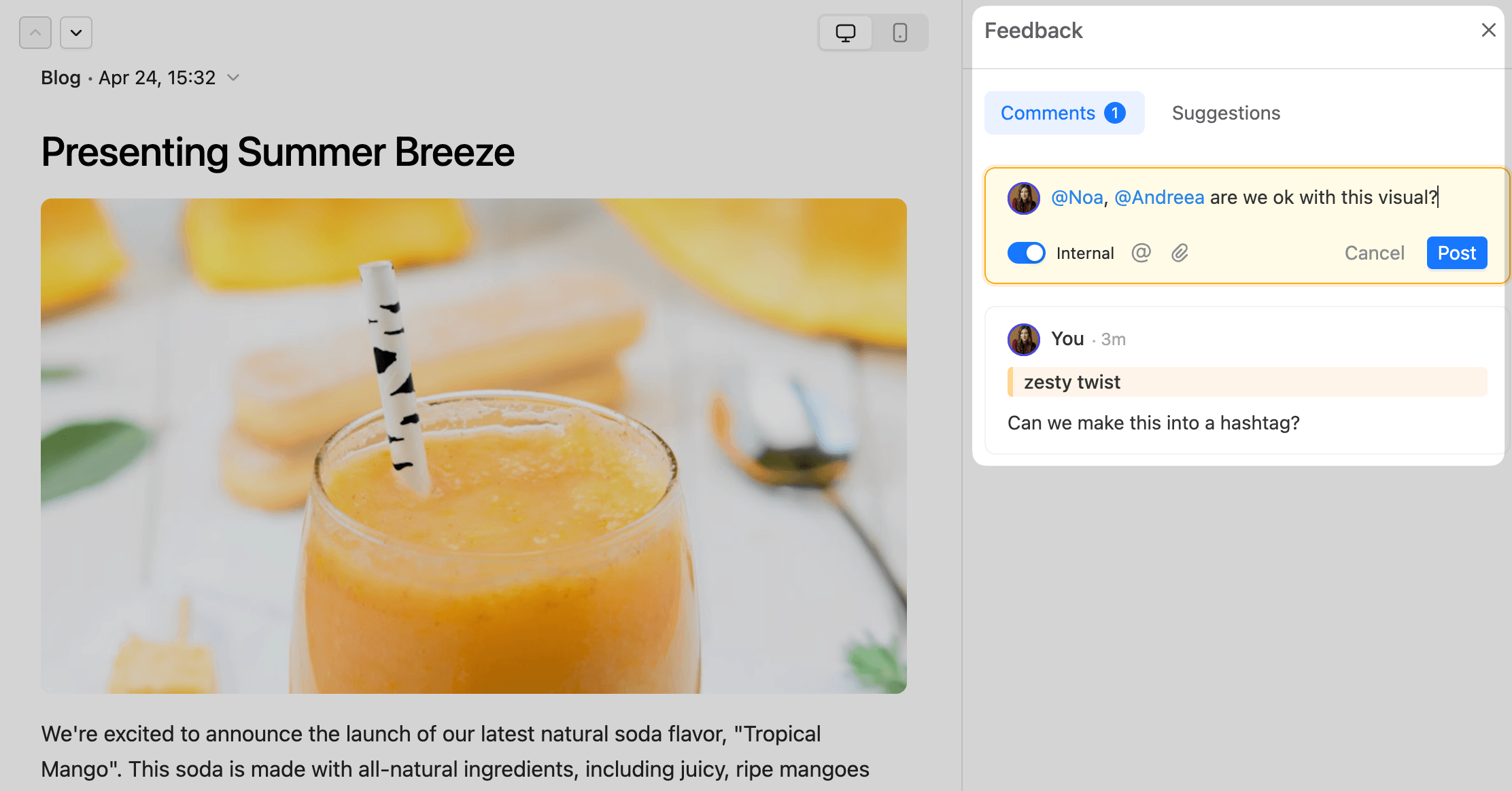
Internal notes for team-only discussions that stay private from clients.
Comment attachments so feedback can include files and visual references.
Blog editor in Planable with team comment asking for feedback on the visual
Activity history + version recovery (useful when multiple editors touch the same draft).
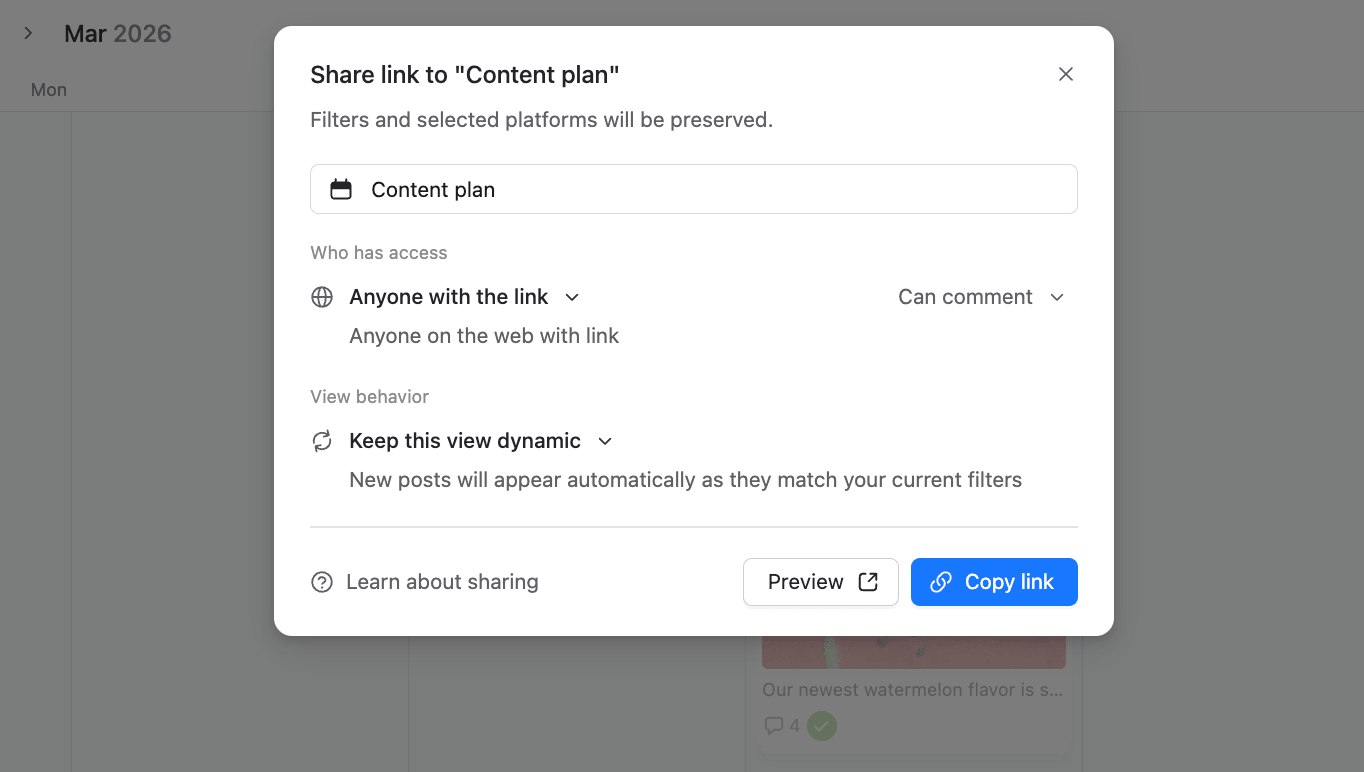
Guest sharing links to let external stakeholders review content without needing full access (internal notes stay hidden).
Planable settings window showing guest view link options for a content plan
Planable has a build-in media editor that includes image editing (like automatic cropping and manual edits) and video editing, so you can adjust assets after feedback without restarting the upload cycle.
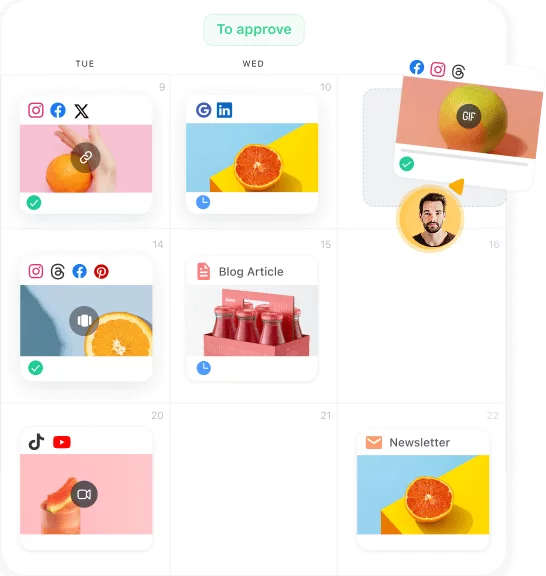
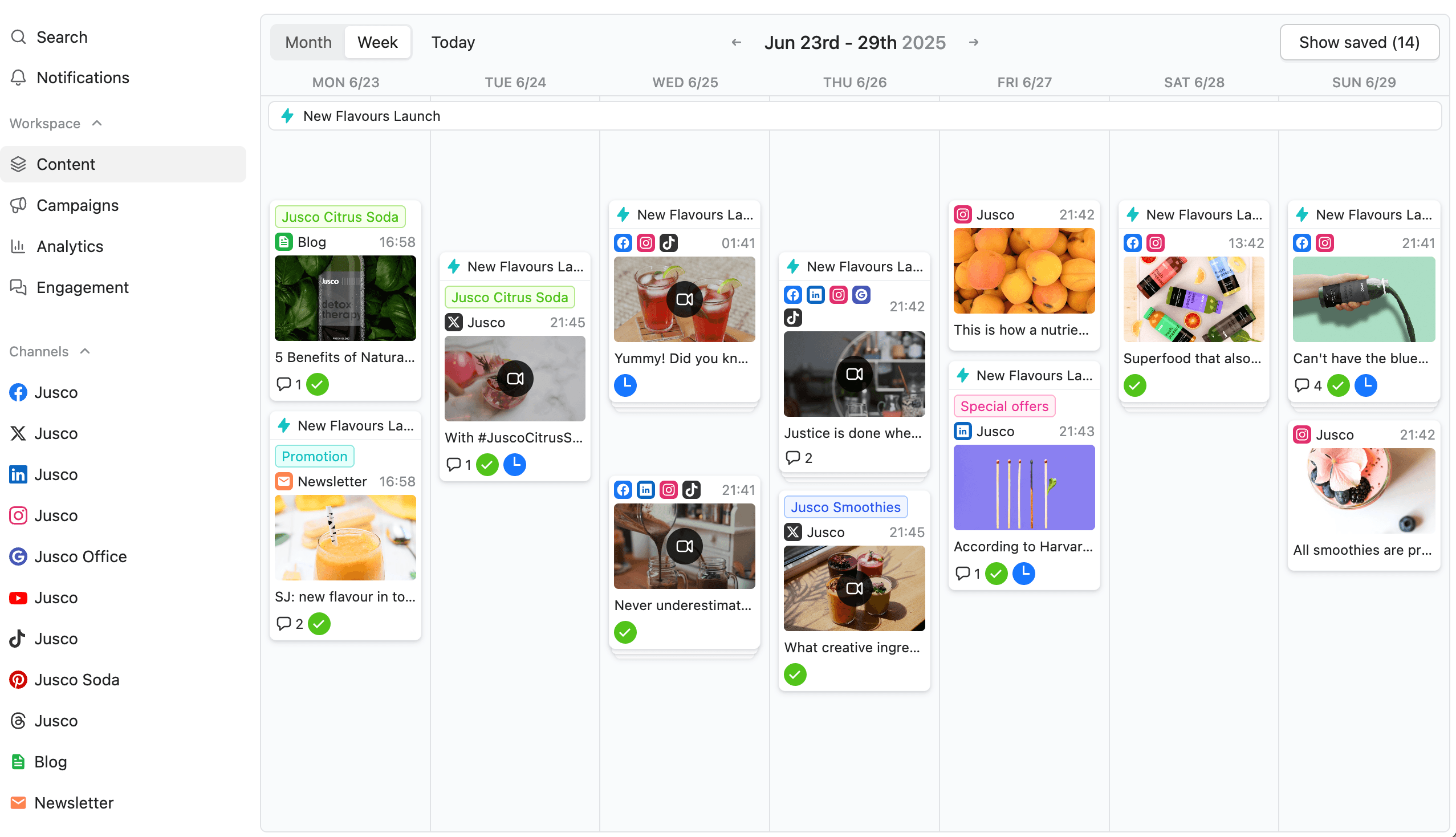
Teams can plan content in a visual social media calendar and schedule once it’s approved.
Planable weekly content calendar with scheduled social media posts across multiple channels and days
Supported platforms
Planable supports: Facebook, Instagram (Stories, and Reels), LinkedIn, X (Twitter), YouTube, TikTok, Pinterest, Google Business Profile, and Threads.
Drawbacks
If your content workflow depends on social listening and brand monitoring, Planable typically isn’t the tool for that. You’ll usually pair it with a dedicated listening platform.
Planable pricing
Free trial: “first 50 posts” to test Planable (not time-limited and no credit card required).
Paid plans: start at $33/workspace/month (Basic) and $49/workspace/month (Pro), with Enterprise as custom pricing.
Analytics & Social inbox: offered as a add-ons.
Who’s it for?
Planable is best for teams that need clear collaboration and approvals at scale, especially agencies and multi-stakeholder marketing teams. If approval speed, version control, and client-friendly reviews are your biggest bottlenecks, it’s one of the strongest workflow-first options to shortlist.
2. Hootsuite – best for enterprise-scale management
Hootsuite is an all-in-one social media management platform for publishing, engagement, monitoring, and performance reporting across multiple networks from a single dashboard.
It’s commonly chosen by teams that prioritize analytics, social inbox management, and monitoring as much as scheduling.
Hootsuite key features
Scheduling and publishing for multiple social profiles from one place.
Monitoring + competitive analysis to benchmark content and performance against other brands (availability can vary by plan/add-ons).
Analytics and reporting to track performance across channels.
Unified inbox/engagement workflows (e.g., routing/assigning messages) depending on plan.
Supported platforms
Hootsuite supports posting/scheduling/management across major networks, including Instagram, Facebook, TikTok, YouTube, and more (exact capabilities vary by network).
Drawbacks
Hootsuite is strong as a management + analytics suite, but teams whose main bottleneck is approval workflows, client sign-offs, and “version control” collaboration may find it less purpose-built than dedicated social collaboration platforms (like Planable).
In other words: Hootsuite can collaborate, but its core value is broader social management and reporting.
Hootsuite pricing
Paid plans start around $199/month/user (annual billing) and scale by plan, users, and features.
Who’s it for?
Choose Hootsuite if your team relies heavily on analytics, monitoring/competitive benchmarking, and centralized engagement management across multiple channels.
If your day-to-day pain is coordinating approvals across creators and stakeholders (especially with clients in the loop), you may prefer a tool that’s workflow-first for collaboration and approvals rather than suite-first for management and reporting.
3. Sprout Social – best for analytics-led teams
Sprout Social is a premium social media management platform built for teams that need deep analytics, customer care workflows, and social listening.
It combines scheduling, engagement, reporting, and brand monitoring (mentions + listening) in one suite, which makes it popular with larger teams and brands managing high message volume.
Sprout Social key features
Social customer care + engagement workflows (centralized inbox, tasking/routing features depending on plan).
Advanced analytics and reporting for tracking performance and campaign results.
Social listening (available as an add-on on certain plans).
Integrations with common workflow and asset tools such as Canva, Dropbox, Google Drive, Bitly.
Supported platforms
Sprout supports major social networks: BlueSky, Instagram, Facebook, LinkedIn, Pinterest, threads, TikTok, X, and Youtube.
Drawbacks
If your main need is collaboration-first approvals and client sign-offs, Sprout can be more “suite-first” (analytics/care/listening) than “approval-first” compared with tools built primarily around review workflows.
Also, the price scales per user, which can get expensive quickly for multi-seat teams.
Sprout Social Pricing
Sprout Social pricing is per user, and starts at $199/user/month billed annually.
Who’s it for?
Sprout Social is best for teams that rely on social intelligence (listening, analytics, and customer care workflows) at scale. If you’re mainly buying for collaboration and approvals, it may be more tool (and cost) than you need compared with approval-first platforms.
4. SocialBee – best for content strategy & scheduling
SocialBee is a social media management tool built for entrepreneurs, small businesses, and lean teams that want to plan, create, schedule, and recycle content from one platform.
It’s especially useful when you need a consistent posting engine without a big budget or a complex enterprise suite.
SocialBee includes team-oriented workflows (depending on plan) such as shared calendars, collaboration, and approvals, plus automation features that help keep content flowing.
SocialBee key features
Social Media Copilot (AI): generates a tailored social strategy, recommended platforms, posting plan, and ready-to-edit posts.
Creative integrations: Canva, GIPHY, and Unsplash integrations to speed up content creation.
Universal Posting:schedule content to supported networks and also post to platforms that aren’t directly integrated via a “universal” workflow.
Supported platforms
SocialBee supports direct scheduling/publishing for major platforms including Facebook, Instagram, LinkedIn, X (Twitter), Pinterest, TikTok, YouTube, Threads, Bluesky, and Google Business Profile, plus Universal Posting for additional networks.
Drawbacks
SocialBee does not offer a free plan, but it includes a 14-day trial with no credit card required.
SocialBee pricing
SocialBee’s pricing starts at $29 per month for the Bootstrap plan (1 user, 5 social profiles), with costs going up to $499 per month for agencies managing up to 150 social profiles.
Who’s it for?
SocialBee is a strong pick for small teams that want an efficient “content engine”: AI-assisted planning, fast creation workflows, flexible scheduling, and broad network coverage (including Universal Posting).
If your priority is enterprise-grade approval governance or complex client sign-off workflows, you may want an approval-first tool, but for lean teams aiming to post consistently and stay organized, SocialBee is a practical option.
5. Sociality.io – best for AI-ready social media management
Sociality.io is an all-in-one social media management platform for agencies, brands, and marketing teams that need publishing, engagement, analytics, competitor tracking, and listening in one place.
Its standout feature is Sociality MCP. You connect it to an MCP-compatible AI tool like ChatGPT, Claude, Gemini, Codex, Claude Code, an internal copilot, or a custom agent, and start chatting with your social media data. Instead of switching between dashboards, exports, spreadsheets, and prompts, teams can ask questions about account performance, post-level insights, and competitors directly inside their AI workflow.
Sociality.io describes MCP as a structured way for AI agents to access account performance, post-level insights, and competitor data.
Sociality.io key features
Publishing and scheduling: plan, approve, and publish social media content from a shared calendar.
Engagement management: manage comments, messages, and mentions from connected social channels in one inbox.
Analytics and reporting: track social media KPIs, analyze post performance, and create reports across channels.
Competitor analysis and listening: monitor competitors, compare performance, and spot useful content patterns.
Sociality MCP: chat with your social media analytics through AI tools, using structured access to owned account stats, account posts, competitor stats, and competitor posts.
Supported platforms
Sociality MCP currently works with Instagram, TikTok, LinkedIn, YouTube, X, and Facebook data. It can be used with tools like ChatGPT, Claude, and Gemini, as well as your own agents, internal copilots, and automation workflows, as long as they support MCP connections.
Drawbacks
Sociality.io is strongest when analytics, engagement, competitor benchmarking, listening, and AI-assisted reporting matter alongside publishing. If your main priority is structured content approvals, client sign-offs, and version control, a workflow-first approval tool may feel more focused.
Sociality MCP is also most useful for teams that already want to use AI for reporting, analysis, competitor monitoring, or internal workflows. If you only need basic scheduling, the MCP layer may be more advanced than your current setup requires.
Sociality.io pricing
Sociality MCP has a free Starter option with 1,000 one-time credits. Paid MCP plans start with Growth at $49/month, while Scale is custom-priced for higher volume or enterprise needs. Sociality.io Dashboard + MCP starts at $83/month, making it suitable for teams.
Who’s it for?
Sociality.io is best for agencies, brands, and marketing teams that want to manage social media and analyze performance in a more conversational way.
It’s a strong fit if your team wants to stop jumping between dashboards, exports, and spreadsheets — and start asking deeper questions about social media performance directly inside the AI tools they already use.
6. Kontentino – best for managing paid & organic posts together
Kontentino is a social media collaboration and approval platform that helps marketing teams with their social media efforts to create, approve, and publish social media content.
It combines a visual content calendar, post previews, task assignment, and approvals so teams (and clients) can review content in context before anything goes live.
Kontentino key features
Approval workflow + tasking: create drafts, assign tasks, and send posts for approval inside the platform.
Post previews & simulations: preview posts in a way that mirrors how they’ll appear on each network.
Performance analytics & reporting (add-on): analytics is listed as an add-on on the pricing page.
Kontentino supports major networks including Facebook, Instagram, LinkedIn, X (Twitter), Pinterest, Google Business Profile, TikTok, YouTube, and Threads.
Drawbacks
If your social media strategy depends heavily on newer/less common platforms or deep social listening, confirm exact coverage and listening depth before committing (Kontentino emphasizes planning/approvals; analytics appears as an add-on).
Kontentino pricing
Kontentino’s entry plan is Starter at €49/month on annual billing and includes 3 users, 10 profiles, and 100 posts. Higher tiers increase limits (posts/users) and pricing; analytics is shown as an add-on.
Who’s it for?
Kontentino is a strong choice when approvals and workflow clarity are your priority. If you need a tool primarily for advanced listening or broad platform coverage beyond the major networks, verify those requirements early (or consider a suite built around listening).
7. Buffer – best for lean teams on a tight budget
Buffer is a lightweight social media management platform for planning, scheduling, publishing, basic engagement, and performance tracking across multiple social channels.
It’s widely used by creators and small-to-mid teams that want a clean workflow and predictable pricing without buying an enterprise suite.
Buffer key features
Visual scheduling + publishing: plan and schedule posts across connected channels from a calendar/queue-style workflow.
Collaboration (Team plan): unlimited users, approval workflows, and custom permissions for teams that need review before publishing.
Analytics: advanced analytics with post-level performance history and reporting, including metrics like engagement, reach, clicks, and follower growth (by plan).
Community inbox: manage replies and engagement from a central inbox (available even on Free, with limits varying by plan).
Supported platforms
Buffer supports major channels including Facebook, Instagram, LinkedIn, X (Twitter), Pinterest, TikTok, Google Business Profile, plus newer networks like Threads, Bluesky, and Mastodon.
Drawbacks
Collaboration is solid but not “approval-first”: compared with tools built primarily around client sign-offs and multi-stage approvals, Buffer’s collaboration depth is strongest on its Team plan and may feel lighter for complex stakeholder workflows.
Buffer pricing
Buffer has a Free plan (up to 3 channels, 10 scheduled posts per channel, 1 user) and paid plans that are priced per channel starting at $5/month.
Who’s it for?
Buffer is best for budget-friendly scheduling and publishing with clean analytics and a simple team workflow. For teams where approvals, client sign-offs, and multi-level governance are the main bottleneck, an approval-first platform like Planable may fit better.
8. SocialPilot – best for multi-location brands
SocialPilot is a social media management and collaboration platform designed for multi-location brands that need efficient scheduling, client approvals, and reporting from one dashboard.
It combines publishing, a social inbox, analytics, and white-label reporting, without the per-user pricing typical of enterprise suites.
SocialPilot key features
Bulk scheduling (up to 500 posts at once): import posts via CSV/text to schedule high volumes quickly—useful for franchises, agencies, and seasonal campaigns.
Client approvals + collaboration controls: plan-level features include manager/client approval and team collaboration (notably from Standard/Premium tiers upward).
Visual content calendar: drag-and-drop planning and rescheduling across multiple accounts.
AI Pilot: built-in assistant to brainstorm ideas, generate captions, and rewrite/optimize copy inside the post composer.
Social inbox: manage comments/messages and assign engagement tasks (included in Standard and higher in the pricing table).
White-label reporting: client-ready reports are included in Premium and higher tiers.
Supported platforms
SocialPilot supports major networks including Facebook, Instagram, TikTok, X (Twitter), LinkedIn, Threads, YouTube, Pinterest, Google Business Profile, and Bluesky.
Drawbacks
While it offers strong collaboration and publishing features, SocialPilot lacks some advanced social listening to monitor brand mentions and conversations.
SocialPilot pricing
SocialPilot offers a 14-day free trial (no credit card required) and paid plans starting at $25.50/month for 7 social accounts and 1 user.
Who’s it for?
SocialPilot is a strong fit for small-to-mid teams and multi-location brands that want affordable collaboration without jumping to an enterprise-priced suite.
9. Asana – best for cross-functional campaign management
Asana is a work management platform that marketing teams use to plan campaigns, track tasks, and coordinate cross-functional work in one place.
It’s not a social media scheduler, but it’s excellent for managing the workflow behind social content: briefs, reviews, approvals, deadlines, and handoffs.
Asana key features
Campaign planning + mapping: build campaign projects, connect intake forms/briefs to execution tasks, and keep everything in one workflow.
Task management: create, assign, and organize tasks with owners, due dates, dependencies, and status tracking.
Calendar + timeline views: turn “spreadsheet-like” plans into timelines and calendars to manage deadlines and launch coordination.
Approvals + proofing (higher tiers): set up approval steps and annotate designs/PDFs so feedback stays attached to the work.
Supported platforms
Asana integrates with common collaboration and creative tools (e.g., Microsoft Teams, Google Drive, Slack, Dropbox, and many more).
Drawbacks
Asana doesn’t natively schedule or publish posts to social media. Its strength is managing the workflow and approvals before content hits your scheduler.
Asana pricing
Asana’s paid tiers are priced per user, starting at $10.99/user/month billed annually.
Who’s it for?
Asana is best for marketers who need to coordinate complex, cross-team work (campaign launches, approvals, creative production, and dependencies across departments).
If your main need is social post scheduling or publishing, Asana works best alongside a dedicated social media management tool rather than replacing it.
10. Canva – best for design-led content teams
Canva is a design-first platform marketers use to create social media graphics and videos quickly, especially when they need templates, brand consistency, and easy collaboration.
It’s strongest for visual production (design + brand assets), and it can also schedule posts to select networks using Canva’s Content Planner.
Canva key features
Templates + drag-and-drop design tools for polished visuals without advanced design skills.
Brand consistency tools like brand templates and brand management features (useful for multi-user teams).
Collaboration in the editor: real-time co-editing, comments, and review-style feedback tied directly to the design (better than passing files around).
Built-in scheduling via Content Planner: design → schedule without exporting and re-uploading assets.
Supported platforms
Canva’s Content Planner lets you schedule posts to: Facebook Pages, Instagram Business accounts, X (Twitter), LinkedIn, Pinterest, Slack, and Tumblr.
So if you need direct scheduling to channels like TikTok or YouTube, Canva may not cover those natively (you’d typically use a dedicated social scheduler).
Drawbacks
Canva collaboration is great for design review, but it’s not built around multi-step content approvals and client sign-offs the way purpose-built social collaboration tools are.
Canva pricing
It has a free plan plus paid tiers (Pro and team/business plans). Pricing varies by region and features, but Canva Pro is commonly listed around $14.99/month on monthly billing.
Who’s it for?
Canva is best for marketing teams that need fast, on-brand visual creation (templates + brand assets) with lightweight collaboration.
Use it as your design hub, and pair it with a dedicated scheduling/approval platform (like Planable) if your workflow depends on multi-step approvals, client sign-offs, or broader social channel publishing.
How to choose the best social media collaboration tool
The best social collaboration platform depends on where your workflow breaks: approvals, volume, reporting, client access, or budget. Use the criteria below to match your needs to the right tool category.
Team structure and workflow complexity
If content goes through multiple reviewers (legal, brand, client, executive) a purpose-built approval tool like Planable or Kontentino matters more than a general scheduler. If publishing is managed by one or two people, Buffer or SocialPilot may be sufficient.
Number of accounts and brands
Tools like Planable, SocialPilot and Hootsuite are built for volume. If you manage 10+ accounts across different clients or locations, workspace organization and bulk publishing become priorities.
Analytics depth
Teams that report to clients or senior stakeholders on performance should evaluate Sprout Social or Hootsuite for their reporting depth. Basic analytics needs are covered by most tools on this list.
Client-facing access
Agencies that share content for client review before publishing need tools with guest access or dedicated client portals. Planable and Kontentino both support this without requiring clients to have a full account.
Budget
Buffer and SocialPilot serve most core needs at significantly lower price points than Hootsuite or Sprout Social. The right question is whether the analytics or listening features in the higher-tier tools justify the cost difference for your specific use case.
Key takeaways
Social media collaboration tools reduce approval bottlenecks by centralizing feedback and review on the content itself.
Agencies and multi-brand teams should look beyond scheduling and choose tools built for approvals: separate workspaces, client access, and multi-level review workflows.
Planable and Kontentino lead on approval workflows while Sprout Social and Hootsuite lead on analytics.
Budget-constrained teams get strong core functionality from Buffer and SocialPilot.
General tools like Asana and Canva serve adjacent needs but shouldn’t replace a purpose-built social media collaboration platform.
FAQs
What is a social media collaboration tool?
Social media collaboration tools are software platforms that help teams create, review, approve, and publish social media content together. It centralizes feedback, replaces email-based review processes, and provides structured approval workflows so content is signed off before it goes live.
What collaboration features matter most for agencies?
Agencies should prioritize multi-level approval workflows, client-facing access without full account setup, role-based permissions, and workspace separation per client. The ability to leave contextual comments on posts (rather than managing feedback through email) significantly reduces turnaround time.
Can these tools manage multiple brands or clients?
Yes. Most social media collaboration tools on this list support multi-account or multi-workspace setups. Planable, SocialPilot, and Hootsuite are specifically designed for managing separate clients or brand accounts with distinct permissions and workflows.
What’s the difference between a social media collaboration tool and a project management tool?
Project management tools like Asana manage tasks and timelines across any type of work. Social media collaboration tools like Planable are built specifically for content creation, review, and publishing. They include content calendars, post previews, platform-specific formatting, and direct publishing integrations that general project management tools don’t offer.
Horea is a software reviewer and tester, content writer, and tech geek. He loves to fiddle with MarTech solutions to find what each software is best for and help you decide which one might be your best fit. His content is allergic to fluff and eats research for breakfast. If you’re on the fence about whether you should commit to a particular platform, Horea probably already wrote about it.








 Create
 Schedule
 Plan
Plan Engage
 Collaborate
 Analyze
 Approve